Standard Library[lib]
C++ ifstream: how to open and read a file

- Section
- Standard Library [lib]
- Standard
- C++17
- Compilers
- MSVC 19.44, Clang 19.1 (MSVC STL), GCC 16.2, Clang 23.1 (libc++)
- Published
- Length
- 7 min read
Abstract
std::ifstream, from <fstream>, reads a file: std::ifstream in("notes.txt"); opens it, if (!in) tells you the open failed, and while (std::getline(in, line)) reads it line by line. A file that does not open is usually a path problem: a relative path starts from the working directory, the folder the program is run from, not the folder that holds the program. std::ofstream writes a file, emptying it first unless you pass std::ios::app, and both close the file when the variable goes out of scope.

A C++ ifstream, std::ifstream from <fstream>, is a stream that reads from a file. std:: opens the file, if (!in) tells you when that failed, and std:: in a loop reads it line by line. The file is closed automatically when the variable goes out of scope.
The whole program, reading a notes.txt of three lines saved in the folder you start the program from (the section on why a file does not open says which folder that is):
Call the bank
Buy coffee
Book the dentist
— end example]
#include <fstream>
#include <iostream>
#include <string>

int main() {
    std::ifstream in("notes.txt");
    if (!in) {
        std::cerr << "could not open notes.txt\n";
        return 1;
    }
    std::string line;
    while (std::getline(in, line)) {
        std::cout << line << '\n';
    }
}
— end example]
It printed those three lines, in order. Each std::getline call reads the next line into line, and the loop ends when none is left; C++ getline has the details of the call, Windows line endings included.
The samples are C++17, built with MSVC 19.44, Clang 19.1 (MSVC STL), GCC 16.2 and Clang 23.1 (libc++); all four printed the same unless a sentence says otherwise. One of them uses std::filesystem, which is C++17 (Since When’s C++17 table).
How do you check that the file opened?
Test the stream as soon as you create it: if (!in) is true when the file could not be opened. The constructor does not throw or stop the program when the open fails; it sets the stream’s failbit, its failed flag, and a failed stream reads nothing. This sample opens a file that does not exist:
std::ifstream in("missing.txt");
if (!in) {
    std::cout << "could not open missing.txt\n";
}
std::cout << std::boolalpha;
std::cout << "is_open: " << in.is_open() << '\n';  // false

std::string line;
int lines = 0;
while (std::getline(in, line)) {
    ++lines;
}
std::cout << "lines read: " << lines << '\n';      // 0
— end example]
All four printed:
could not open missing.txt
is_open: false
lines read: 0
— end example]
Without the check, a missing file reads like an empty one, and the program says nothing. if (!in) asks whether the stream has failed; in.is_open() asks whether it has a file attached, and right after the constructor the two agree.
How do you read words and numbers from a file?
Use >>, as you would with std::cin: in >> word reads one word, in >> name >> score reads a word and then a number, and a read in a loop’s condition goes on until the file ends. scores.txt holds a name and a score on each line:
Ana 90
Ben 72
Cy 90
— end example]
std::ifstream in("scores.txt");
if (!in) {
    std::cerr << "could not open scores.txt\n";
    return 1;
}
std::string name;
int score = 0;
int total = 0;
while (in >> name >> score) {
    std::cout << name << ": " << score << '\n';
    total += score;
}
std::cout << "total: " << total << '\n';
— end example]
All four printed:
Ana: 90
Ben: 72
Cy: 90
total: 252
— end example]
The loop runs while both reads work and stops at the first one that fails, here at the end of the file. Reading with >> and then with std::getline from the same file meets a leftover newline: why getline seems skipped after >> explains it and gives both fixes.
How do you read a whole file into a string?
Send the file’s buffer into a std::ostringstream, from <sstream>, a stream that writes into a string in memory, and take the string from it:
std::ifstream in("notes.txt");
std::ostringstream buffer;
buffer << in.rdbuf();
std::string text = buffer.str();

std::cout << text;
std::cout << "size: " << text.size() << '\n';
— end example]
All four printed:
Call the bank
Buy coffee
Book the dentist
size: 42
— end example]
in.rdbuf() is the file’s stream buffer, and << copies all of it into buffer; text is then an ordinary std::string, newlines included. On an empty file, << inserted nothing and left buffer failed, with an empty string, on all four, and a file that did not open did the same. So check in with if (!in) right after opening it, and then test text, not buffer.
Do you need to call close()?
No: the stream’s destructor closes the file when the variable goes out of scope, at the closing brace of the block that declared it. Call close() to open another file with the same variable: in.close(); in.open("scores.txt"); read the second file on all four, even after the first had been read to its end and the stream had failed. Without the close(), open() on a stream that was still open failed on all four, and the next read got nothing.
Why does my file not open?
Usually because of the path. A relative path, a name such as "notes.txt" or "data/notes.txt" that does not start at the top of the disk, is looked for in the working directory: the folder the program was started from, by a terminal or an IDE, which need not be the folder that holds the program. Visual Studio, for one, starts the program in the project’s folder by default, not in the folder it builds the program into.
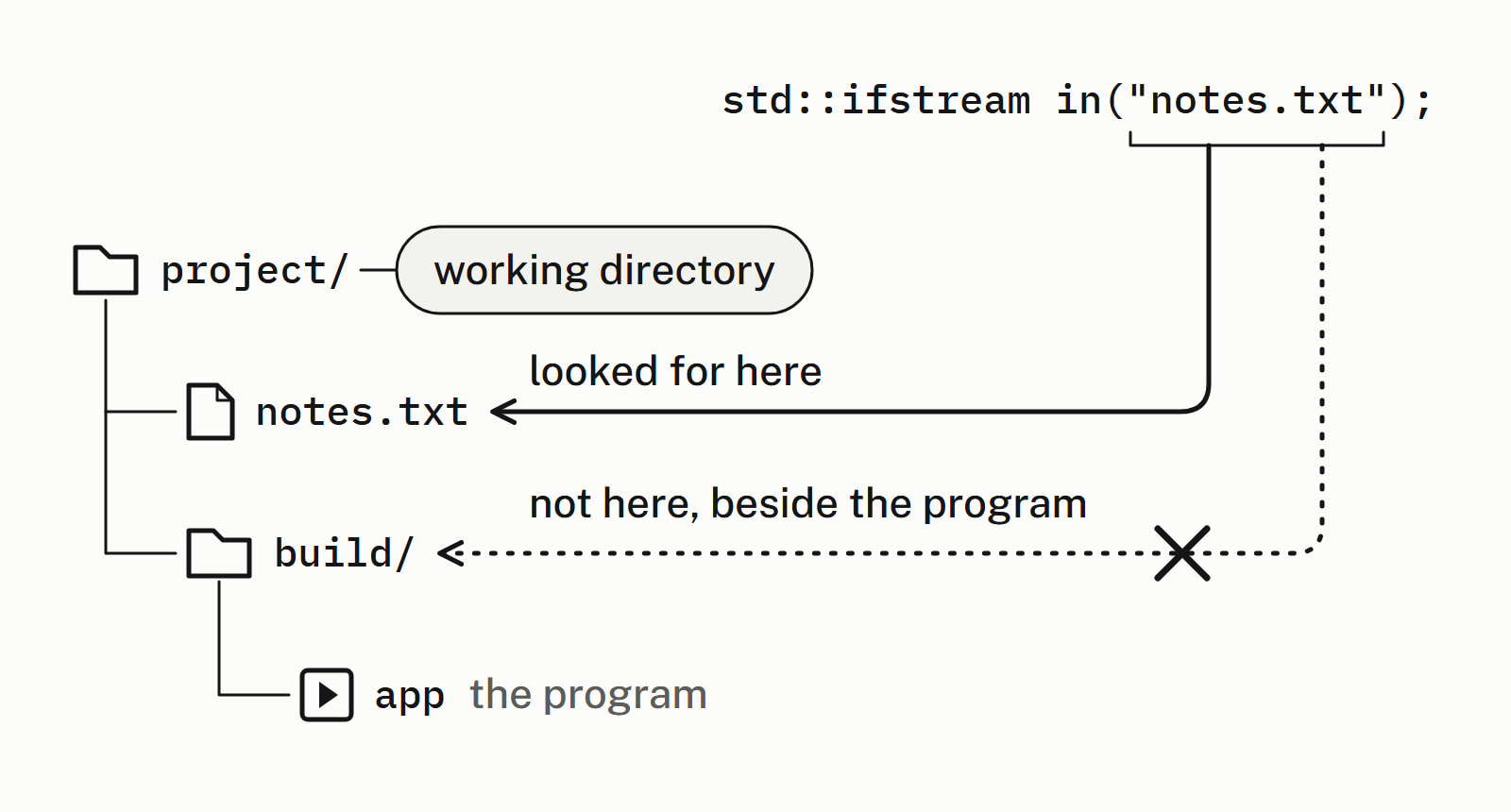
This sample writes data/notes.txt, inside a folder data in the working directory, and leaves no notes.txt beside it. try_open opens a path and says whether it worked:
void try_open(const std::string& path) {
    std::ifstream in(path);
    if (!in) {
        std::cout << path << ": not opened\n";
        return;
    }
    std::cout << path << ": opened\n";
}
// ...
try_open("notes.txt");       // looked for in the working directory
try_open("data/notes.txt");  // data is a folder in it

std::filesystem::current_path("data");  // change the working directory
try_open("notes.txt");                  // the same name, now found
— end example]
All four printed:
notes.txt: not opened
data/notes.txt: opened
notes.txt: opened
— end example]
The program did not move; only its working directory did, and the same "notes.txt" then opened. Called with no argument, std:: (C++17) returns the working directory, so printing it shows where your program is looking. So put the file in the working directory, start the program from the folder that holds the file, or write the path from the working directory, as "data/notes.txt" does.
If the path is right, check the name: the extension is part of it, so notes and notes.txt are two different names. In a string literal a backslash starts an escape sequence, so in "data\notes.txt" the \n is one character, a newline, and that name opened on none of the four: write "data/notes.txt", which opened on all four, or, on Windows only, double the backslash, "data\\notes.txt".
How do you write a file with std::ofstream?
std::ofstream is the mirror image: std:: creates the file, or empties it if it exists, and out << ... writes to it as std::cout writes to the screen. Open it with std::ios::app to add to the end instead:
{
    std::ofstream out("log.txt");  // creates log.txt
    out << "started\n";
    out << "loaded 3 notes\n";
}                                  // closed here
show("written");

{
    std::ofstream out("log.txt", std::ios::app);
    out << "saved\n";              // added at the end
}
show("appended");

{
    std::ofstream out("log.txt");  // opened again: emptied
}
show("opened again");
— end example]
Each show call reads log.txt back with a std::ifstream and prints its lines. All four printed:
written:
  started
  loaded 3 notes
  (2 lines)
appended:
  started
  loaded 3 notes
  saved
  (3 lines)
opened again:
  (0 lines)
— end example]
Each pair of braces closes its stream, as the destructor runs, before show reads the file. The plain open in the last block emptied the file because an ofstream’s default mode acts as out | trunc, and trunc, truncate, empties the file as it opens.
An ifstream cheat sheet
| To | Write |
|---|---|
| Open a file to read | std:: |
| Check that it opened | if (!in) |
| Read it line by line | while (std:: |
| Read words or numbers | while (in >> name >> score) |
| Read all of it | buffer << in.rdbuf(); |
| Write a file, emptied first | std:: |
| Add to the end of a file | std:: |
Standard library has the answers on the library’s other types and functions.
Questions
Which header is ifstream in?
std::ifstream is declared in <fstream>, and so is std::ofstream, so one #include <fstream> covers reading and writing files. A program that prints what it reads also needs <iostream> for std::cout, and <string> for the std::string each line goes into.
What is the difference between ifstream, ofstream and fstream?
std::ifstream reads a file, std::ofstream writes one, and std::fstream does both through the same stream. An ifstream fails to open a file that does not exist, and so does an fstream with its default mode; an ofstream creates it, and empties a file that already exists unless you open it with std::ios::app.
Does ifstream create the file if it does not exist?
No. Opening a file that does not exist fails: the stream is marked failed, if (!in) is true, and every read gets nothing. std::ofstream is the stream that creates a missing file.
How do you check if a file exists in C++?
Open it with std::ifstream and test the stream with if (!in): that tells you whether the program can open it, which is usually the question. Since C++17, std::, from <filesystem>, asks whether the path exists without opening anything.
How do you read a file line by line in C++?
Open it as a std::ifstream and make std::getline the condition of a while loop: while (std::getline(in, line)) runs once for each line, with that line in the std::string line, and stops when there is nothing left to read. Check that the file opened, with if (!in), before the loop.
How do you open a file in binary mode?
Pass std::ios::binary as the constructor’s second argument, as in std::ifstream in(“photo.jpg”, std::ios::binary). The constructor adds std::ios::in to the mode you give it, so the stream still opens the file for reading.
Sources
- std::basic_ifstreamcppreference.com
- std::basic_ifstream::basic_ifstreamcppreference.com
- [ifstream.cons] ConstructorsC++ standard working draft
- std::basic_ios::operator boolcppreference.com
- std::basic_ostream::operator<<cppreference.com
- std::basic_ofstream::basic_ofstreamcppreference.com
- std::basic_filebuf::opencppreference.com
- std::filesystem::existscppreference.com