Standard Library[lib]
cin in C++: read numbers, words and lines

- Section
- Standard Library [lib]
- Standard
- C++17
- Compilers
- MSVC 19.44, Clang 19.1 (MSVC STL), GCC 16.2, Clang 23.1 (libc++)
- Published
- Length
- 6 min read
Abstract
cin in C++ is std::cin, the standard input stream from <iostream>: std::cin >> x skips spaces and newlines, reads one value into x and stops where the value ends, and std::cin >> a >> b reads several. When the user types letters where a number belongs, the read fails and every later read does nothing, until std::cin.clear() resets the stream and std::cin.ignore(std::, '\n') discards the rest of the bad line. A whole line, spaces included, takes std::getline(std::cin, line).
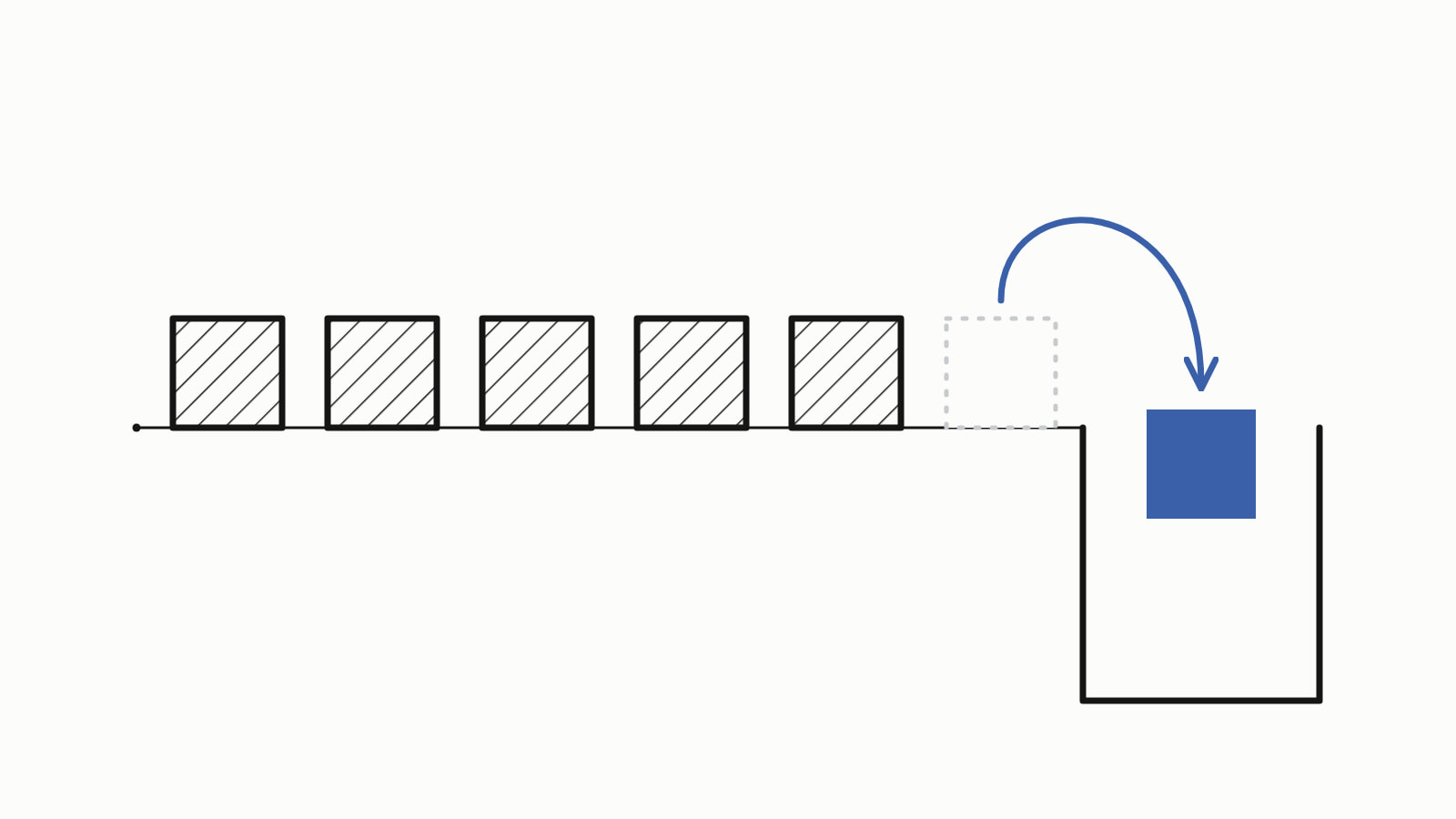
cin in C++ is the standard input stream, std::cin from <iostream>: it reads what the user types. std::cin >> age; skips spaces and newlines, reads one value into age and stops where the value ends, at a space or Enter. When the user types letters where a number belongs, the read fails, and cin reads nothing more until you clear it.
A program that asks for an age and prints it back:
#include <iostream>

int main() {
    int age = 0;
    std::cout << "How old are you? ";
    std::cin >> age;                         // reads one number
    std::cout << "You are " << age << ".\n";
}
— end example]
Given the input 36, it printed How old are you? You are 36. on one line, because the samples read their input from a file and nothing echoes it. At a keyboard your 36 appears after the question, and Enter moves the answer to the next line.
The prompt needs no std::endl to appear before the program waits: a read from cin first flushes cout, writing out whatever it still holds, because the two streams are tied. C++ cout has the rest of printing.
The samples are C++17, built with MSVC 19.44, Clang 19.1 (MSVC STL), GCC 16.2 and Clang 23.1 (libc++), and all four printed the same output for every one. Since When lists, for each standard, the first compiler releases that support its features.
How do you read several values with cin?
Chain the reads: each >> reads the next value into its variable, as that variable’s type, and the values may be separated by spaces or by Enter. Reading into a std::string needs #include <string>:
#include <iostream>
#include <string>

int main() {
    int width = 0;
    double height = 0.0;
    std::string name;
    std::cin >> width >> height >> name;     // an int, a double, a word
    std::cout << "width: " << width << '\n';
    std::cout << "height: " << height << '\n';
    std::cout << "name: " << name << '\n';
}
— end example]
With 3 4.5 on one line and Ada on the next, it printed width: 3, height: 4.5 and name: Ada on three lines.
Why does cin stop at a space?
Because >> reads one word: into a std::string it skips the spaces before the word, then stops at the next space, tab or newline and leaves it in the input. For a whole line, spaces included, use std:::
std::string name;
std::string rest;
std::cin >> name;                        // one word: stops at the space
std::getline(std::cin >> std::ws, rest); // the rest of the line
std::cout << "name: [" << name << "]\n";
std::cout << "rest: [" << rest << "]\n";
— end example]
Given Ada Lovelace, it printed name: [Ada] and rest: [Lovelace]. std::ws throws away the space left before Lovelace, then getline reads to the end of the line. Mixing >> and getline has one trap, a getline that seems skipped: C++ getline explains it and how to fix it.
What happens when the user types a letter instead of a number?
The read fails. The variable is set to 0, cin sets its fail flag (the failbit, which std::cin.fail() reports), and every >> after that does nothing at all, so the program seems to skip its remaining questions:
std::cout << std::boolalpha;             // print true/false, not 1/0
int age = -1;
int number = -1;

std::cin >> age;                         // "abc" is not a number
std::cout << "age: " << age
          << ", fail: " << std::cin.fail() << '\n';

std::cin >> number;                      // skipped: cin has failed
std::cout << "number: " << number
          << ", fail: " << std::cin.fail() << '\n';
— end example]
With abc 5 typed, all four printed:
age: 0, fail: true
number: -1, fail: true
— end example]
The 0 comes from the rule for reading numbers, which stores zero when the text cannot be converted; the second read never reached the 5.
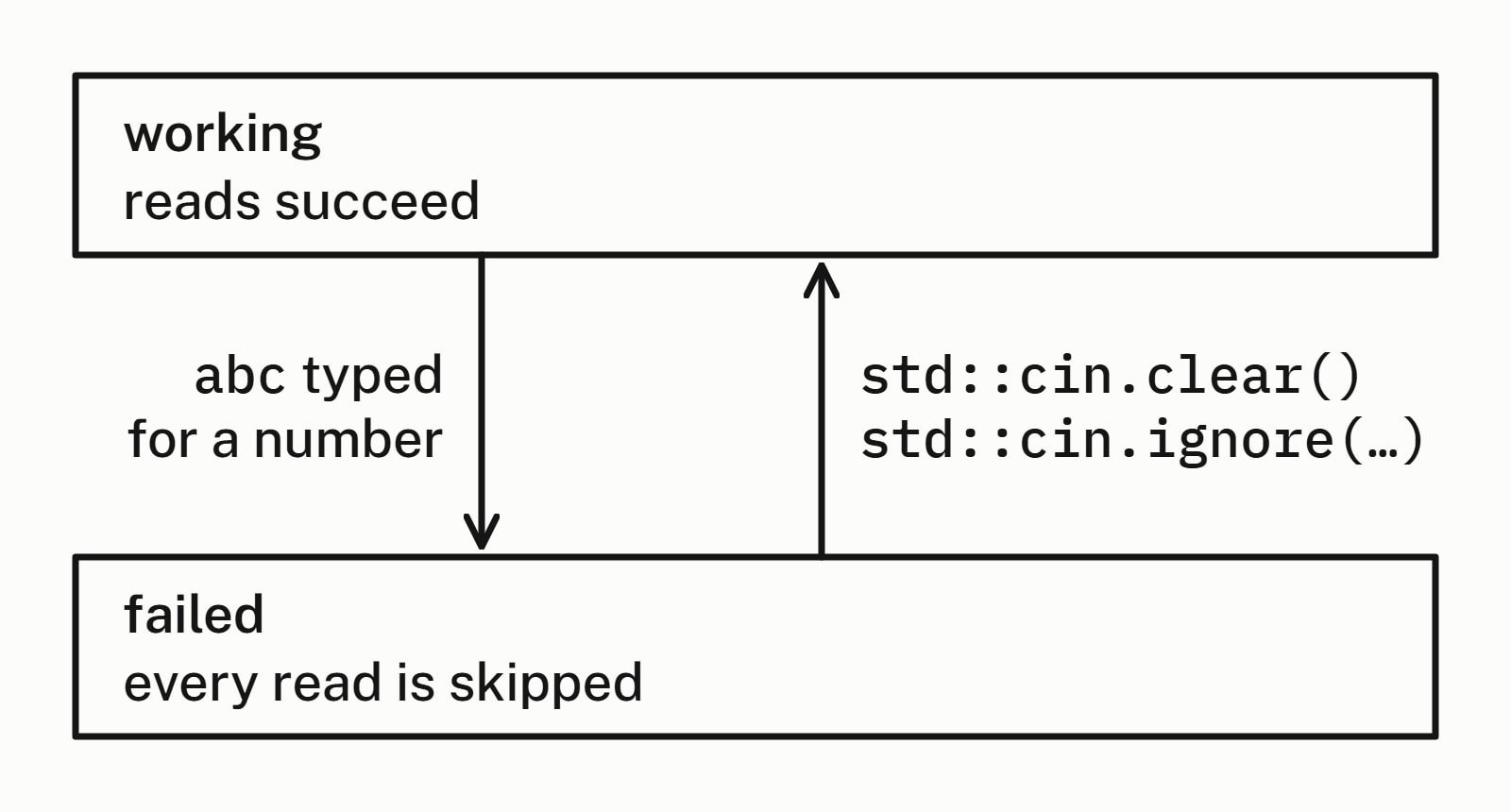
Test a read you depend on by using it as a condition: if (std::cin >> age) is true only when the read worked. >> gives back the stream, and a stream tests false once its fail flag is set.
How do you fix cin after bad input (clear and ignore)?
Make two calls, in this order: std::cin.clear() puts the stream back in working order, and std:: throws away the rest of the bad line, its newline included. Then ask again. This program asks for an age until a read works, and gives up when the input ends:
#include <iostream>
#include <limits>
#include <string>

int main() {
    int age = 0;
    std::cout << "Age: ";
    while (!(std::cin >> age)) {
        if (std::cin.eof()) {                // the input has run out
            std::cout << "No age given.\n";
            return 1;
        }
        std::cin.clear();                    // working order again
        // throw away the rest of the bad line
        std::cin.ignore(std::numeric_limits<std::streamsize>::max(),
                        '\n');
        std::cout << "Not a number. Age: ";
    }
    std::cout << "Saved age " << age << ".\n";
    std::string rest;  // what the read left behind
    std::getline(std::cin, rest);
    std::cout << "left: [" << rest << "]\n";
}
— end example]
Given abc, 12x and 42 on three lines, all four printed:
Age: Not a number. Age: Saved age 12.
left: [x]
— end example]
It asked twice, not three times: the abc failed and was thrown away. A read stops at the first character that does not fit, so 12x counts as 12, and the x stays in cin for the next read: the getline after the loop found it. The 42 was never read. To reject 12x too, read the whole line with std::getline and convert it, checking that every character was used, as converting a C++ string to an int shows.
Both calls are needed, clear() first: ignore, like every read, does nothing while cin is failed. clear() resets the flags but removes no characters, so without the ignore the next read fails on the same abc and the loop never ends. ignore discards characters up to and including the '\n'; its first argument is a count, std:: turns the count off, and std::numeric_limits needs #include <limits>.
The eof() test is the way out when the input has run out: given abc, xyz and nothing more, the loop printed No age given. and returned 1, instead of clearing and failing again on every pass.
How do you read numbers until the input ends?
Make the read the condition of a while loop: while (std:: runs its body once per number and stops when a read fails.
#include <iostream>

int main() {
    int number = 0;
    int count = 0;
    int sum = 0;
    while (std::cin >> number) {  // false when nothing is left
        ++count;
        sum += number;
    }
    std::cout << count << " numbers, sum " << sum << '\n';
}
— end example]
Given 4 8 15 16 23 42, it printed 6 numbers, sum 108. The loop ends when nothing is left to read, or at the first word that is not a number, because that read fails as abc did above and leaves cin failed until you clear it. At a keyboard, end the input with Ctrl+D at the start of a line (Linux, macOS) or Ctrl+Z on a line of its own, then Enter (Windows).
Which cin read for which input?
| The user types | Read it with |
|---|---|
| One number or one word | std::cin >> x |
| Several values, spaces or Enter between | std:: |
| A whole line, spaces included | std:: |
| Something that may not be a number | if (std::cin >> x) |
| Bad input, to ask again | std::cin.clear(), then std::cin.ignore(...) |
| Values until the input ends | while (std:: |
The Standard Library section has the other answers on the library.
Questions
Which header is cin in?
std::cin is declared in <iostream>, so #include <iostream> is the one header it needs. Reading into a std::string also needs <string>, and the std::numeric_limits in the ignore call that discards a bad line needs <limits>.
What does cin return in C++?
std::cin >> x returns the stream, std::cin itself, not the value: the value goes into x. The stream tests true while its fail flag is clear and false once a read has failed, until clear() resets it, so the read can be the condition of an if or a while. Because it returns the stream, reads chain: std::cin >> a >> b.
What is the difference between cin and getline?
std::cin >> name reads one word: it skips the spaces before it and stops at the next space, tab or newline. std::getline(std::cin, line) reads the whole line, spaces included, up to the Enter. Mixed with >>, a getline can seem skipped; Cpp Next’s getline answer explains why and how to fix it.
What does cin.ignore() do?
It reads characters from the input and throws them away. With no arguments it discards one character. std::cin.ignore(std::, '\n') discards everything up to and including the next newline, the rest of the line: the first argument is a count, and that value turns the count off.
Why does cin skip my input?
When every read after one answer is skipped, an earlier read failed and cin was never cleared: while its fail flag is set, every >> returns at once without reading. Call std::cin.clear(), then std::cin.ignore(std::, '\n'), before reading again. A single getline skipped after >> has a different cause, the newline that >> leaves behind.
What happens if the number is too big for an int?
The read fails, and an int gets the largest value it can hold (a negative number too far below zero gets the smallest). Given 99999999999, all four compilers used here stored 2147483647, the largest int on each, and set the fail flag, so cin needs the same clear() and ignore() as after a letter.
Sources
- std::cin, std::wcincppreference.com
- std::basic_istream::operator>>cppreference.com
- std::basic_ios::clearcppreference.com
- std::basic_istream::ignorecppreference.com
- std::basic_ios::failcppreference.com
- std::basic_ios::operator boolcppreference.com
- [facet.num.get.virtuals] Virtual functions of num_getC++ standard working draft