Tooling[tools]
What is CMake? A build system generator, explained

- Section
- Tooling [tools]
- Standard
- C++17
- Compilers
- MSVC 19.44, Clang 19.1 (MSVC STL), GCC 16.2, Clang 23.1 (libc++)
- Published
- Length
- 7 min read
In this answer8 clauses
- 1What does CMake do, and is it a compiler?
- 2What goes in a CMakeLists.txt?
- 3How do you build a project with CMake?
- 4What is the build folder, and how do you clean it?
- 5CMake vs Make: what is the difference?
- 6How do you add more files and a library?
- 7How do you make a Debug or a Release build?
- 8The CMake commands you will use
Abstract
CMake is an open-source build system generator: it reads a CMakeLists.txt that names your targets and their source files, and writes the build files for a build tool such as Make, Ninja or MSBuild, which runs the compiler. Configure with cmake -S . -B build, then build with cmake --build build. Everything generated stays in the build folder: cmake --build build --target clean removes the compiled files, and deleting the folder starts over.
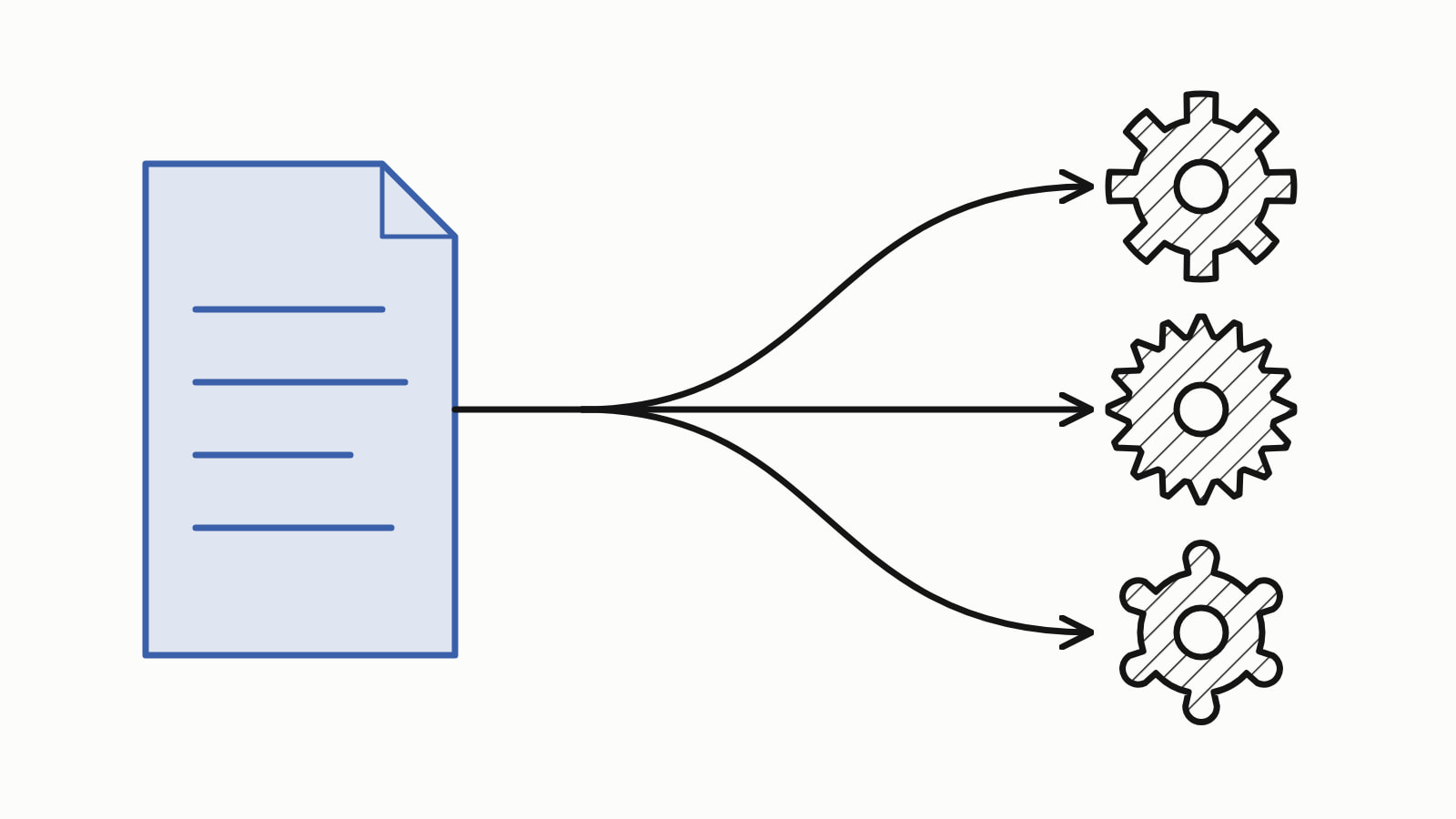
CMake is a build system generator: an open-source, cross-platform tool that reads a file named CMakeLists.txt and writes the build files for the program that runs your compiler, such as Make, Ninja or Visual Studio. The file lists your sources and how they fit together; describe the project once, and CMake writes the build for Windows, Linux or macOS.
The smallest project is two files in one folder. main.cpp:
#include <iostream>

int main() {
    const double average = (3.0 + 5.0 + 10.0) / 3;
    std::cout << "Hello, CMake!\n";
    std::cout << "average: " << average << '\n';
}
— end example]
CMakeLists.txt, beside it:
cmake_minimum_required(VERSION 3.20)
project(hello LANGUAGES CXX)
add_executable(hello main.cpp)
target_compile_features(hello PRIVATE cxx_std_17)
— end example]
Two commands in that folder configure the project into a new build folder and build it; then the program runs. Trimmed, with the folder paths shortened to the project folder, they printed:
hello> cmake -S . -B build
-- Building for: Visual Studio 17 2022
-- The CXX compiler identification is MSVC 19.44.35228.0
-- Build files have been written to: hello/build

hello> cmake --build build
  main.cpp
  hello.vcxproj -> hello\build\Debug\hello.exe

hello> build\Debug\hello.exe
Hello, CMake!
average: 6
— end example]
These runs used CMake 4.4.5 and Ninja 1.13.2 on Windows, with Visual Studio 2022 and its compiler, MSVC 19.44. Nothing here was run on Linux or macOS, where the two cmake commands are the same but the generated files and the program’s path differ. The C++ is C++17 and printed the same on MSVC 19.44, Clang 19.1 (MSVC STL), GCC 16.2 and Clang 23.1 (libc++): Clang vs GCC compares them, and Since When lists the releases that support each C++17 feature.
Older tutorials run cmake . inside the source folder, which writes CMake’s files among your sources; -S . names the source folder and -B build the folder to write into.
What does CMake do, and is it a compiler?
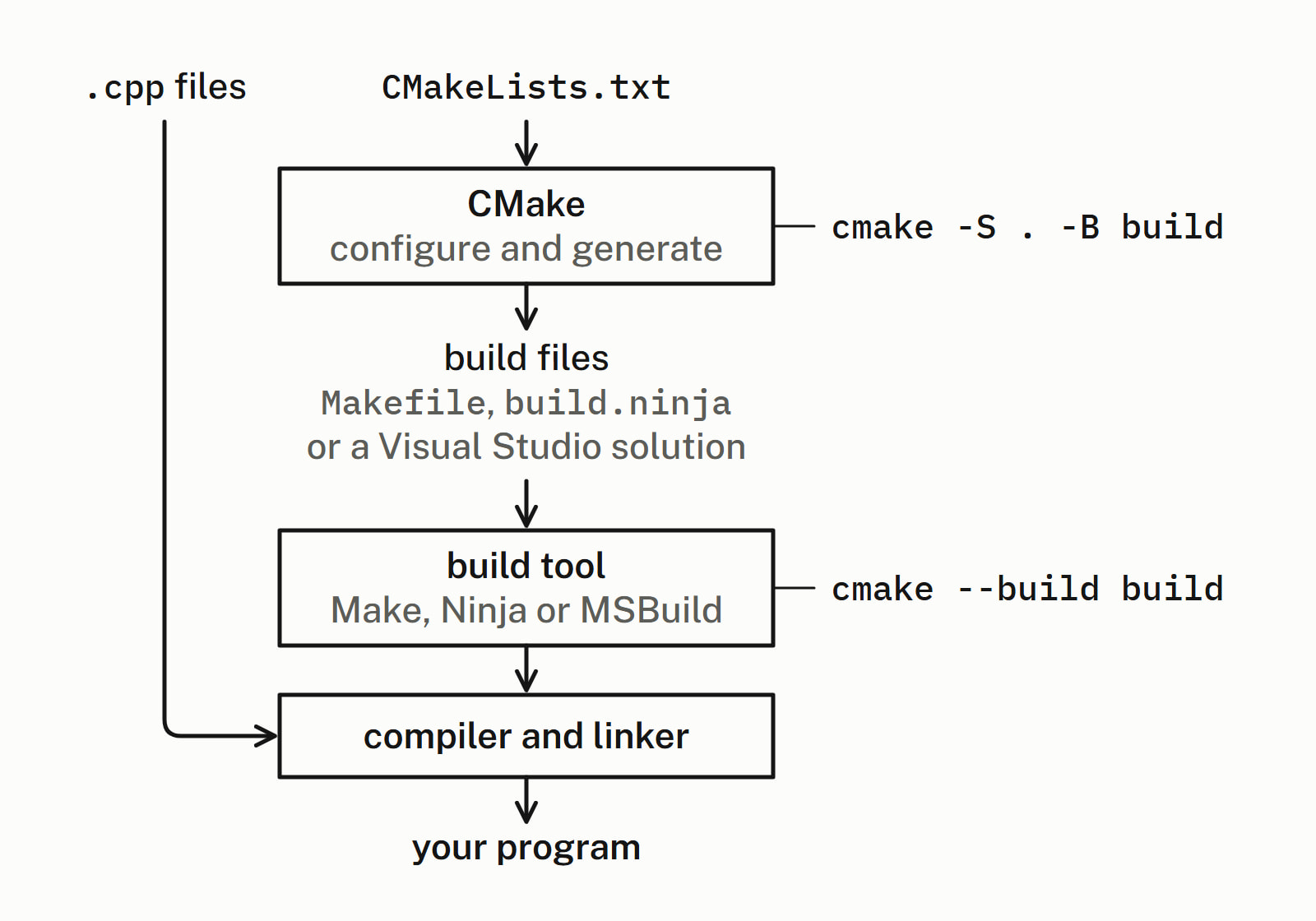
No: CMake compiles none of your files. It writes instructions that two other programs carry out:
- CMake reads
CMakeLists.txtand writes build files: Makefiles, abuild.ninjafile or a Visual Studio solution. - A build tool (Make, Ninja or MSBuild) reads them and runs the compiler and linker on what changed.
- The compiler (GCC, Clang or MSVC) turns each
.cppfile into an object file; the linker joins them into your program.
A build system is those build files plus the tool that runs them; CMake generates one, hence the name. When you configure, CMake does start your compiler briefly, to identify and test it, but your sources wait for cmake --build.
What goes in a CMakeLists.txt?
Commands that describe what to build, one per line. The four lines of the first example:
cmake_minimum_required(VERSION 3.20)comes first: the oldest CMake the file is written for. CMake 4 rejects anything below 3.5, which breaks the first line of older tutorials: withVERSION 3.0, CMake 4.4.5 stopped withCompatibility with CMake < 3.5 has been removed from CMake.To build an old project without editing it, add-DCMAKE_POLICY_VERSION_MINIMUM=to the configure command, as the error suggests.3. 5 project(hello LANGUAGES CXX)names the project and turns on C++, which CMake callsCXX.add_executable(hello main.cpp)declares a target, one thing the build makes: a programhello, built frommain.cpp.target_compile_features(hello PRIVATE cxx_std_17)means “build this target as C++17 or newer”: the build passed/std:c++17to MSVC.PRIVATEkeeps it tohelloitself.
How do you build a project with CMake?
Configure with cmake -S . -B build, then build with cmake --build build each time you change a file. Configuring reads CMakeLists.txt, finds the compiler and writes the build files into build; building runs the build tool, which compiles what changed.
The kind of build files CMake writes is its generator. With no -G, CMake chose Visual Studio on the Windows machine these ran on (cmake --help stars the default); cmake -G Ninja -S . -B build asks for Ninja. On Windows with MSVC, run that from Visual Studio’s x64 Native Tools Command Prompt with ninja on the PATH, or it stops with No CMAKE_CXX_COMPILER could be found. The Ninja build, then a rebuild with nothing changed, printed:
hello> cmake --build build
[1/2] Building CXX object CMakeFiles\hello.dir\main.cpp.obj
[2/2] Linking CXX executable hello.exe

hello> cmake --build build
ninja: no work to do.
— end example]
The program lands in build\hello.exe with Ninja and in build\Debug\hello.exe with Visual Studio, which keeps one folder per configuration (Debug, Release).
What is the build folder, and how do you clean it?
build holds everything generated: the build files, CMake’s cache (CMakeCache.txt), the object files and the program. Keep build out of version control; to start over, delete it and configure again.
cmake --build build --target clean removes the compiled files and keeps the generated build files. With Ninja it printed:
hello> cmake --build build --target clean
[1/1] Cleaning all built files...
Cleaning... 2 files.
— end example]
With Visual Studio the clean printed only MSBuild’s version line, but removed the program all the same.
CMake vs Make: what is the difference?
Make runs a Makefile you write by hand. CMake writes that Makefile for you from one CMakeLists.txt (with the Unix Makefiles generator) and Make then runs it, so the two work together; CMake can write Ninja files or Visual Studio projects instead.
| Question | Make | CMake |
|---|---|---|
| What you write | a Makefile: each file and the command that builds it | a CMakeLists.txt: targets and their sources |
| What it does | runs those commands on what changed | writes build files for a build tool |
| Where it works | where Make and the Makefile’s commands exist | wherever it has a generator: Makefiles, Ninja, Visual Studio, Xcode |
How do you add more files and a library?
Add source files to the list in add_executable, or move shared code into a library target with add_library and link it with target_link_libraries. Here average() moved into stats.cpp, declared in stats.h, all four files in one folder:
cmake_minimum_required(VERSION 3.20)
project(hello LANGUAGES CXX)

add_library(stats stats.cpp)
target_include_directories(stats PUBLIC ${CMAKE_CURRENT_SOURCE_DIR})
target_compile_features(stats PRIVATE cxx_std_17)

add_executable(hello main.cpp)
target_link_libraries(hello PRIVATE stats)
target_compile_features(hello PRIVATE cxx_std_17)
— end example]
stats.cpp:
#include "stats.h"

double average(double a, double b, double c) {
    return (a + b + c) / 3;
}
— end example]
main.cpp now includes stats.h and prints average(3.0, 5.0, 10.0); what goes in a header file explains the .h and .cpp split. The Ninja build printed:
stats> cmake --build build
[1/4] Building CXX object CMakeFiles\stats.dir\stats.cpp.obj
[2/4] Linking CXX static library stats.lib
[3/4] Building CXX object CMakeFiles\hello.dir\main.cpp.obj
[4/4] Linking CXX executable hello.exe
— end example]
add_library with no type made a static library, stats.lib, linked into hello.exe, which printed the same two lines. target_include_directories names the folder of the library’s headers (${CMAKE_CURRENT_SOURCE_DIR}, the project’s own), and PUBLIC passes it on to whatever links stats; this flat folder built without it, but headers in a folder of their own need it.
How do you make a Debug or a Release build?
Ninja and the Makefile generators pick the build type when you configure; Visual Studio picks it when you build:
| Generator | Release build | Where the program lands |
|---|---|---|
| Ninja | -DCMAKE_BUILD_TYPE= on the configure command |
build\hello.exe, the same place as Debug |
| Visual Studio | cmake --build build --config Release |
build\Release\hello.exe, beside build\Debug\hello.exe |
Each form belongs to its kind of generator: --config Release on the earlier Ninja build printed only ninja: no work to do. and built nothing.
The CMake commands you will use
| Command | What it does |
|---|---|
cmake -S . -B build |
configures: reads CMakeLists.txt, writes the build files into build |
cmake -G Ninja -S . -B build |
configures with the Ninja generator |
cmake --build build |
builds what changed |
cmake --build build --target clean |
removes what the build compiled |
cmake --build build --clean-first |
cleans, then builds |
cmake --build build --config Release |
a Release build, with Visual Studio |
cmake --version |
prints the version |
cmake --help |
lists the options and the generators, the default starred |
Next: presets (a CMakePresets.json committed with the project) keep the configure settings in a file, and the official CMake tutorial goes further. The C++ toolchain list puts CMake beside Ninja and the IDEs; Tooling covers the rest of the build.
Questions
Is CMake a compiler?
No. CMake reads CMakeLists.txt and writes build files for a build tool such as Make, Ninja or MSBuild, and that tool runs the compiler on your sources. When you configure, CMake does start your compiler briefly to identify and test it, but none of your files is compiled until you run cmake --build, and then by the compiler, not by CMake.
Is CMake free?
Yes. CMake is free and open source: cmake.org describes it as an “open source, cross-platform family of tools designed to build, test, and package software”. It runs on Windows, Linux and macOS, and the latest stable release on its download page in November 2026 is 4.4.5.
Do I need Make or Ninja to use CMake?
You need one build tool, because CMake only writes the build files and a build tool runs them. On Windows with Visual Studio installed, CMake can write a Visual Studio solution that MSBuild builds, with no Make or Ninja; CMake 4.4.5 chose that generator by default on the Windows machine these examples ran on. Without Visual Studio, install Make or Ninja and name its generator with -G, such as -G Ninja.
What is the difference between CMake and Ninja?
Ninja is a build tool: it reads a build.ninja file and runs the compile and link steps in it, and on a second build with nothing changed it printed ninja: no work to do. CMake writes that build.ninja when you configure with -G Ninja, and cmake --build build runs Ninja for you. You write the CMakeLists.txt; CMake writes the build.ninja.
Where does CMake put the executable?
In the build folder, at a place that depends on the generator. On Windows with Ninja, cmake --build build put the program at build\hello.exe, for Debug and Release alike; with Visual Studio, at build\Debug\hello.exe, or build\Release\hello.exe for a Release build. The build output names it: Ninja prints Linking CXX executable hello.exe, and MSBuild prints the path after hello.vcxproj ->.
What does cmake_minimum_required do?
It names the oldest CMake version the project supports, and CMake sets its behaviors, called policies, to match that version. It goes first in CMakeLists.txt, before project(). CMake 4 rejects a version below 3.5: CMake 4.4.5 stopped with “Compatibility with CMake < 3.5 has been removed from CMake.”, so a file written today names a newer one, such as 3.20.
Sources
- cmake(1)CMake documentation
- cmake-generators(7)CMake documentation
- Getting Started with CMakeCMake documentation
- cmake_minimum_requiredCMake documentation
- target_compile_featuresCMake documentation
- target_link_librariesCMake documentation
- CMAKE_BUILD_TYPECMake documentation
- About CMakeKitware