Language[lang]
C++ array: declare, initialize and get the length

- Section
- Language [lang]
- Standard
- C++17
- Compilers
- MSVC 19.44, Clang 19.1 (MSVC STL), GCC 16.2, Clang 23.1 (libc++)
- Published
- Length
- 3 min read
In this answer7 clauses
- 1How do you declare and initialize an array in C++?
- 2How do you loop over an array in C++?
- 3How do you get the length of an array in C++?
- 4Why does sizeof give the wrong length inside a function?
- 5What is std::array, and how is it different?
- 6What happens when you go past the end of an array?
- 7C++ array vs vector: which should you use?
Abstract
A C++ array is a fixed number of elements of one type, stored side by side: int temps[7] holds seven ints, numbered 0 to 6, and std::size(temps) gives 7. Passed to a function parameter like int temps[], it becomes a pointer to its first element and loses its length. Use std::array to copy, return or pass one with its length, and std::vector when the size is known only at run time.
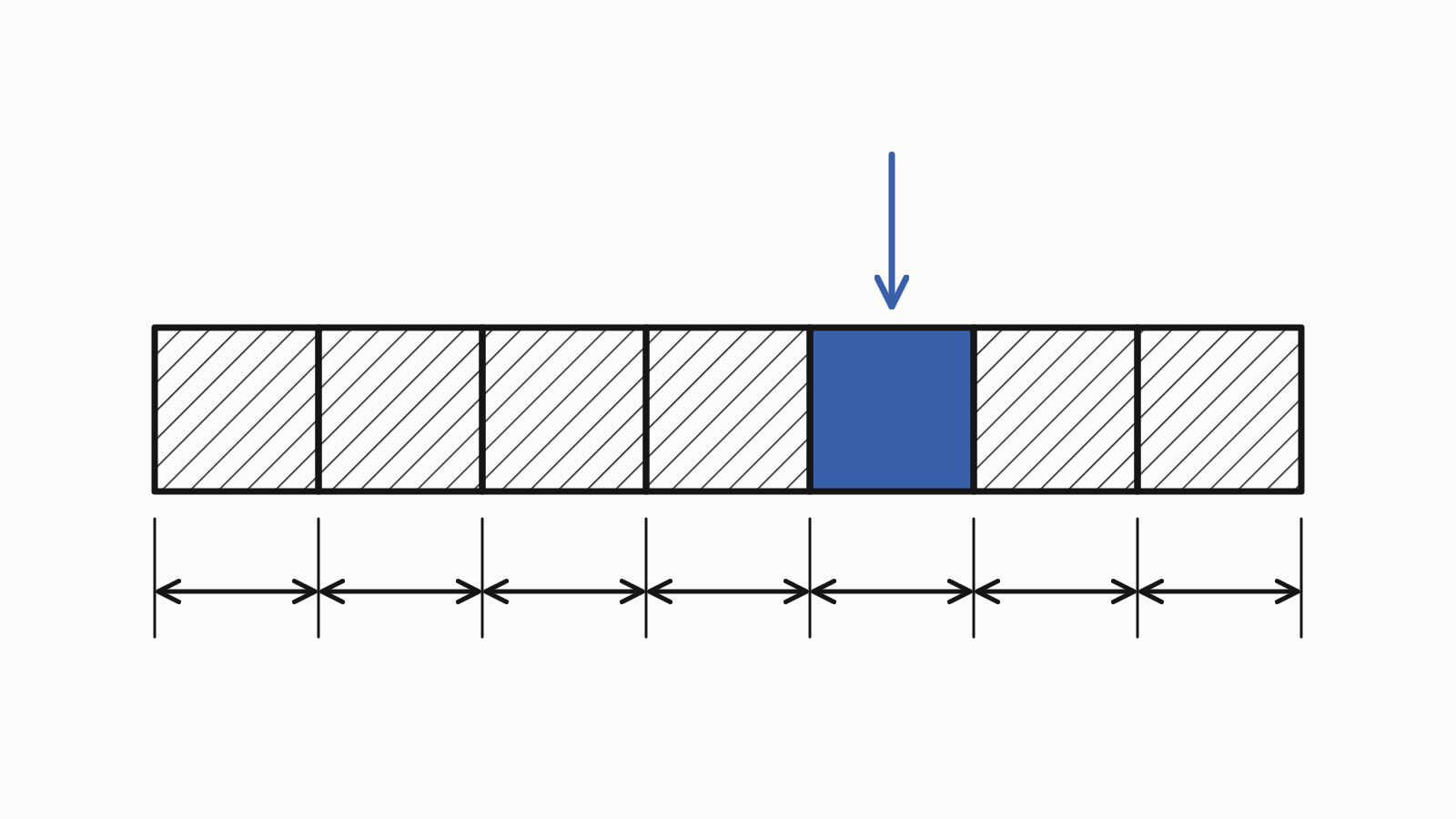
A C++ array is a fixed number of elements of one type, stored side by side. int temps[7] = {18, 21, 19}; holds seven ints, numbered 0 to 6, the last four 0. std::size(temps) gives the length. Use std::array to copy, return or pass one with its length, and std::vector when the size is known only at run time.
A week of temperatures, read, changed, summed and averaged:
#include <iostream>
#include <iterator>

int main() {
    int temps[7] = {18, 21, 19, 23, 22, 20, 17};

    std::cout << "Monday: " << temps[0] << '\n';
    temps[6] = 24;  // Sunday turned out warmer

    int sum = 0;
    for (int t : temps) {
        sum += t;
    }
    double average = static_cast<double>(sum) / std::size(temps);

    std::cout << "days: " << std::size(temps) << '\n';
    std::cout << "average: " << average << '\n';
}
— end example]
It printed:
Monday: 18
days: 7
average: 21
— end example]
This answer is written for C++17, the standard that added std::size; Since When’s C++17 table has the first compiler releases for that standard’s features. The samples were built with MSVC 19.44, Clang 19.1 (MSVC STL), GCC 16.2 and Clang 23.1 (libc++), and they agreed unless a sentence says otherwise.
How do you declare and initialize an array in C++?
Write the element type, the name and the size in brackets, then the values in braces. The size must be a constant known when the program is compiled, greater than zero. These are the four common forms of initialization:
int temps[7] = {18, 21, 19};     // the other four are 0
int week[] = {18, 21, 19, 23, 22, 20, 17};  // size counted: 7
int zeros[7] = {};               // all seven are 0
int later[7];                    // not set: do not read them yet
— end example]
Elements left out of the braces are set to zero, not left random: the short list printed 18 21 19 0 0 0 0. Read or change one element by its index in brackets: temps[0] is the first, and temps[6], the length minus one, is the last.
How do you loop over an array in C++?
Use a range-based for loop, for (int t : temps), to visit every element in order, as the first example does. When you need the position too, count the index from 0 up to the length:
for (std::size_t i = 0; i < std::size(temps); ++i) {
    std::cout << "day " << i << ": " << temps[i] << '\n';
}
— end example]
It printed day 0: 18 through day 6: 17. std::size_t is the type std::size returns, so i and the length have the same type.
How do you get the length of an array in C++?
Call std::size, since C++17, from <iterator>; <array>, <vector> and <string> declare it too. The older sizeof(temps) / sizeof(temps[0]), the whole array’s size in bytes divided by one element’s, gives the same number as long as temps is still an array:
int temps[7] = {18, 21, 19, 23, 22, 20, 17};

std::cout << std::size(temps) << '\n';                  // 7
std::cout << sizeof(temps) / sizeof(temps[0]) << '\n';  // 7
— end example]
Both lines printed 7 on all four. sizeof(temps) on its own counts bytes, not elements. A std::array or a std::vector has a .size() member that gives the length directly.
Why does sizeof give the wrong length inside a function?
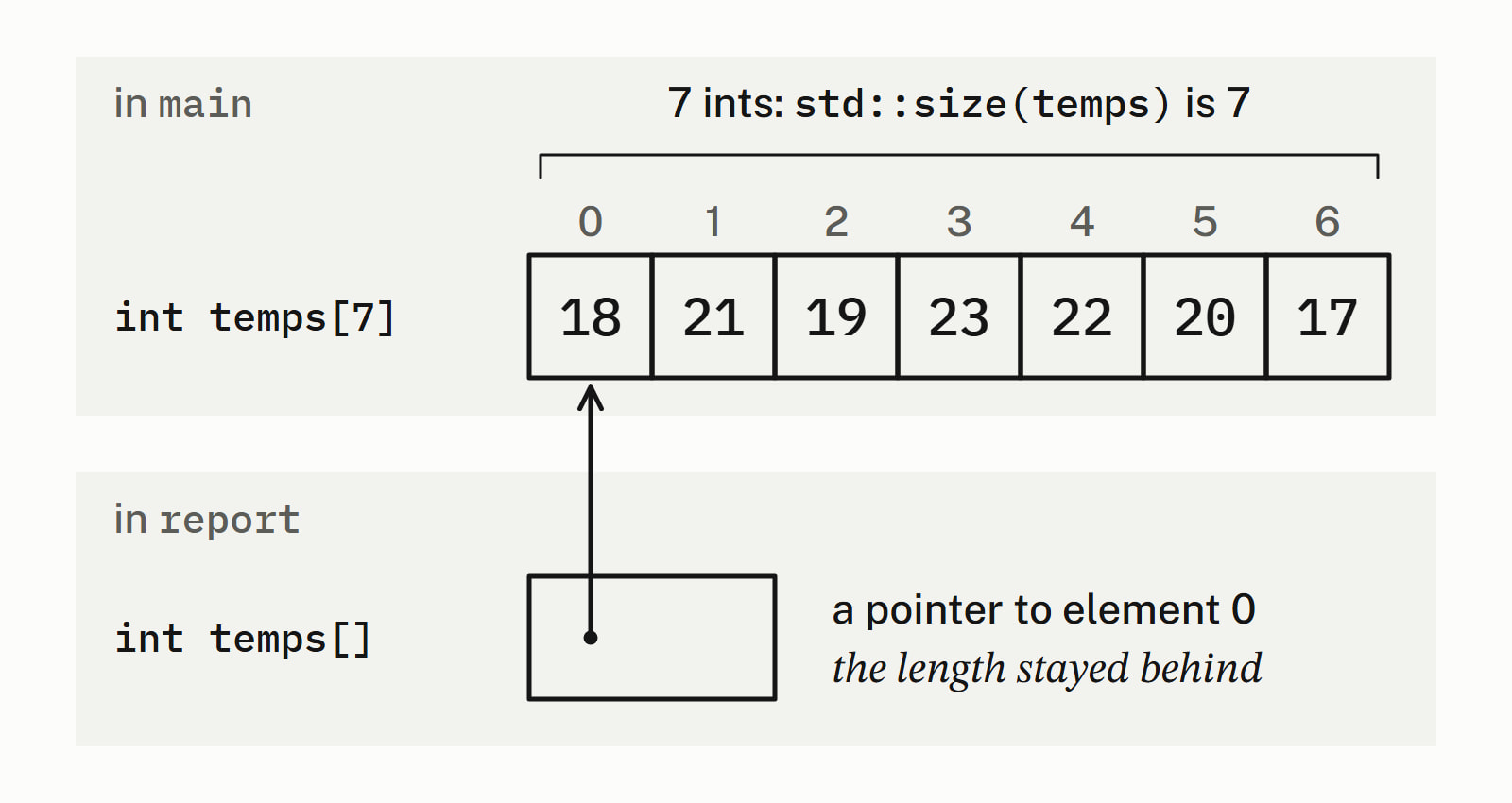
Because the function never receives the array. A parameter written int temps[] is adjusted to int* temps, a pointer to the first element ([dcl.fct]), so sizeof measures the pointer:
void report(int temps[]) {  // really: int* temps
    std::cout << "in report: "
              << sizeof(temps) / sizeof(temps[0]) << '\n';
}

int main() {
    int temps[7] = {18, 21, 19, 23, 22, 20, 17};
    std::cout << "in main:   "
              << sizeof(temps) / sizeof(temps[0]) << '\n';
    report(temps);
}
— end example]
On a 64-bit build, all four printed:
in main:   7
in report: 2
— end example]
The 2 is an 8-byte pointer divided by a 4-byte int. GCC and Clang warned about that line; MSVC, even at /W4, did not. At the call, the array turns into a pointer to its first element, as it does wherever a pointer is expected: array-to-pointer decay. A pointer does not carry a length.
std::size is the better tool here because it refuses to compile instead of giving a wrong number:
void report(int temps[]) {
    std::cout << std::size(temps) << '\n';  // error: temps is a pointer
}
— end example]
GCC’s message names the pointer the function really received:
error: no matching function for call to 'size(int*&)'— end example]
Four ways to keep the length:
- Pass the length as a second parameter.
- Take a
std::array<int, 7>byconst&, a reference that reads the caller’s array without copying it; the length is part of the type. - Take a
std::vector<int>when the length varies. - Take a
std::span<const int>(C++20), a view of any of them that carries the length: std::span replaces a pointer and a size.
What is std::array, and how is it different?
std::array, from <array>, is the same fixed row of elements wrapped in a type that knows its size and can be copied, compared and returned. It behaves like a struct whose only member is a built-in array, so the elements are stored the same way. std::array<int, 7> holds seven ints; here one function takes it by const&, another returns one, and main copies and compares them:
double average(const std::array<int, 7>& temps) {
    int sum = 0;
    for (int t : temps) {
        sum += t;
    }
    return static_cast<double>(sum) / temps.size();
}

std::array<int, 7> next_week() {
    return {20, 22, 21, 24, 23, 21, 19};
}

int main() {
    std::array<int, 7> temps = {18, 21, 19, 23, 22, 20, 17};
    std::cout << "days: " << temps.size() << '\n';
    std::cout << "average: " << average(temps) << '\n';

    std::array<int, 7> last_week = temps;  // a real copy
    last_week[0] = 15;
    std::cout << "temps[0] is still " << temps[0] << '\n';
    std::cout << std::boolalpha << (last_week == temps) << '\n';

    temps = next_week();                   // returned and assigned
    std::cout << "next average: " << average(temps) << '\n';
    // ...
}
— end example]
All four printed temps[0] is still 18, then false: the copy is a separate array, and == compares the elements. Since C++17 the compiler can also work out the type and the count from the values: std:: is a std::array<int, 3>.
Besides size(), [] and at(), a std::array has front() and back() for the first and last elements, fill() to set them all, and data(), a pointer to the first element for a function that takes one.
A built-in array cannot be copied with = or returned. int copy[7] = temps; does not compile, and neither does a function declared to return int[7]; Clang says function cannot return array type 'int[7]'.
| What it does | Built-in array | std::array |
std::vector |
|---|---|---|---|
| Keeps its length when passed to a function | no | yes | yes |
Copied with = and returned |
no | yes | yes |
| Size can change while running | no | no | yes |
Checked access with at() |
no | yes | yes |
What happens when you go past the end of an array?
The language does not check it: temps[7] on seven elements is undefined behavior, which means the standard promises nothing, so the program may print garbage, crash or seem to work. [] on a std::array is not required to check either. std::array and std::vector also have at(), which checks the index and throws std::out_of_range when it is not less than size():
std::array<int, 7> temps = {18, 21, 19, 23, 22, 20, 17};
try {
    std::cout << temps.at(7) << '\n';  // there is no day 7
} catch (const std::out_of_range& e) {
    std::cout << "out_of_range: " << e.what() << '\n';
}
— end example]
All four caught it; the text of what() differs from library to library, so do not match on it.
C++ array vs vector: which should you use?
Pick by when you know the size:
| Your case | Use |
|---|---|
| The size is known when you write the code | std::array |
| The size is known only at run time, or it grows | std::vector |
| The code is shared with C, or you maintain code that has one | a built-in array |
A std::vector<int> of the same week took an eighth day with push_back(24) and reported days: 8; how a std::vector grows covers its size and capacity. The Language section has the rest of the core language, and cppreference’s Array declaration has the full rules for built-in arrays.
Questions
How do you return an array from a function in C++?
A built-in array cannot be returned: a function declared to return int[7] does not compile. Return a std::array<int, 7> instead, which is returned like any other value, or a std::vector when the size is known only at run time.
How do you print an array in C++?
Loop over it and send each element to std::cout with a space after it: for (int t : temps) std::cout << t << ‘ ‘; prints the week as 18 21 19 23 22 20 17. There is no single call that prints a whole built-in array.
How do you sort an array in C++?
Call std::sort(std::begin(temps), std::end(temps)) from <algorithm>. It sorts the array in place, smallest first: the week of temperatures 18 21 19 23 22 20 17 printed as 17 18 19 20 21 22 23.
Can the size of an array be a variable in C++?
Only a constant one: the size must be known when the program is compiled, so constexpr int days = 7; int temps[days]; is fine. int n = 7; int temps[n]; is a variable-length array, a compiler extension: MSVC rejects it, while GCC and Clang accept it. Use a std::vector when the size comes at run time.
How do you declare a 2D array in C++?
Give two sizes, rows first: int grid[2][3] is two rows of three ints. Fill it with nested braces, {{14, 19, 16}, {15, 21, 17}}, read an element as grid[row][col], and print it with one loop inside another.
Do array indexes start at 0 or 1 in C++?
At 0. The first of seven elements is temps[0] and the last is temps[6], the length minus one. Reading temps[7] goes past the end, which is undefined behavior: no error is promised.
Sources
- Array declarationcppreference.com
- std::size, std::ssizecppreference.com
- std::arraycppreference.com
- std::array::atcppreference.com
- [dcl.init.aggr] AggregatesC++ standard working draft
- [dcl.fct] FunctionsC++ standard working draft