Tooling[tools]
clang-tidy: run it, configure it, pick the checks

- Section
- Tooling [tools]
- Standard
- C++17
- Compilers
- MSVC 19.44, Clang 19.1 (MSVC STL)
- Published
- Length
- 16 min read
In this answer9 clauses
- 1Run clang-tidy on one file
- 2Run it on a project: compile_commands.json and run-clang-tidy
- 3The .clang-tidy file
- 4The clang-tidy checks to turn on first
- 5Let clang-tidy fix the code: –fix
- 6Silence one finding with NOLINT
- 7clang-tidy vs clang-format and the Clang Static Analyzer
- 8What changed from clang-tidy 19 to 23
- 9A starter setup for CI
Abstract
clang-tidy is LLVM’s linter for C++: it parses each file with Clang from its compile command and runs the checks you enable, many with fixes. Run it on one file as clang-tidy reader.cpp -- -std=c++17, with the checks named in --checks or in a .clang-tidy file, or on a project as run-clang-tidy -p build, which reads compile_commands.json. Commit a .clang-tidy that starts with bugprone-* and performance-*, check it with --verify-config, and use one release locally and in CI: 22 changed the default checks and header filtering.
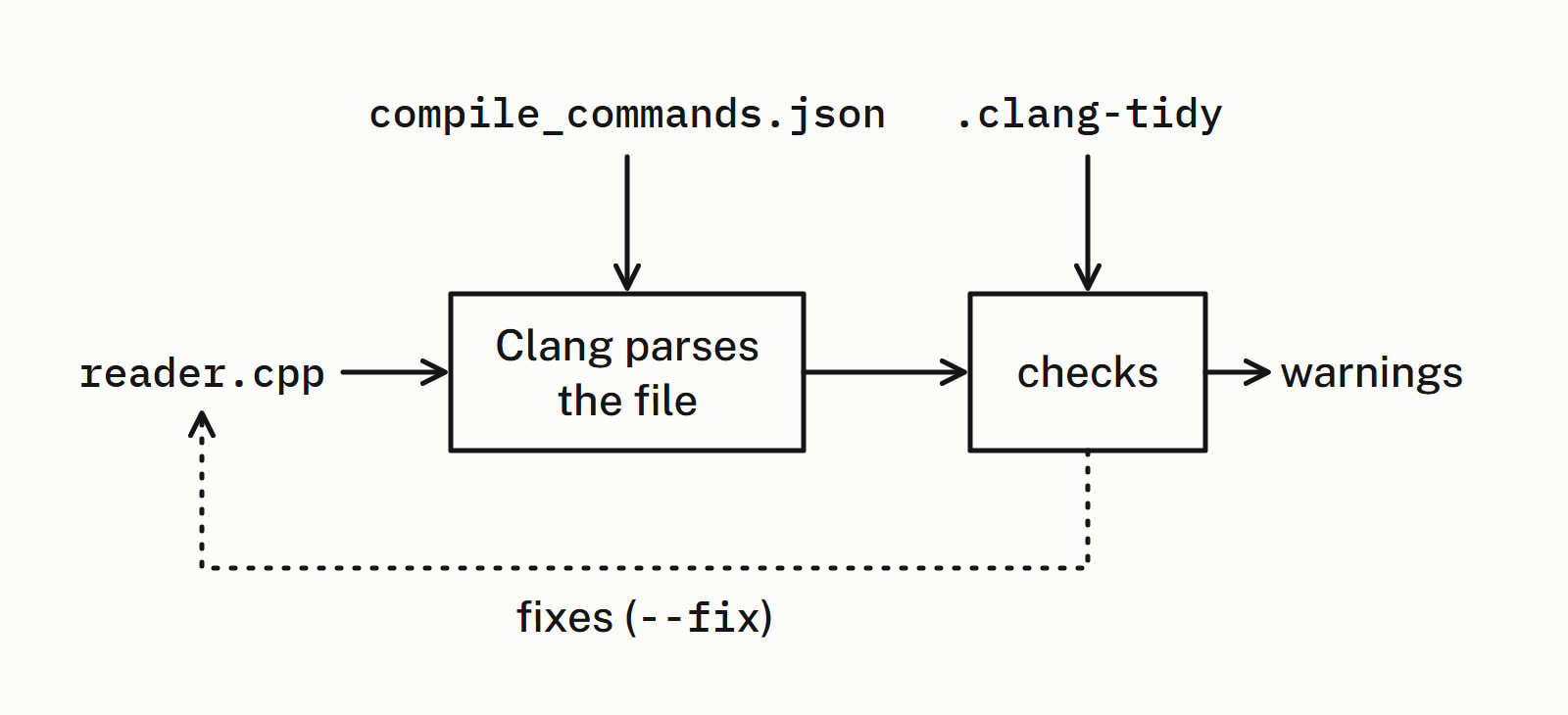
clang-tidy is LLVM’s linter for C++: it parses each file with Clang, from the compile command you give it, and runs the checks you choose to find bugs, outdated constructs and style problems; many checks offer a fix it can write into the file. Run it on one file with clang-tidy reader.cpp --checks=, and on a project with -p build, which reads the build’s compile_commands.json. Keep the checks in a .clang-tidy file at the repository’s root, start with bugprone-* and performance-*, and add groups one at a time.
The samples are C++17 (one is C++20), built with MSVC 19.44 and Clang 19.1 on Microsoft’s standard library. Every clang-tidy message here was printed by clang-tidy 19.1.5, the one Visual Studio 2022 installs; 23.1.5 (2026-11-03) is current, and what changed from 20 to 23 comes from LLVM’s release notes. The checks suggest C++11’s nullptr and override and C++20’s contains(): Since When has the first compiler release for each.
Run clang-tidy on one file
Three mistakes in the sensor-log reader: 0 returned as a null pointer, a copy of each reading in a range-for, and a vector read after it was moved from:
const Reading* find(const std::vector<Reading>& batch,
                    std::string_view sensor) {
    for (const Reading& r : batch)
        if (r.sensor == sensor)
            return &r;
    return 0;
}

int main() {
    std::vector<Reading> batch{{"t1", 21.5}, {"t2", 19.0}};
    for (auto r : batch)
        std::printf("%s %.1f\n", r.sensor.c_str(), r.value);
    keep(std::move(batch));
    std::printf("t1 %s\n", find(batch, "t1") ? "found" : "missing");
}
— end example]
Saved as 01-first-run.cpp, it was checked with:
clang-tidy 01-first-run.cpp \
    --checks='-*,bugprone-*,performance-*,modernize-use-nullptr' \
    -- -std=c++17 -Wall -Wextra
— end example]
The quotes keep the shell from expanding the * (zsh stops with no matches found). clang-tidy 19.1.5 reported four findings. Two of them:
01-first-run.cpp:25:12: warning: use nullptr [modernize-use-nullptr]
   25 |     return 0;
      |            ^
      |            nullptr
01-first-run.cpp:33:33: warning: 'batch' used after it was moved [bugprone-use-after-move]
   33 |     std::printf("t1 %s\n", find(batch, "t1") ? "found" : "missing");
      |                                 ^
01-first-run.cpp:32:10: note: move occurred here
   32 |     keep(std::move(batch));
      |          ^
— end example]
Each finding reads the same way:
file:line:column: warning:, the message, then the check’s name in brackets: the name a.clang-tidyfile or aNOLINTcomment uses.- A line under the caret (
nullptr) is the check’s replacement.--fixwrites it into the file. - A
note:points at a second place that explains the first: here, where the move happened.
The other two were performance-for-range-copy on the loop’s copy and bugprone-exception-escape on main (an exception may be thrown in function 'main' which should not throw exceptions). The vector built in main can throw: that is what a whole group brings, findings you did not ask for by name.
Everything after -- is the compile command: the standard, include paths (-I), defines. Without -std=c++17, the Visual Studio Clang 19.1 compiles as C++14, and clang-tidy 19.1.5 printed error: no type named 'string_view' in namespace 'std' [clang-diagnostic-error], then three of the four findings. The use after move, in a call to the function that failed, was gone; the exit code was 1.
With no --checks and no .clang-tidy file, 19.1.5 runs 125 checks, all clang-analyzer-*; from 22 the default is clang-diagnostic-* alone, the compiler’s own warnings. Name the checks you want.
Run it on a project: compile_commands.json and run-clang-tidy
On a project, clang-tidy takes each file’s compile command from compile_commands.json, the compilation database the build writes, and -p names the folder that holds it. CMake writes it from 3.5, for the Makefile and Ninja generators only.
# configure; writes build/compile_commands.json
cmake -S . -B build -DCMAKE_EXPORT_COMPILE_COMMANDS=ON
# one file, its command read from the database
clang-tidy -p build src/reader.cpp
# every file in the database, in parallel
run-clang-tidy -p build
# only the lines changed since the previous commit
git diff -U0 --no-color HEAD^ | clang-tidy-diff.py -p1
— end example]
With -p, no -- is needed; a -- after -p build replaces the database’s command (a bare -- brought the string_view error back). With neither, 19.1.5 searched only the source’s folder and its parents for compile_commands.json, printed Running without flags. and parsed the file with none.
| Way | Runs | What to know |
|---|---|---|
run-clang-tidy |
every file in the database, in parallel (-j jobs) |
LLVM’s Python script, in bin since 13 (once run-clang-tidy.py); needs clang-tidy and clang-apply-replacements on the PATH; -clang-tidy-binary names another clang-tidy |
run-clang-tidy on Windows |
python "…\Llvm\x64\bin\run-clang-tidy" -p build |
the script has no extension, so name Python |
CMAKE_CXX_CLANG_TIDY |
beside the compiler, on every build | CMake 3.6 and later; Makefile and Ninja generators; without -checks= in it, the .clang-tidy file decides |
clang-tidy-diff.py |
on the lines a diff changed | LLVM’s script; still analyzes whole files; not in Visual Studio’s LLVM folder |
| Visual Studio | in Code Analysis, after a successful build | since Visual Studio 2019 16.4; adds no checks of its own (its Clang-Tidy Checks property is passed as --checks); reads .clang-tidy |
To keep third-party and generated sources out: run-clang-tidy’s trailing arguments are regexes on file paths, and -source-filter (19) is a regex of the sources to report on. For headers, ExcludeHeaderFilterRegex (19) hides findings that HeaderFilterRegex would show: on 19.1.5, Exclude beside HeaderFilterRegex: '.*' kept the finding in src/own.h and hid the one in third_party/vendor.h.
The .clang-tidy file
clang-tidy reads the .clang-tidy file in the closest parent directory of each source file, and options on the command line win over it. This starter was checked with clang-tidy 19.1.5, and --verify-config printed No config errors detected.:
Checks:
  - -*
  - bugprone-*
  - -bugprone-easily-swappable-parameters
  - performance-*
  - clang-analyzer-*
  - modernize-use-override
  - modernize-use-nullptr
  - modernize-use-emplace
  - modernize-loop-convert
  - readability-container-contains
WarningsAsErrors: 'bugprone-use-after-move,bugprone-dangling-handle'
HeaderFilterRegex: '.*'
CheckOptions:
  performance-for-range-copy.WarnOnAllAutoCopies: true
— end example]
Checksapplies its globs in order:-*turns everything off, each line after it turns a group or a check on, and a leading-turns one off again, here the noisy check for neighboring parameters a caller could swap. The list form needs 17 or later; before that, write one string.WarningsAsErrorsmakes those findings errors and the exit code 1; it enables nothing, and it is one string because its list form needs 22. On the reader:error: 'batch' used after it was moved [bugprone-use-after-move,.-warnings-as-errors] HeaderFilterRegex: '.*'reports findings in your own headers, which 19.1.5 hides by default (Suppressed 1 warnings (1 in non-user code).). On Windows the paths have backslashes (src\reading.h):'^src/'matched nothing,--header-filter=matched. On 19.1.5 the filter in the file took effect only when clang-tidy ran from this file’s folder or below it, a bug LLVM 21’s notes list as fixed.'src[/ \\]' CheckOptionssets one check’s options. This one makesperformance-for-range-copyflag everyautoloop variable of a type that is costly to copy, even one the loop modifies.
--list-checks printed the 232 checks in force (125 clang-analyzer-*, 83 bugprone-*, 19 performance-*, the five named); --dump-config printed the merged configuration, every option included.
Run --verify-config after each edit: a misspelled check or option is silent in a normal run. It caught unknown check 'modernize-use-emplaec'; did you mean 'modernize-use-emplace' and a misspelled option, but not a misspelled check in WarningsAsErrors.
A .clang-tidy in a subfolder replaces the root’s file: src/.clang-tidy holding Checks: -bugprone-exception-escape left the defaults minus that check. With InheritParentConfig: true added, its list was appended to the root’s.
The clang-tidy checks to turn on first
Start with bugprone-* and performance-*. Findings per group on a 49-line file of the reader:
| Group | For, in the project’s words | Findings on 49 lines |
|---|---|---|
bugprone-* |
“bug-prone code constructs” | 1 |
performance-* |
“performance-related issues” | 1 |
clang-analyzer-* |
“Clang Static Analyzer checks” | 0 |
cppcoreguidelines-* |
“C++ Core Guidelines” | 3 |
misc-* |
“Checks that we didn’t have a better category for” | 5, three misc-use-internal-linkage |
modernize-* |
“modern language constructs”; the docs still say “C++11”, but 19.1.5’s group reaches C++23’s std::print | 6, four modernize-use-trailing-return-type |
readability-* |
“readability-related issues”, of no particular coding style | 13, six readability-braces-around-statements |
Of the 557 checks in 19.1.5 (--checks=*), the ones to know first; Fix says whether 19.1.5 printed a replacement:
| Check | Finds | Fix |
|---|---|---|
bugprone-use-after-move |
an object read after std::move |
no |
bugprone-dangling-handle |
a std::string_view of a temporary |
no |
bugprone-unchecked-optional-access |
an optional read with no check | no |
bugprone-narrowing-conversions |
a double added into an int |
no |
bugprone-exception-escape |
an exception that can leave main, a destructor, a move or a noexcept function |
no |
performance-for-range-copy |
a loop variable copied, then only read | yes |
performance-unnecessary-copy-initialization |
a const local copied from a reference |
yes |
performance-unnecessary-value-param |
a parameter copied, then only read | yes |
performance-noexcept-move-constructor |
move operations without noexcept |
yes |
modernize-use-override |
virtual where override belongs |
yes |
modernize-use-nullptr |
0 or NULL as a null pointer |
yes |
modernize-use-emplace |
a push_back of std::make_pair(…) |
yes |
modernize-loop-convert |
an index loop over a container | yes |
readability-container-contains |
count() as a membership test |
yes |
misc-const-correctness |
locals that could be const |
yes |
Clang-Tidy Checks lists them all. Add misc-const-correctness last: it reported 3 locals in 12 ordinary lines.
bugprone-dangling-handle caught a std::string_view bound to the std::string that label() returns by value:
04b-dangling-handle.cpp:18:29: warning: std::basic_string_view outlives its value [bugprone-dangling-handle]
   18 |     std::string_view name = label(r);  // the string dies here
      |                             ^
— end example]
From 20 it treats std::span as a handle too; the std::span answer shows a span that dangles.
bugprone-unchecked-optional-access follows the tests the code makes before reading an optional:
double arrow(const std::vector<Reading>& batch) {
    std::optional<Reading> r = latest(batch);
    return r->value;          // no check
}

double star(const std::vector<Reading>& batch) {
    std::optional<Reading> r = latest(batch);
    return (*r).value;        // no check
}

double value(const std::vector<Reading>& batch) {
    std::optional<Reading> r = latest(batch);
    return r.value().value;   // no check (throws when empty)
}
— end example]
On Microsoft’s library, clang-tidy 19.1.5 flagged r->value and r.value() (unchecked access to optional value) and missed (*r).value, so a clean run there does not prove every *o is checked; the std::optional answer has the reason.
readability-container-contains wants C++20’s contains() for a membership test:
04h-contains.cpp:11:23: warning: use 'contains' to check for membership [readability-container-contains]
   11 |     return last_value.count(sensor) > 0;
      |                       ^~~~~         ~~~
      |                       contains
— end example]
On 19.1.5, on Microsoft’s library, it flagged count() only, not last_value.find(sensor) != last_value.end(); LLVM 20’s notes list a fix for “false negatives in the find() case”. std::map covers contains().
On 19.1.5, modernize-use-emplace flagged peaks.push_back(std:: and left batch. alone, in C++17, where emplace_back cannot build an aggregate, and in C++20, where it can.
In 19.1.5, bugprone-narrowing-conversions is an alias of cppcoreguidelines-narrowing-conversions; with both on, the finding carried both names.
performance-noexcept-move-constructor said move constructors should be marked noexcept, and the same of move assignment: when a move constructor should be noexcept has why std::vector cares.
Keep the compilers’ warnings on too: MSVC’s /W4 warned about the narrowing (C4244) where Clang’s -Wall -Wextra did not, and Clang about the dangling view (-Wdangling-gsl, on by default) where /W4 did not. Inside clang-tidy they are the clang-diagnostic-* checks: with -* first, the -Wall -Wextra after -- printed nothing, and clang-diagnostic-* in Checks brings them back. Clang vs GCC compares the compilers’ warnings.
Let clang-tidy fix the code: –fix
--fix writes the replacements into the file; --fix-errors does so even when the file has compile errors, and --fix-notes also applies fixes attached to notes. Run it on a clean working tree and read the diff. This file had four findings, from modernize-use-override, modernize-use-nullptr (two) and modernize-loop-convert:
class PrintSink : public Sink {
public:
    virtual void write(const Reading& r) {
        std::printf("%s %.1f\n", r.sensor.c_str(), r.value);
    }
};

void flush(std::vector<Reading> batch, Sink* sink = 0) {
    if (sink == 0)
        return;
    for (std::size_t i = 0; i < batch.size(); ++i)
        sink->write(batch[i]);
}
— end example]
clang-tidy 19.1.5 said clang-tidy applied 6 of 6 suggested fixes. (the override and loop fixes are two replacements each) and wrote:
class PrintSink : public Sink {
public:
    void write(const Reading& r) override {
        std::printf("%s %.1f\n", r.sensor.c_str(), r.value);
    }
};

void flush(std::vector<Reading> batch, Sink* sink = nullptr) {
    if (sink == nullptr)
        return;
    for (const auto & i : batch)
        sink->write(i);
}
— end example]
override in place of virtual is what C++ virtual functions recommends. Two things to do after every --fix:
- Run it again. With
batch[i]gone (its non-constoperator[]had hidden thatbatchis only read),performance-unnecessary-value-paramreported thatbatchis copied but only used as a const reference. A second--fixmade itconst std::; the next run found nothing.vector<Reading>& batch - Format it. The loop came out as
for (const auto & i : batch): the element keeps the index’s name,i, and&has a space on both sides.--format-style=file(orFormatStylein the file) passes the fixes through clang-format, asrun-clang-tidy -formatdoes; these runs did not.
For a project, run-clang-tidy -p build -fix applies the fixes. To read them first, run-clang-tidy -p build -export-fixes fixes writes one YAML file per source into the existing folder fixes, and clang-apply-replacements fixes applies them.
Silence one finding with NOLINT
// NOLINT(check) silences a check on its line, // NOLINTNEXTLINE(check) on the next line, and NOLINTBEGIN(check) and NOLINTEND(check) around a block (since 14). Five null pointers written as 0, four of them silenced:
const char* unit = 0;  // NOLINT(modernize-use-nullptr)

// NOLINTNEXTLINE(modernize-use-nullptr)
const char* label = 0;

// NOLINTBEGIN(modernize-use-nullptr)
const char* first_sensor = 0;
const char* last_sensor = 0;
// NOLINTEND(modernize-use-nullptr)

const char* log_path = 0;  // NOLINT(bugprone-use-after-move)
— end example]
With --checks=, clang-tidy 19.1.5 reported only the last line, whose NOLINT names another check:
06-nolint.cpp:16:24: warning: use nullptr [modernize-use-nullptr]
   16 | const char* log_path = 0;  // NOLINT(bugprone-use-after-move)
      |                        ^
      |                        nullptr
— end example]
The check list in parentheses is optional; fill it in, so the comment silences that check and no other. A NOLINTBEGIN with no NOLINTEND silenced nothing and added an error: unmatched 'NOLINTBEGIN' comment without a subsequent 'NOLINTEND' comment [clang-tidy-nolint].
clang-tidy vs clang-format and the Clang Static Analyzer
| Tool | Does | Changes your code | Run as |
|---|---|---|---|
| clang-tidy | parses the code with Clang and runs checks over it | with --fix |
clang-tidy, run-clang-tidy, CMake, Visual Studio |
| clang-format | lays out code without reading what it means | yes: layout and #include order; some options (InsertBraces) edit tokens |
clang-format |
| Clang Static Analyzer | follows paths through the code to find bugs | no | scan-build before the build command, clang --analyze, or clang-tidy’s clang-analyzer-* |
The analyzer is path-sensitive. Through clang-tidy 19.1.5 (--checks=), it found the null dereference in this function, on the path where no reading matches:
double value_of(const std::vector<Reading>& batch,
                std::string_view sensor) {
    const Reading* found = nullptr;
    for (const Reading& r : batch)
        if (r.sensor == sensor)
            found = &r;
    return found->value;  // null when no reading matches
}
— end example]
It reported Access to field 'value' results in a dereference of a null pointer (loaded from variable 'found') [clang-analyzer-core., then traced the path:
07-analyzer.cpp:26:27: note: Calling 'value_of'
   26 |     std::printf("%.1f\n", value_of(batch, "t9"));
      |                           ^~~~~~~~~~~~~~~~~~~~~
07-analyzer.cpp:16:5: note: 'found' initialized to a null pointer value
   16 |     const Reading* found = nullptr;
      |     ^~~~~~~~~~~~~~~~~~~~
— end example]
When the null came back from another function, a find() returning nullptr, it reported nothing. That is a heuristic, not a limit of the analysis: by default the analyzer drops a path whose null is a called function’s return (suppress-null-return-paths). With -Xclang -analyzer-config -Xclang suppress-null-return-paths= after --, clang-tidy 19.1.5 reported it and traced the path into find() (note: Returning null pointer). Toolchain lists clang-tidy with the other analyzers.
What changed from clang-tidy 19 to 23
From LLVM’s release notes, most of it in the 22.1.0 notes, the changes that alter what a .clang-tidy file does:
| Release | Change | For your file |
|---|---|---|
| 19 | ExcludeHeaderFilterRegex and --exclude-header-filter |
hide some headers; filters reports only |
| 20 | bugprone-narrowing-conversions becomes the check, the cppcoreguidelines- name its alias |
the bugprone- name works in both |
| 21 | a HeaderFilterRegex set in .clang-tidy takes effect wherever clang-tidy runs |
on 19.1.5, run it from the folder of the .clang-tidy |
| 22 | clang-analyzer-* removed from the default checks, now clang-diagnostic-* alone |
list it in Checks |
| 22 | findings in all non-system headers are shown by default (the filter’s default became .*) |
an empty -header-filter turns it off |
| 22 | WarningsAsErrors takes the list form |
one string for older releases |
| 22 | RemovedArgs and --removed-arg take flags out of the compile command |
drop a flag Clang rejects |
| 22 | global StrictMode and IgnoreMacros removed, deprecated since 20 |
set them per check in CheckOptions |
| 23 | hicpp-* removed; each of its checks now lives in another group (modernize-, readability-, cppcoreguidelines-, bugprone-, performance-, misc-, portability-) |
rename those entries from the 23.1.0 notes’ table |
| 23 | no early exit when the only checks enabled are clang-diagnostic-* |
a run on 22’s default goes ahead |
| 23 | misc-const-correctness covers auto and lambdas |
expect more findings |
A starter setup for CI
Commit the .clang-tidy above at the repository’s root, have the build write compile_commands.json, and run this in CI:
run-clang-tidy -p build -quiet -warnings-as-errors='*'— end example]
With clang-tidy 19.1.5 it turned every finding into error: … [check, and exited with 1. -quiet passes clang-tidy’s --quiet, which leaves out the statistics about ignored warnings; run-clang-tidy still prints each command.
- One group at a time: fix or switch off what it finds before the next.
- A check name in every
NOLINT. --fixon a clean working tree, then a second run, then the formatter.- The same clang-tidy release locally and in CI, checked with
clang-tidy --version(Visual Studio’s, inVC\Tools\Llvm\x64\bin, saysLLVM version 19.1.5): 22 changed the default checks and the header filter. - Every finding an error in CI only; in the file, only the checks that are always bugs.
Tooling covers the compilers and build setups.
Questions
What is clang-tidy?
clang-tidy is the LLVM project’s clang-based C++ linter, built in its own words for “diagnosing and fixing typical programming errors, like style violations, interface misuse, or bugs that can be deduced via static analysis”. It parses each file with Clang, from the file’s compile command, and runs the checks you enable over the result; release 19.1.5 has 557. Many checks also offer a replacement that clang-tidy writes into the file with --fix.
What is the difference between clang-tidy and clang-format?
clang-format formats code: it is a standalone formatter, built on LibFormat, for C, C++, Java, JavaScript, JSON, Objective-C, Protobuf and C#. clang-tidy parses C++ the way the compiler does and reports bugs, outdated constructs and style problems, many with a fix. Use both: the fixes clang-tidy 19.1.5 wrote did not follow the file’s layout (a loop came out as for (const auto & i : batch)), so format after a --fix.
Is clang-tidy a static analyzer?
It is a linter that can also run the Clang Static Analyzer’s checks, named clang-analyzer-*. The analyzer follows paths through the code: through clang-tidy 19.1.5 it found a pointer that is null on one path of a function and dereferenced. Its checks are on by default in clang-tidy up to 21 and off from 22, so list clang-analyzer-* in Checks to keep them; the analyzer also runs alone, through scan-build or clang --analyze.
How do I run clang-tidy on a whole project?
Have the build write compile_commands.json (in CMake, turn on CMAKE_EXPORT_COMPILE_COMMANDS, which the Makefile and Ninja generators honor), then run run-clang-tidy -p build, LLVM’s script that runs clang-tidy on every file in that database in parallel. In CI, add -warnings-as-errors with the glob * in quotes: with clang-tidy 19.1.5 it turned every finding into an error and the run exited with 1.
How do I disable a clang-tidy check?
In .clang-tidy, add the check’s name with a leading minus to Checks, after the glob that turned it on, since the globs apply in order: bugprone-*, then -bugprone-easily-swappable-parameters. For one line, write // NOLINT(check-name) on it or // NOLINTNEXTLINE(check-name) above it; with clang-tidy 19.1.5, a NOLINT that named a different check silenced nothing.
Does clang-tidy work with GCC or MSVC projects?
It parses every file with Clang, so the compile commands must be ones Clang accepts: given GCC’s -fanalyzer after --, clang-tidy 19.1.5 printed error: unknown argument ‘-fanalyzer’; did you mean ‘-Xanalyzer’? [clang-diagnostic-error] before the file’s findings, and from clang-tidy 22 --removed-arg takes a flag out of the command. Visual Studio has run clang-tidy as part of Code Analysis since Visual Studio 2019 16.4, for MSVC and clang-cl builds; it adds no checks of its own and reads .clang-tidy.
Sources
- Clang-TidyLLVM Project
- Clang-Tidy ChecksLLVM Project
- Extra Clang Tools 22.1.0 Release NotesLLVM Project
- Extra Clang Tools 23.1.0 Release NotesLLVM Project
- CMAKE_<LANG>_CLANG_TIDYCMake documentation
- Using Clang-Tidy in Visual StudioMicrosoft Learn
- Clang Static AnalyzerClang documentation