Standard Library[lib]
std::println in C++23: print without std::cout or printf

- Section
- Standard Library [lib]
- Standard
- C++23
- Compilers
- MSVC 19.44, Clang 19.1 (MSVC STL), GCC 16.2, Clang 23.1 (libc++)
- Published
- Length
- 7 min read
In this answer10 clauses
- 1Print a line with std::println
- 2std::cout before C++23
- 3The same line with std::println, std::cout and printf
- 4Where std::println writes: stderr, a file, a stream
- 4.1Mixing std::println and std::cout
- 5A wrong format string does not compile
- 5.1A format string built at run time
- 6What std::println can print
- 6.1Your own type: the smallest std::formatter
- 7std::endl vs ‘\n’: what the flush is
- 8Does std::println flush, and is it thread-safe?
- 9What std::println needs: compilers, libraries, flags
- 10Which one to use: std::println, std::cout or printf
Abstract
Write std::println("port {}", port) (C++23, header <print>): it formats each argument into its {} placeholder, writes the text to stdout and adds the newline. A format string with a placeholder that has no argument, or a spec the type does not take, does not compile. std::print does the same without the newline. Before C++23, end std::cout lines with '\n': std::endl also flushes the stream, once for every line.
To print a line in C++23, call std:: from <print>: it formats each argument into its {} placeholder, writes the text to standard output and adds the newline. The format string is checked at compile time, so a placeholder with no argument, or a spec the type does not take, does not build. std::print is the same without the newline, and both take a FILE* or a stream as their first argument to write elsewhere. Before C++23, write std:: and keep std::endl for when you want the flush.
This answer is written for C++23, where P2093R14 added std::print and std::println; they take the format strings of C++20’s std::format. C++26 adds std::dynamic_format for a format string built at run time. It also adds std::println() with no arguments (P3142R0), which all four compilers here accept in C++23 mode.
The samples were compiled and run with MSVC 19.44 and Clang 19.1 on Microsoft’s STL (Windows x64), and with GCC 16.2 (libstdc++) and Clang 23.1 (libc++) on Compiler Explorer (Linux x86-64), their output read through a pipe, not a terminal. An output shown is what all four printed unless the text names one. First releases: Since When’s C++23 table.
What changed: a line is printed with std::cout and std::endl, or printfstd::println.
since C++23
Print a line with std::println
Include <print>, then pass a format string and a value for each {}:
#include <print>
#include <string>

int main() {
    int port = 8080;
    std::string host = "db.local";
    double load = 0.4567;
    std::println("port {}", port);             // port 8080
    std::println("{}:{}", host, port);         // db.local:8080
    std::println("{1} on {0}", host, port);    // 8080 on db.local
    std::println("[{:>8}]", port);             // [    8080]
    std::println("[{:06}]", port);             // [008080]
    std::println("load {:.2f}", load);         // load 0.46
    std::println("{{}} is a literal {}", "pair of braces");
    std::print("host {}", host);               // no newline
    std::print(", port {}\n", port);           // so add one
}
— end example]
All four printed:
port 8080
db.local:8080
8080 on db.local
[    8080]
[008080]
load 0.46
{} is a literal pair of braces
host db.local, port 8080
— end example]
{}takes the next argument;{0}and{1}pick one by position.- After a colon comes the spec:
>8right-aligns in eight characters,06pads with zeros to six,.2fkeeps two decimals. Hex, signs and the rest are in std::format’s specs for numbers, in C++ int to string. {{and}}print one brace each.std::println()with no arguments prints an empty line.
std::cout before C++23
Before <print>, a line goes to std::cout from <iostream>, one << per piece, ended with '\n'; errors go to std::cerr:
#include <iostream>
#include <string>
// ...
std::string host = "db.local";
int port = 8080;

std::cout << "connecting to " << host << ':' << port << '\n';
std::cerr << "warning: no TLS\n";       // errors go to std::cerr
— end example]
It printed connecting to db.local:8080 to standard output and warning: no TLS to standard error, on all four.
std::hex, std::fixed and std::setprecision stay set on std::cout for every later line, std::setw applies to the next item only, and std::println carries nothing from one call to the next:
std::cout << std::hex << port << '\n';
std::cout << port << '\n';              // still hex
std::cout << std::dec << std::setw(8) << port << '\n';
std::cout << port << '\n';              // setw applied once

std::cout << std::fixed << std::setprecision(2) << load << '\n';
std::cout << 1.0 / 3 << '\n';           // still fixed, 2 digits
std::println("{:x} {}", port, port);    // nothing carries over
— end example]
With load at 0.5, all four printed:
1f90
1f90
    8080
8080
0.50
0.33
1f90 8080
— end example]
The same line with std::println, std::cout and printf
One job per row, std:: left out, with p a void* holding 0x1f90. The cout lines end in << '\n' and the printf formats in \n; every row was printed all three ways and the texts compared.
| Job | std::println |
std::cout << |
printf |
|---|---|---|---|
| A value | "{}", port |
port |
"%d", port |
| Two values | "port {} on {}", port, host |
"port " << port << " on " << host |
"port %d on %s", port, host.c_str() |
| Zero padding | "{:06}", port |
setfill('0') << setw(6) << port |
"%06d", port |
| Hex | "{:x}", port |
hex << port << dec |
"%x", static_cast<unsigned>(port) |
| Two decimals | "{:.2f}", load |
fixed << setprecision(2) << load |
"%.2f", load |
| A bool as text | "{}", verbose |
boolalpha << verbose |
"%s", verbose ? "true" : "false" |
A std::string |
"{}", host |
host |
"%s", host.c_str() |
A void* |
"{}", p: 0x1f90 on all four |
p: 0000000000001F90 on Windows, 0x1f90 on Linux |
"%p", p: as cout |
Every other row printed the same text all three ways on all four compilers.
A plain {} on a double is not cout << x. For 1.0 / 3, {} gave 0.3333333333333333 where cout and %g gave 0.333333; for 1234567.0, 1234567 where they gave 1.23457e+06 (all four). When translated output must not change, write the precision, as in {:.2f}.
Where std::println writes: stderr, a file, a stream
With no stream argument, std::println writes to C’s stdout. A FILE* first sends the line there instead, and a std::ostream& first picks the overload declared in <ostream>:
std::println(stderr, "warning: port {} in use", port);
// ...
std::FILE* log = std::fopen(path.string().c_str(), "w");
if (!log) return 1;
std::println(log, "{}:{}", host, port);
std::fclose(log);
// ...
std::ostringstream os;
std::println(os, "{}:{}", host, port);  // the <ostream> overload
— end example]
Read back, the file and the string stream each held db.local:8080 on all four.
Mixing std::println and std::cout
std::println writes to stdout, not through std::cout. With the default std::, the standard keeps the two in order: a synchronized cout writes as fputc on stdout would ([ios.members.static]). After sync_with_stdio(false) the order is up to the library:
std::ios::sync_with_stdio(false);   // before any output
std::println("1 println");
std::cout << "2 cout\n";
std::println("3 println");
std::cout << "4 cout\n";
std::println(std::cout, "5 println(std::cout)");
std::println("6 println");
— end example]
Through a pipe, Microsoft’s STL and libc++ still printed 1 to 6 in order. GCC with libstdc++ printed:
2 cout
4 cout
5 println(std::cout)
1 println
3 println
6 println
— end example]
In a program that turns synchronization off, send std::println through the stream: std:: kept its place among the cout lines. The Core Guidelines (SL.io.10) say to turn it off “unless you use printf-family functions”; through a pipe on libstdc++, std::println to stdout behaved like a printf call, and its lines came out after every cout line.
A wrong format string does not compile
std::println checks its format string against the argument types while compiling (P2216R3, applied to C++20 as a defect report). Two placeholders and one argument:
std::string host = "db.local";
std::println("{}:{}", host);   // two placeholders, one argument
— end example]
All four rejected it, and std:: too, where d asks for an integer. The error starts with call to consteval function 'std:: (MSVC: error C7595: … call to immediate function is not a constant expression). The note that says why differs by library:
| Library | Missing argument | {:d} on a string |
|---|---|---|
| Microsoft’s STL | _You_see_this_error_because_arg_id_is_out_of_range |
_Throw_format_error (MSVC), Invalid presentation type for string (Clang) |
| libstdc++ | __invalid_arg_id_in_format_string |
__failed_to_parse_format_spec |
| libc++ | Argument index outside the valid range |
The type option contains an invalid value for a string formatting argument |
An extra argument is not an error: std:: printed port 8080 on all four. In printf, a conversion that does not match its argument, or a missing argument, is undefined behavior (fprintf on cppreference).
A format string built at run time
std:: with a std::string fmt does not compile (Clang: read of non-constexpr variable 'fmt' is not allowed in a constant expression). Pass the string to std::vprint_unicode with stdout first, the form that built on all four:
std::string fmt = "port {}\n";   // known only at run time
std::vprint_unicode(stdout, fmt, std::make_format_args(port));

std::string bad = "host {:d}\n";   // d is for integers
try {
    std::vprint_unicode(stdout, bad, std::make_format_args(host));
} catch (const std::format_error& e) {
    std::println("format_error: {}", e.what());
}
— end example]
The check moves to run time, as a std::format_error. On Microsoft’s STL it printed:
port 8080
host format_error: Invalid presentation type for string
— end example]
libstdc++ also wrote host before it threw; libc++ wrote nothing. [print.syn] also declares std:: without the stream, but only libc++ built it.
In C++26, std:: takes the string directly. The name comes from P3953R3, voted into C++26 in March 2026; until then it was std::runtime_format, so the name a release accepts in C++26 mode depends on its library:
| Library | Name in C++26 mode |
|---|---|
| libstdc++ | std::runtime_format in GCC 14 and 15; std::dynamic_format from GCC 16.1 |
| libc++ | std::runtime_format in 18 to 22; std::dynamic_format from 23 |
| Microsoft’s STL | neither (MSVC 19.44, Clang 19.1) |
GCC 16.2 and Clang 23.1 with libc++ built std::dynamic_format under -std=c++26 and rejected std::runtime_format. std:: is C++23 and built on all four, whatever the name.
What std::println can print
On all four compilers:
| Argument | {} printed |
|---|---|
int 8080 |
8080 |
double 0.4567 |
0.4567 |
bool true |
true; {:d} gives 1 |
char ':' |
:; {:d} gives 58 |
std::string, std::string_view |
db.local, https |
const char* |
the text: db.local |
nullptr |
0x0 |
void*, const void* |
the address in hex: 0x1f90 |
int* |
does not compile |
std::vector<int> |
[8080, 8443] |
std:: |
("db.local", 8080) |
std:: |
{"db.local": 8080} |
std:: |
90s |
| A struct of yours | does not compile without a std::formatter |
Ranges print in C++23 through P2286R8, with strings inside quoted. For &port, Clang names the missing formatter<int *, char>: among pointers, only void*, const void* and std::nullptr_t print an address (char* and const char* print the string they point to), so write static_cast<const void*>(&port).
Your own type: the smallest std::formatter
struct Endpoint {
    std::string host;
    int port;
};

template <>
struct std::formatter<Endpoint> {
    constexpr auto parse(std::format_parse_context& ctx) {
        return ctx.begin();   // no specs: only {}
    }
    auto format(const Endpoint& e, auto& ctx) const {   // any context
        return std::format_to(ctx.out(), "{}:{}", e.host, e.port);
    }
};
// ...
Endpoint db{"db.local", 8080};
std::println("{}", db);                    // db.local:8080
std::vector<Endpoint> all{db, {"cache.local", 6379}};
std::println("{}", all);                   // C++23: a range of them
— end example]
It printed:
db.local:8080
[db.local:8080, cache.local:6379]
— end example]
Only parse has to be constexpr; without it, all four rejected the call. Take the context as auto& ctx: with std::, the struct printed but a std:: did not compile on any of the four. The range formatter requires formattable<Endpoint, char>, which calls format with a context whose iterator type is unspecified ([format.formattable]), and a format that takes only std::format_context& fails that test.
std::endl vs ‘\n’: what the flush is
std::endl writes '\n' and then flushes the stream: the standard defines it as os.put(os.widen('\n')) followed by os.flush() ([ostream.manip]). '\n' writes the character and nothing else. A stream buffer that counts its sync() calls shows the difference:
// A stream buffer that counts its flushes: a flush ends in sync().
class FlushCounter : public std::stringbuf {
public:
    int flushes = 0;

protected:
    int sync() override {
        ++flushes;
        return std::stringbuf::sync();
    }
};
// ...
FlushCounter buf;
std::ostream out(&buf);

for (int i = 0; i < 1000; ++i)
    out << "port " << port << std::endl;
// ...
for (int i = 0; i < 1000; ++i)
    out << "port " << port << '\n';
// ...
out << std::flush;
— end example]
All four printed:
1000 lines with std::endl: 1000 flushes
1000 lines with '\n':     0 flushes
one std::flush:            1 flush
— end example]
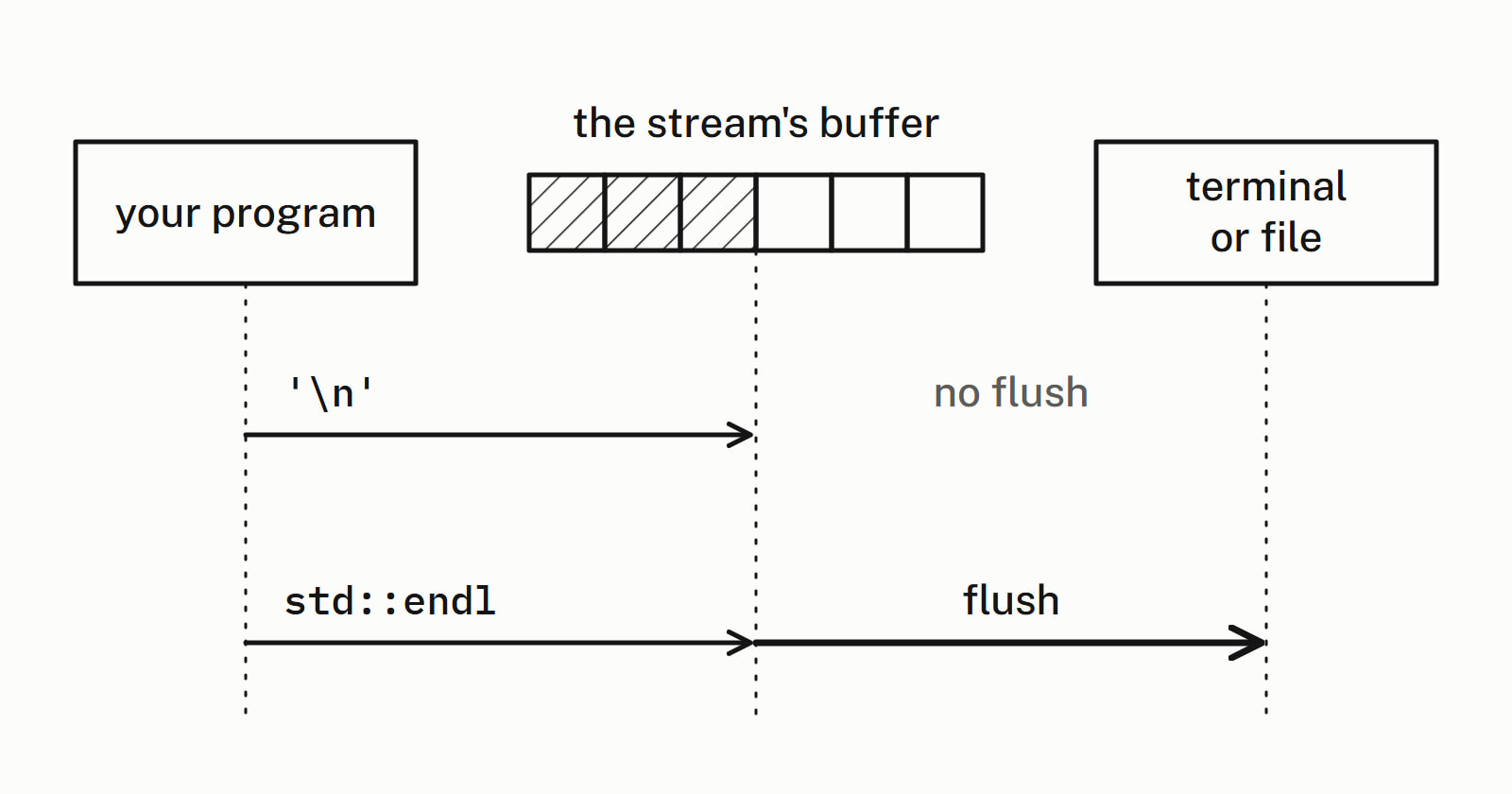
The counts are calls to the stream buffer’s sync(), not what reached the screen. On a terminal, C’s stdout is not fully buffered (C rules that out for an interactive device, and on Linux it is line-buffered), so with the default synchronization a std::cout line ended with '\n' still appears at once. The flush you save is the one a file or a pipe would otherwise get after every line: a std::ofstream file held 0 bytes after a '\n' line, and 20 once a std::endl line followed.
- When you want the flush (a progress line, a message before a crash), name it:
std::writes no newline.cout << std:: flush std::coutis flushed anyway before a read fromstd::cinand before each output tostd::cerr, both tied to it, and when the program ends normally.std::cerrhasunitbufset, so it flushes after every output.
SL.io.50 of the Core Guidelines puts it this way: “The endl manipulator is mostly equivalent to '\n' and "\n"; as most commonly used it simply slows down output by doing redundant flush()s.” Neither writes \r\n: on Windows a text-mode file turns the '\n' into \r\n, and the same guideline notes that “endl does not take care of producing a platform specific end-of-line sequence (like "\r\n" on Windows)”.
Visual Studio’s clang-tidy 19.1.5 reported warning: do not use 'std:: for a std::endl on std::cout and one on std::cerr, rewrote both to '\n' and left std::flush alone. It is among the analyzers on the Toolchain page.
Does std::println flush, and is it thread-safe?
It depends on the overload, the one that takes a FILE* or the one that takes a stream:
| Overload | Flushes | Locks |
|---|---|---|
To a FILE* (stdout, stderr, a file) |
No, except before writing to a terminal through a native Unicode API, such as the Windows console ([print.fun]) | Yes, since P3107R5: another thread’s output through the same FILE* does not land inside the line |
To a stream (std::cout, std::cerr) |
As any << does: its tie() first, then the stream itself when unitbuf is set ([ostream.formatted.print]) |
No |
- So
std::flushesprintln(std:: cerr, …) std::coutand thenstd::cerr. - P3107R5 (2024) is in C++26 and meant to be applied to C++23 too. Its lock keeps out output through the same
FILE*only, not through anotherFILE*on the same file. - Counted on all four: 1,000
printlncalls to a plainstd::ostreammade 0 flushes; withunitbufset, 1,000; to a stream tied to another, 1,000 flushes of the other and 0 of its own. - A line written to a
FILE*was not on disk (0 bytes) untilstd::fflush(10 bytes). - Two threads writing 2,000 lines of 200 characters each to one
FILE*gave 4,000 whole lines on all four.
std::println takes the Unicode path only when the ordinary literal encoding is UTF-8; on MSVC that takes /utf-8 (or /execution-charset:utf-8), which every MSVC build here used.
What std::println needs: compilers, libraries, flags
It needs C++23 mode and <print>. The first releases, from Since When: GCC 14.1, Clang 18 and Visual Studio 2022 17.7. Beyond that:
- Clang 18 means libc++ 18 (
-stdlib=libc++). Clang on Linux uses libstdc++ by default, and there it needs GCC 14’s library. - Range formatting came later in two libraries: libstdc++ 15.1 (complete in 15.2) and Visual Studio 2022 17.12. libc++ formats ranges since 16, before its
<print>in 18. - GCC 14’s release notes say
std::printon Windows needs-lstdc++exp(GCC 14 changes). - In C++23 mode,
__cpp_lib_printwas202406on Microsoft’s STL and libstdc++: they have P3107R5 and P3235R3, which print straight into the locked stream and opt more standard types in. libc++ 23.1 reported C++23’s202207.
Under C++20 (-std=c++20, /std:c++20), each build said:
| Build | What it said |
|---|---|
| MSVC 19.44 | warning STL4038: The contents of <print> are available only with C++23 or later. |
| Clang 19.1, Microsoft’s STL | error: use of undeclared identifier 'std' (with <print> the only header) |
| GCC 16.2 | note: 'std:: |
| Clang 23.1, libc++ | error: no member named 'println' in namespace 'std'; did you mean 'printf'? |
std:: built under C++20 on all four; std::format itself ships from GCC 13.1, Clang 14 and Visual Studio 2019 16.10 (Since When’s C++20 table).
Which one to use: std::println, std::cout or printf
| Situation | Write | Since |
|---|---|---|
| New code | std:: |
C++23 |
C++20, no <print> |
std:: |
C++20 |
| Older code | std:: |
every standard |
| An error message | std::, or std::cerr << |
C++23; every standard |
| Text that must show now | std::, or std::fflush(stdout) after std::println |
every standard |
| A format string built at run time | std:: |
C++23 |
printf calls you inherit |
leave them, or let clang-tidy rewrite them | clang-tidy, C++23 |
The Core Guidelines still say “Prefer iostreams for I/O” (SL.io.3), a rule written before <print> existed.
clang-tidy’s modernize-use-std-print does the rewriting under -std=c++23. On a sample of printf calls and std::endl lines, clang-tidy 19.1.5:
- reported
warning: use 'std::, orprintln' instead of 'printf' [modernize-use-std-print] 'std::print'for the line with no\n; - turned
fprintf(stderr, …)intostd::, droppedprintln(stderr, …) .c_str()and added#include <print>; - left
int n = std::alone, because its result is used.printf(…)
Each rewrite printed what the original printed, on all four; for a bool and a char that takes {:d}, not std::println’s default:
std::printf("verbose %d\n", verbose);
std::println("verbose {:d}", verbose);   // {:d}: 1, not true
std::printf("sep %d\n", sep);
std::println("sep {:d}", sep);           // {:d}: 58, not :
— end example]
Reading a number back out of text is the reverse job: C++ string to int with std::stoi or std::from_chars. The other answers on the library are under Standard library.
Questions
What does using std::cout; do?
It is a using-declaration: it brings the one name std::cout into the current scope, so cout << "port " << port << '\n'; compiles without the std:: prefix. using namespace std; makes every name in std visible instead. Either way, std::cout itself comes from #include <iostream>.
Why do I get “undefined reference to std::cout”?
The program was linked without the C++ standard library. Linking with gcc does that: GCC’s manual says “the use of gcc does not add the C++ library”, while g++ “automatically specifies linking against the C++ library”. Link with g++. With libc++, the same error names std::__1::cout.
What does std::flush do?
It flushes the stream: the standard defines it as a call to os.flush(), and it writes no newline. std::endl is a newline followed by the same flush. On a stream buffer that counted its flushes, one std::flush made one, 1,000 std::endl lines made 1,000 and 1,000 lines ended with ‘\n’ made none.
How do I print a std::vector in C++?
In C++23, std::println("{}", v) prints a vector of ints as [8080, 8443], through the range formatting of P2286R8; MSVC 19.44, GCC 16.2 and Clang 19.1 and 23.1 all printed that. The first releases where it works are libstdc++ 15.1 (complete in 15.2), libc++ 18 (the first with <print>; it formats ranges with std::format since 16) and Visual Studio 2022 17.12. Before C++23, loop over the elements and print each one.
Is there a std::println for wide strings?
No. <print> declares std::print and std::println for char format strings only, so an L"…" format string or a std::wstring does not go through them. A std::string holding UTF-8 text does, and it takes the Unicode path to a terminal when the ordinary literal encoding is UTF-8.
Sources
- std::printlncppreference.com
- [print.fun] Print functionsC++ standard working draft
- [ostream.manip] Standard basic_ostream manipulatorsC++ standard working draft
- P2093R14: Formatted outputWG21
- P2286R8: Formatting RangesWG21
- C++ Core Guidelines, SL.io.50: Avoid endlStandard C++ Foundation
- Compiling C++ ProgramsGCC
- modernize-use-std-printclang-tidy (LLVM)