Standard Library[lib]
C++ int to string: to_string, format or to_chars, not itoa

- Section
- Standard Library [lib]
- Standard
- C++17
- Compilers
- MSVC 19.44, Clang 19.1 (MSVC STL), GCC 16.2, Clang 23.1 (libc++)
- Published
- Length
- 6 min read
In this answer8 clauses
- 1Convert an int to a string: three calls
- 2std::to_string, and what it does to a double
- 2.1C++26: the same code prints 0.1
- 2.2std::to_string and the C locale
- 3std::format: padding, hex, binary and signs
- 3.1Zero padding and fixed decimals in C++17
- 4std::to_chars: no allocation, no locale, no exception
- 5Does converting an int to a string allocate?
- 6Double and float to string
- 7The older ways: ostringstream, snprintf, and why not itoa
- 8Which one to call
Abstract
Call std::to_string(n) (C++11) for the digits alone, std::format (C++20) when the number needs padding, a base or a sign or sits in a message, and std::to_chars (C++17) when nothing may allocate, throw or read the locale. In release builds no int made to_string or format allocate on Microsoft’s STL, libstdc++ or libc++. For a double, to_string prints six decimals (0.1 is 0.100000) until C++26, which libstdc++ has shipped since GCC 14; format and to_chars print the shortest text that reads back. itoa is not standard.
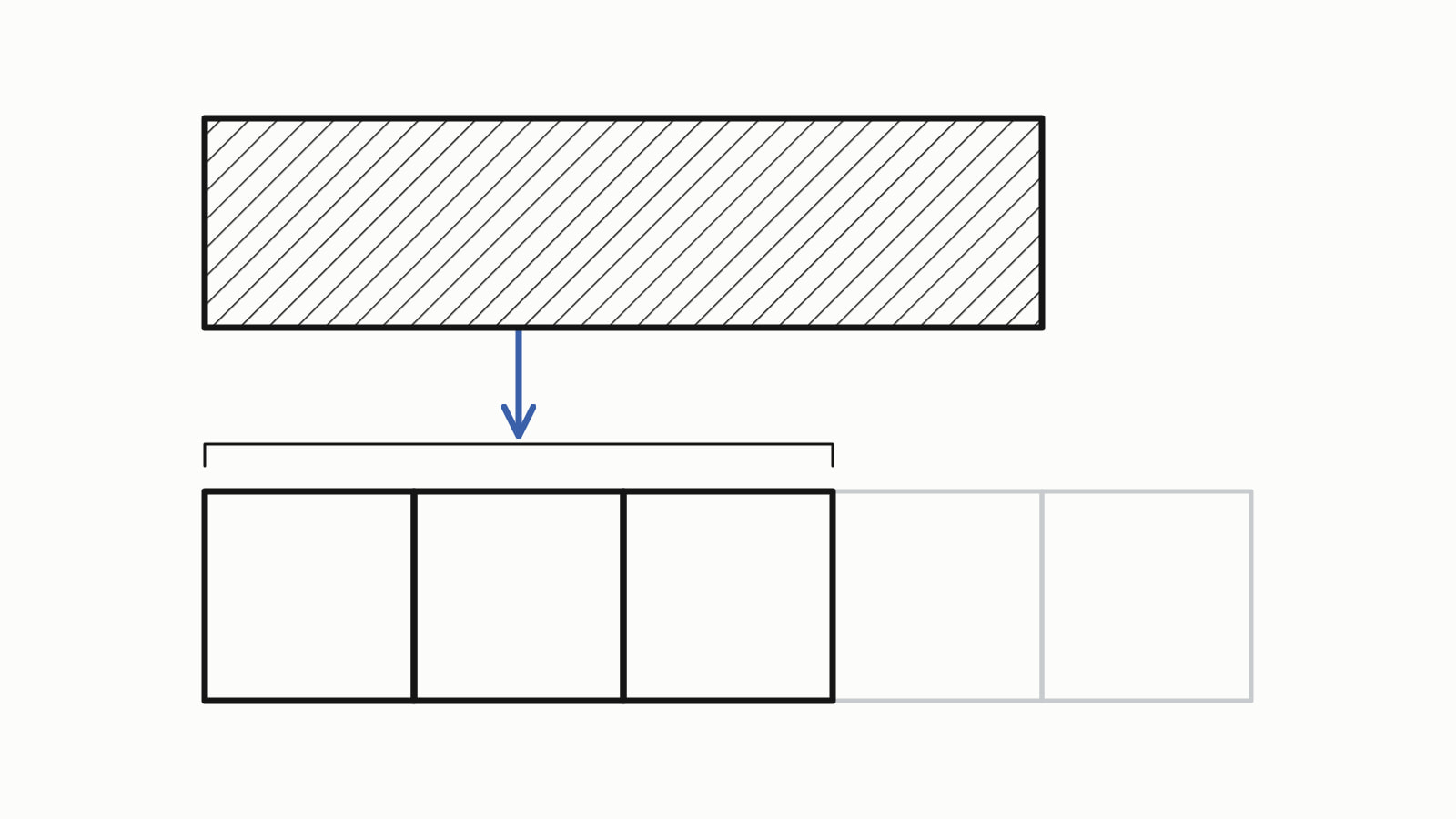
To convert an int to a string in C++, call std::to_string(n) (C++11, <string>). Call std::format("{}", n) (C++20, <format>) when the number needs a width, zero padding, a base or a sign, or sits inside a message. Call std::to_chars (C++17, <charconv>) when the conversion must not allocate, throw or depend on the locale: it writes into your buffer and returns where it stopped. Standard C++ has no itoa. For a double, std::to_string prints six decimals until C++26, 0.1 as 0.100000, where std::format prints 0.1.
This answer is written for C++17, which added std::to_chars; std::to_string is C++11 and std::format C++20. Later standards changed:
- C++23:
std::printandstd::println, andconstexprintegerto_chars. - C++26:
std::to_stringbecomesstd::, which changes its floating-point output. libstdc++ has shipped it since GCC 14.format("{}", value)
The samples were built with four compilers on three standard libraries: MSVC 19.44 and Clang 19.1 on Microsoft’s STL (Windows x64), GCC 16.2 with libstdc++ and Clang 23.1 with libc++ (Compiler Explorer, Linux x86-64). Each output shown is what all four printed unless the text says otherwise; Since When’s C++17 table gives the releases that complete <charconv>.
What changed: an int becomes text through sprintf, itoa or a std::ostringstreamstd::to_string, or std::to_chars where nothing may allocate.
since C++11
Convert an int to a string: three calls
Each turns value, an int, into text; only to_chars needs a buffer from you:
std::string a = std::to_string(value);
std::string b = std::format("{}", value);  // C++20: std::format

std::array<char, 16> buf;
auto [ptr, ec] =
    std::to_chars(buf.data(), buf.data() + buf.size(), value);
std::string_view c(buf.data(), ptr - buf.data());  // [buf, ptr)
— end example]
For 8080 and -7 the three gave the same text on all four compilers. No cast does it: all four rejected static_cast<std::, MSVC with error C2440: 'static_cast': cannot convert from 'int' to 'std::.
std::to_string, and what it does to a double
For an integer, std::to_string gives the digits, with a minus sign for a negative value. Until C++26, a float or a double comes out as sprintf with %f prints it: six decimals, never an exponent (std::to_string on cppreference). The running example:
int port = 8080;
int retries = -7;
long long big = std::numeric_limits<long long>::min();
double ratio = 0.1;

std::cout << std::to_string(port) << '\n'
          << std::to_string(retries) << '\n'
          << std::to_string(big) << '\n'
          << std::to_string(ratio) << '\n'
          << std::to_string(1e-9) << '\n'
          << std::to_string(1e20) << '\n'
          << std::to_string(0.42f) << '\n';
— end example]
Under C++17 and C++23, all four printed:
8080
-7
-9223372036854775808
0.100000
0.000000
100000000000000000000.000000
0.420000
— end example]
C++26: the same code prints 0.1
C++26 defines every overload as std:: (P2587R3). libstdc++ has shipped it since GCC 14 (its release notes: “std::to_string now uses std::format”), so the same source prints different text depending on the standard flag: GCC 16.2 printed 0.100000 under -std=c++23 and 0.1 under -std=c++26. In C++26 mode (-std=c++26, /std:c++latest):
| Library | __cpp_lib_to_string |
to_string(0.1) |
to_string(1e-9) |
to_string(0.42f) |
|---|---|---|---|---|
| Microsoft’s STL (MSVC 19.44, Clang 19.1) | not defined | 0.100000 |
0.000000 |
0.420000 |
| libstdc++ (GCC 16.2) | 202306 |
0.1 |
1e-09 |
0.42 |
| libc++ (Clang 23.1) | not defined | 0.100000 |
0.000000 |
0.420000 |
The integers printed the same in every build. If a double written with to_string ends up in a file or a key, its text changes when a GCC build moves to C++26; std::format("{}") gives the C++26 text from C++20 on.
std::to_string and the C locale
Until C++26, the floating-point overloads follow the C locale’s decimal point. A program that converts 0.1 and 1234567 six ways printed this on all four after a setlocale call (GCC 16.2 in C++26 mode printed 0.1 for to_string):
after setlocale(LC_ALL, "de_DE.UTF-8"):
  to_string:     0,100000 1234567
  snprintf %f:   0,100000
  ostringstream: 0.1 1234567
  format {}:     0.1
  format {:L}:   0.1
  to_chars:      0.1
— end example]
setlocale reaches the C library, not std::locale, so streams and std::format kept the point. The integer did not change.
std::format: padding, hex, binary and signs
Use std::format (C++20, <format>) when the number needs a width, padding, a base or a sign, or sits inside a message:
std::string padded = std::format("{:06}", port);     // "008080"
std::string hex = std::format("{:#x}", 255);         // "0xff"
std::string line =
    std::format("port {}, retries {:+}", port, retries);
— end example]
line is port 8080, retries -7; to print it instead of keeping it, std::println (C++23) takes the same format string. Each standard format spec applied to 42, -7 and 255, as all four printed it:
{}     "42"          "-7"          "255"
{:5}   "   42"       "   -7"       "  255"
{:<5}  "42   "       "-7   "       "255  "
{:05}  "00042"       "-0007"       "00255"
{:+}   "+42"         "-7"          "+255"
{:x}   "2a"          "-7"          "ff"
{:#x}  "0x2a"        "-0x7"        "0xff"
{:X}   "2A"          "-7"          "FF"
{:b}   "101010"      "-111"        "11111111"
{:#b}  "0b101010"    "-0b111"      "0b11111111"
{:o}   "52"          "-7"          "377"
— end example]
- A width right-aligns a number;
<aligns it left.0pads after the sign and the prefix. - A negative value keeps its minus sign in every base:
-0x7,-111. - A format string that names an argument that is not there, or a spec its type does not take, is a compile error since P2216R3, applied to C++20 as a defect report (std::format on cppreference). All four rejected
std::, MSVC with a note namingformat("port {} of {}", port) _You_see_this_error_because_arg_id_is_out_of_range. An extra argument is not an error:std::printedformat("port {}", port, retries) port 8080. - A format string built at run time goes through
std::, which the compile-time check does not cover.vformat(spec, std:: make_format_args(value)) - Under
-std=c++17there is nostd::format; GCC says'std::. First releases: GCC 13.1, Clang 14, Visual Studio 2019 16.10, per Since When’s C++20 table; libc++ checks format strings at compile time from LLVM 15, and Visual Studio 2019 16.10 checked them only at run time.format' is only available from C++20 onwards
Thousands separators take a locale and the L flag; without L, std::format ignores the locale. A facet that groups digits by three:
struct Thousands : std::numpunct<char> {
    char do_thousands_sep() const override { return ','; }
    std::string do_grouping() const override { return "\3"; }
};
// ...
std::locale grouped(std::locale::classic(), new Thousands);
— end example]
std:: gave 1,234,567, and std:: gave 1234567. Without the locale argument, {:L} uses the global std::locale, so it grouped only after std::.
std::format_to writes into a buffer you own and returns the end; std::format_to_n also takes a limit:
std::array<char, 16> buf;
char* end = std::format_to(buf.data(), "{:06}", port);
std::string_view text(buf.data(), end - buf.data());  // "008080"
// ...
char small[4];
auto [out, size] = std::format_to_n(small, sizeof small, "{}", big);
// out - small: characters written; size: the length untruncated
// ...
std::size_t needed = std::formatted_size("{}", big);  // 20
— end example]
format_to takes no end, so the buffer must be big enough. big into four cells wrote -922, and size was 20.
Zero padding and fixed decimals in C++17
Without std::format, pad with snprintf or a stream, and fix the decimals with std::to_chars:
char padded[16];
std::snprintf(padded, sizeof padded, "%06d", port);  // 008080

std::ostringstream os;
os << std::setw(6) << std::setfill('0') << port;     // 008080
// ...
char buf[32];
auto [ptr, ec] = std::to_chars(buf, buf + sizeof buf, ratio,
                               std::chars_format::fixed, 2);
std::string text(buf, ptr);                          // 0.10
— end example]
All four printed 008080 twice, then 0.10.
std::to_chars: no allocation, no locale, no exception
std:: (C++17, <charconv>) fills only the range you pass. The standard says it throws nothing and formats a floating-point value as printf does in the “C” locale ([charconv.to.chars]); cppreference’s std::to_chars page sums it up as locale-independent, non-allocating and non-throwing.
It writes from first and returns {ptr, ec}: on success ec is std::errc{} and the text is [first, ptr), with no null terminator. Size the buffer for the longest value in base 10:
constexpr int int_chars = std::numeric_limits<int>::digits10 + 2;
static_assert(int_chars == 11);
static_assert(std::numeric_limits<long long>::digits10 + 2 == 20);
// ...
char buf[int_chars];
// ...
auto [ptr, ec] = std::to_chars(buf, buf + sizeof buf, port);
if (ec == std::errc{}) {
    std::string_view text(buf, ptr - buf);  // "8080", no '\0'
    std::cout << text << '\n';
}
— end example]
With every cell set to . beforehand, a helper printed each result, where ptr stopped and every cell. All three libraries agreed:
8080: "8080", ptr - buf = 4 of 11, cells [8080.......]
INT_MIN: "-2147483648", ptr - buf = 11 of 11, cells [-2147483648]
INT_MIN, 10 cells: errc::value_too_large, ptr - buf = 10 of 10, cells [-.........]
— end example]
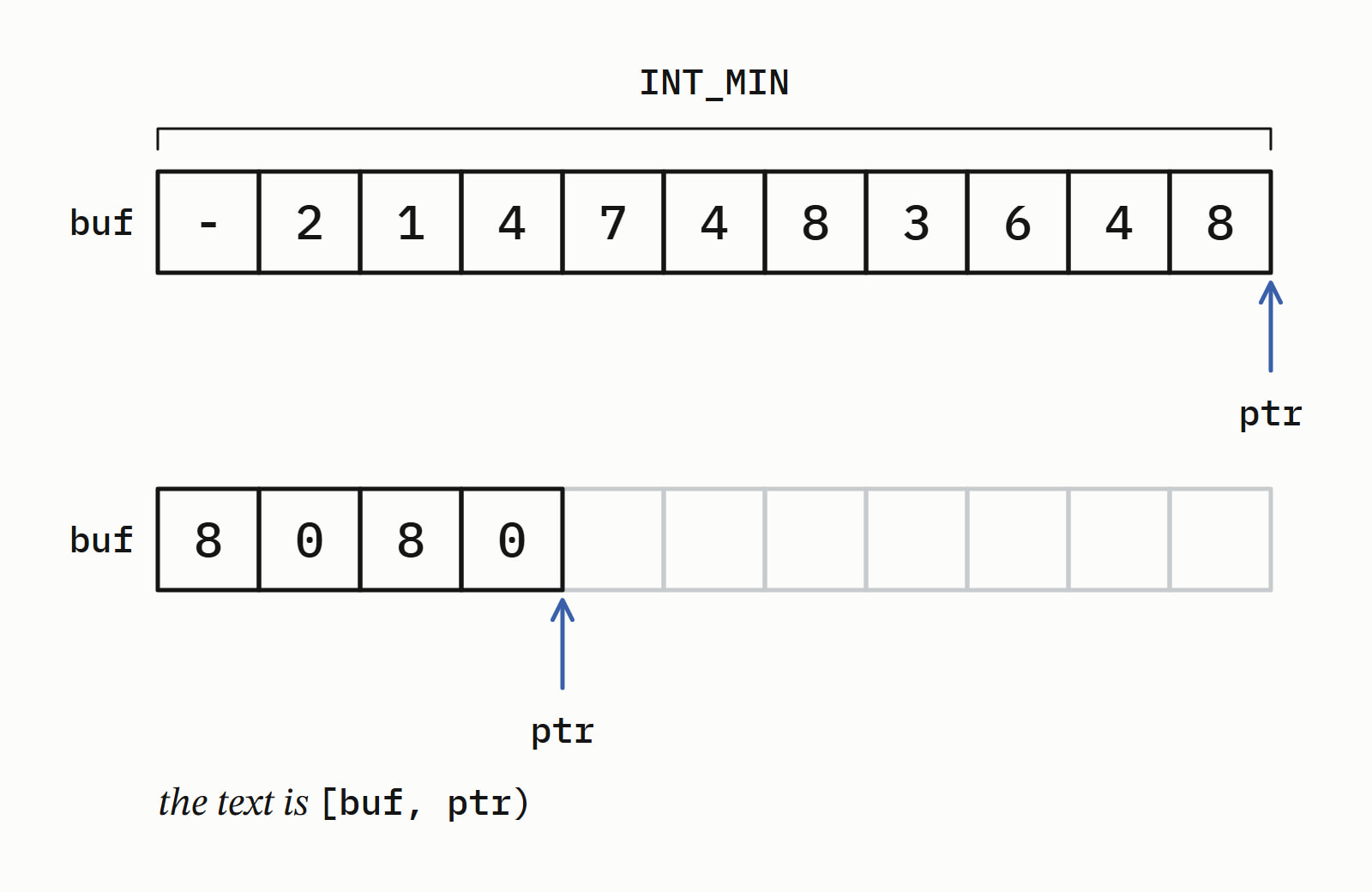
digits10is the number of decimal digits the type always holds, 9 forint. One more digit covers the largest values and one cell takes the sign:digits10 + 2is 11 forintand 20 forlong long. An unsigned type needs no sign:UINT_MAXfilleddigits10 + 1, 10 cells.- Too small a buffer gives
std::anderrc:: value_too_large ptr == last. The standard leaves the contents unspecified, andINT_MINin 10 cells left a-on all three libraries: on error, ignore the buffer. - The base is the fourth argument, 2 to 36, in lowercase:
std::wroteto_chars(buf, buf + sizeof buf, 255, 16) ff, and base 2 wrote11111111. Another base needs another size:INT_MINin base 2 is 33 characters,std::, and gavenumeric_limits<int>:: digits + 2 value_too_largein the 11-cell buffer. - The reverse is
std::from_chars, covered in C++ string to int: std::stoi or std::from_chars.
Does converting an int to a string allocate?
Not for an int, in release builds of the three libraries. std::to_string and std::format return a std::string whose own small buffer holds 15 characters (22 on libc++), and an int needs 11 at most. std::to_chars writes only into your buffer; every count below is the libraries’. Calls to a replaced global operator new in release builds, the same with and without optimization:
| Call | Microsoft’s STL | libstdc++ | libc++ |
|---|---|---|---|
to_string(42), to_string(port), to_string(ratio) |
0 | 0 | 0 |
format("{}", 42) |
0 | 0 | 0 |
to_string(big), 20 characters |
1 | 1 | 0 |
format("{}", big) |
1 | 1 | 0 |
ostringstream: os << 42; os.str() |
3 (7 for the program’s first stream) | 0 | 0 |
An empty ostringstream |
2 | 0 | 0 |
to_chars, format_to into char[11] |
0 | 0 | 0 |
| Longest result with no allocation | 15 characters | 15 characters | 22 characters |
- A Debug build of Microsoft’s STL (
/MDd) made one allocation for everystd::string, an empty one included, soto_string(42)andformat("{}", 42)made one each. - The stream is where the libraries differ most: Microsoft’s allocates before anything is written, and for
42,std::move(os).str()(C++20) made the same three allocations asos.str(), whose two characters fit the small buffer anyway.
Double and float to string
std::format("{}", x) and std::to_chars print the shortest text that reads back as the same double. std::to_string prints six decimals and loses whatever is smaller:
std::string shortest(double value) {
    char buf[32];
    auto [ptr, ec] = std::to_chars(buf, buf + sizeof buf, value);
    return ec == std::errc{} ? std::string(buf, ptr) : "error";
}
// ...
std::string a = std::to_string(value);
std::string b = std::format("{}", value);      // C++20
std::string c = std::format("{:.2f}", value);  // C++20
std::string d = shortest(value);  // std::to_chars
— end example]
All four printed the same. “Reads back different” marks text that std::stod turned into another double:
| Value | to_string |
format("{}") |
format("{:.2f}") |
to_chars |
|---|---|---|---|---|
0.1 |
0.100000 |
0.1 |
0.10 |
0.1 |
1.0 / 3 |
0.333333, reads back different |
0.3333333333333333 |
0.33, reads back different |
0.3333333333333333 |
1e20 |
100000000000000000000. |
1e+20 |
100000000000000000000.00 |
1e+20 |
2.5 |
2.500000 |
2.5 |
2.50 |
2.5 |
1e-9 |
0.000000, reads back different |
1e-09 |
0.00, reads back different |
1e-09 |
- The longest shortest form a
doubleneeds is 24 characters,-1.7976931348623157e+308forstd::, sonumeric_limits<double>:: lowest() char[32]is enough. - The standard guarantees the round trip only on the same implementation.
The older ways: ostringstream, snprintf, and why not itoa
std::ostringstream builds the text in every standard, and std::snprintf writes it into a buffer:
std::ostringstream os;
os << "port " << port << ", retries " << retries;
std::string line = os.str();  // "port 8080, retries -7"
// ...
int needed = std::snprintf(nullptr, 0, "%d", retries);  // 2
std::string text(needed, '\0');
std::snprintf(text.data(), text.size() + 1, "%d", retries);
— end example]
- A stream formats with its own
std::locale: imbued with theThousandsfacet, it wrote1234567as1,234,567. std::snprintfreturns the length the text needs, without the null, so a call withnullptrand 0 sizes the buffer. Into a buffer that is too small it truncates and still returns the full length: 8080 intochar[4]returned 4 and left808, and GCC warned at compile time (-Wformat-truncation).
itoa is not a standard C or C++ function, and not a POSIX one either, whatever MSVC’s warning calls it. Microsoft’s C runtime declares it in <stdlib.h> as the old name of _itoa (newlib has one too; glibc does not):
char buf[12];
itoa(port, buf, 10);  // not standard C or C++
— end example]
MSVC and Clang on Windows compiled it with a deprecation warning and printed 8080; MSVC’s reads warning C4996: 'itoa': The POSIX name for this item is deprecated. On Linux, GCC said 'itoa' was not declared in this scope and Clang with libc++ use of undeclared identifier 'itoa'.
Microsoft’s page on _itoa warns that it can write past a buffer that is too small. std:: does the same job within bounds, except for a negative value in another base: itoa(-7, buf, 16) wrote fffffff9, std::to_chars wrote -7.
Which one to call
| You need | Call | Since |
|---|---|---|
| The digits, nothing else | std::to_string(n) |
C++11 |
| The number in a message, or with padding, a base or a sign | std::format |
C++20 |
| No allocation, no locale, your own buffer | std::to_chars |
C++17 |
| To print it, not keep it | std::println, or a stream |
C++23 for std::println |
A double you will read back |
std::format("{}", x) or std::to_chars |
C++20, C++17 |
| Code that must build before C++11 | std::ostringstream |
every standard |
std:: takes the same format strings and writes to standard output; its first releases are in Since When’s C++23 table. More answers about the library are in Standard library.
Questions
How do I append an int to a std::string in C++?
Append its text: s += std::to_string(n), or build the whole line with std::format (C++20). s += n also compiles, and appends one char: with n equal to 8080 the string grew by one byte, 0x90. With a literal all four compilers warned; with an int variable only MSVC did (C4244), and GCC and Clang compiled it silently at -Wall -Wextra. Add -Wconversion and they report it too.
How do I convert an int to a hex string in C++?
In C++20, std::format("{:x}", n) gives ff for 255, {:#x} gives 0xff and {:X} gives FF. In C++17, std::to_chars(first, last, n, 16) writes ff into your buffer: the base is the fourth argument. Both keep the minus sign of a negative value, so -7 becomes -7, or -0x7 with #. For the bit pattern, convert to unsigned first: std::format("{:x}", static_cast<unsigned>(n)) gave fffffff9 for -7.
Does std::to_string depend on the locale?
For integers, no: after setlocale(LC_ALL, “de_DE.UTF-8″), std:: still printed 1234567 on all four compilers. For float and double it follows the C locale’s decimal point until C++26: 0.1 became 0,100000, except on GCC 16.2 in C++26 mode, which printed 0.1. std::format with {} and std::to_chars ignore the locale.
How do I convert a single digit to a char?
Add it to '0': '0' + 7 is '7', and '7' - '0' turns the character back into 7. The sum is an int, so cast it where a char is required, as in static_cast<char>('0' + digit); without the cast, MSVC warned C4244 at /W4. This works for 0 to 9 only; a whole number goes through std::to_chars or std::to_string.
Sources
- std::to_stringcppreference.com
- std::to_charscppreference.com
- std::formatcppreference.com
- [charconv.to.chars] Primitive numeric output conversionC++ standard working draft
- [format.string.std] Standard format specifiersC++ standard working draft
- P2587R3: to_string or not to_stringWG21
- GCC 14 Release Series: Changes, New Features, and FixesGCC
- itoa, _itoa, ltoa, _ltoa, ultoa, _ultoa, _i64toa, _ui64toa, _itow, _ltow, _ultow, _i64tow, _ui64towMicrosoft Learn