Standard Library[lib]
C++ getline: how to read a whole line of input

- Section
- Standard Library [lib]
- Standard
- C++11
- Compilers
- MSVC 19.44, Clang 19.1 (MSVC STL), GCC 16.2, Clang 23.1 (libc++)
- Published
- Length
- 7 min read
In this answer7 clauses
- 1What is the difference between cin >> and getline?
- 2Why is getline skipped after cin >>?
- 3How do you fix getline being skipped?
- 4How do you read every line until the end of input?
- 5How do you read a file line by line in C++?
- 6How do you split a line on commas with getline?
- 7std::getline, cin.getline or cin >>: which one?
Abstract
std::getline(std::cin, line) reads one whole line of input into a std::string, spaces included, and throws the newline away; std::cin >> stops at the first space. A getline that comes back empty after a cin >> has read the newline the earlier input left behind: skip it with std::getline(std::cin >> std::ws, line), or call std::cin.ignore first. Read to the end with while (std::getline(in, line)), and split a line on commas with getline’s third argument.
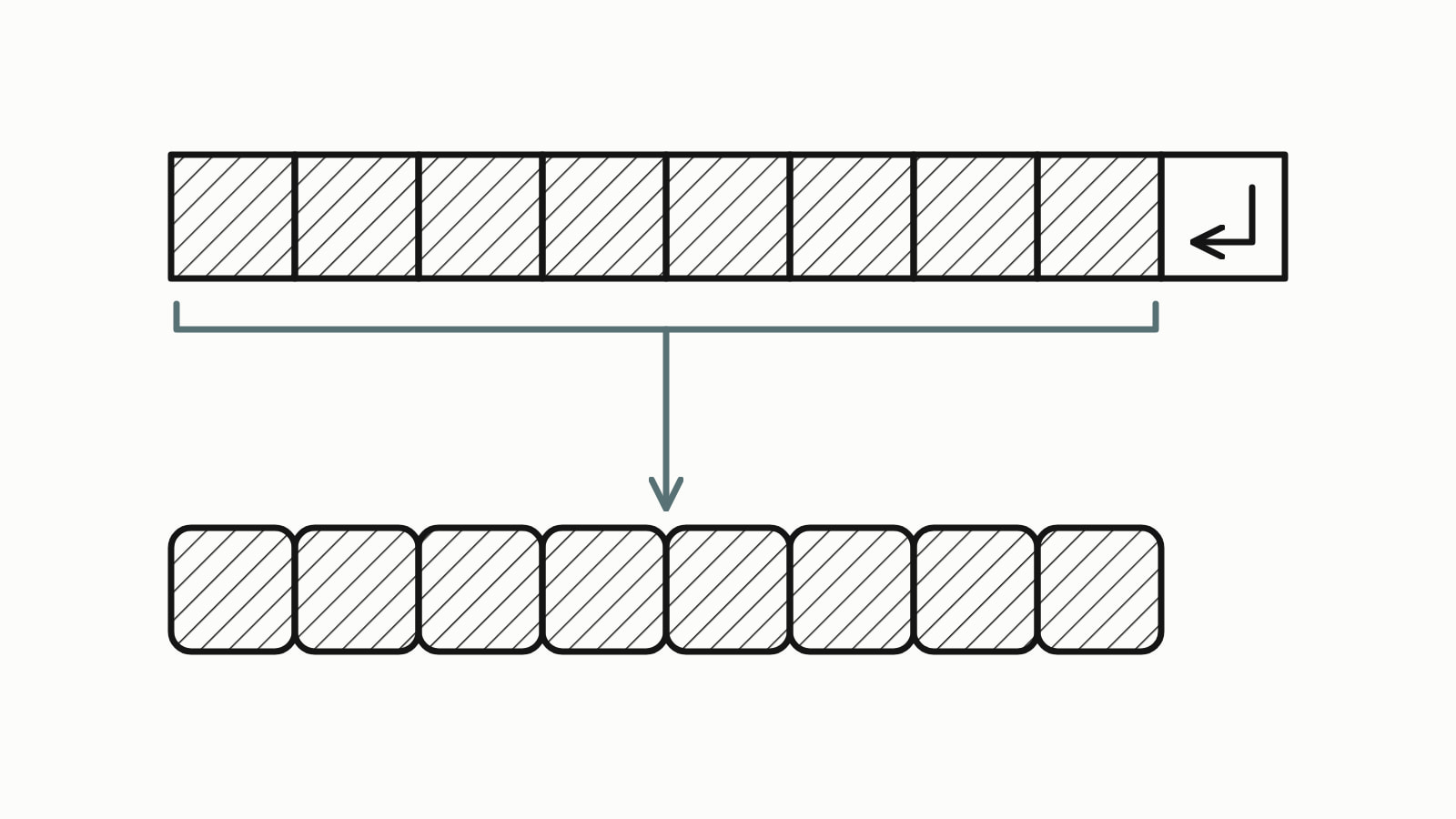
In C++, std:: reads one whole line of input into a std::string, spaces included, and throws the newline away. std::cin >> word stops at the first space instead. If getline comes back empty right after a cin >>, it read the newline that the earlier input left behind: skip it with std::.
#include <iostream>
#include <string>

int main() {
    std::cout << "Full name: ";
    std::string name;
    std::getline(std::cin, name);           // reads the whole line
    std::cout << "Hello, " << name << "!\n";
}
— end example]
Given Ada Lovelace as its input, it printed this (the typed line itself is not part of the program’s output):
Full name: Hello, Ada Lovelace!— end example]
Everything on this page is C++11 or older (Since When’s C++11 table). The samples were built with MSVC 19.44, Clang 19.1 (MSVC STL), GCC 16.2 and Clang 23.1 (libc++), as C++17 and, on the last two, also as C++11; all four printed the same unless a sentence says otherwise.
What is the difference between cin >> and getline?
std::cin >> name skips the spaces before a word, reads that one word and stops at the next space, tab or newline; std::getline reads everything up to the end of the line. std::cin is the program’s standard input: the keyboard, unless a file is fed in. Change one line of the first example:
std::cin >> name; // stops at the first space— end example]
With the same input, it printed:
Full name: Hello, Ada!— end example]
The rest of the line, a space and Lovelace, stays in the input for the next read. Use >> for one word or one number, and getline for anything a person types with spaces in it: a full name, an address, a sentence.
The call’s full form is std::: any input stream (std::cin, a file stream, a string stream), a std::string to fill, and the character to stop at, '\n' when you leave it out.
Why is getline skipped after cin >>?
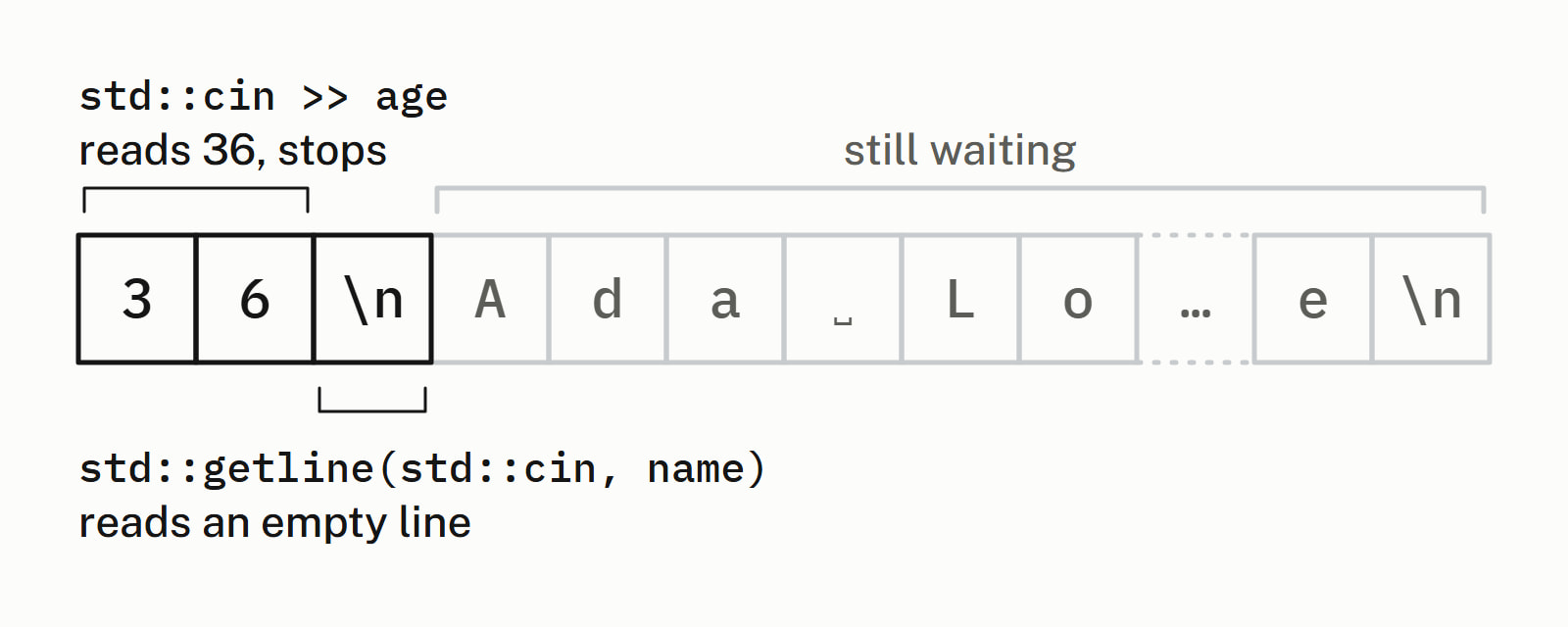
It is not skipped: std::cin >> age reads the digits and leaves the newline you typed after them, '\n', in the input, so the next std::getline reads up to that newline and returns an empty line. A second >> would not notice, because >> skips whitespace before it reads; getline skips nothing. This program reads an age, then a name:
int age = 0;
std::string name;
std::cin >> age;                        // reads 36, leaves the '\n'
std::getline(std::cin, name);           // reads up to that '\n'
std::cout << "age: " << age << '\n';
std::cout << "name: [" << name << "]\n";
std::cout << "size: " << name.size() << '\n';
std::string rest;
std::getline(std::cin, rest);           // the name was still waiting
std::cout << "next line: [" << rest << "]\n";
— end example]
With 36 and Ada Lovelace typed on two lines, all four printed:
age: 36
name: []
size: 0
next line: [Ada Lovelace]
— end example]
How do you fix getline being skipped?
Throw the leftover newline away before the getline, in one of two ways. The shorter one passes the stream through std::ws, a manipulator, a function you apply to a stream with >>, that discards spaces, tabs and newlines up to the next character that is not one:
std::getline(std::cin >> std::ws, name); // skip whitespace first— end example]
The other calls ignore right after the >>, to discard the rest of the age line up to and including its newline. A count of std:: turns the length limit off, and std::numeric_limits needs #include <limits>:
// throw away the rest of the age line, '\n' included
std::cin.ignore(std::numeric_limits<std::streamsize>::max(), '\n');
std::getline(std::cin, name);
— end example]
With 36 and Ada Lovelace typed, both printed:
age: 36
name: [Ada Lovelace]
size: 12
— end example]
The two differ on a name typed after three spaces. std::ws drops the spaces at the start of the line itself, and ignore keeps them:
ws:     [Ada Lovelace]
ignore: [   Ada Lovelace]
— end example]
std::ws skips blank lines too, so it cannot read an empty answer. Use it when leading spaces and empty lines do not matter, and ignore when they do.
How do you read every line until the end of input?
Make the getline call the loop’s condition: it returns the stream, which tests true while the read worked and false once there is nothing left to read.
std::string line;
int number = 0;
while (std::getline(std::cin, line)) {  // false once nothing is left
    ++number;
    std::cout << number << ": [" << line << "]\n";
}
— end example]
Given four lines, the second empty and the last with no newline after it, all four printed:
1: [Ada Lovelace]
2: []
3: [Charles Babbage]
4: [Mary Somerville]
— end example]
Each call empties line before it reads, so nothing from the line before is left in it. At the keyboard, end the input with Ctrl+D at the start of a line on Linux and macOS, or Ctrl+Z on a line of its own and then Enter on Windows.
Do not write the loop as while (!std::. The end-of-input flag is set by a read that has already run into the end, so when the input ends with a newline, that loop can run its body once more on a getline that read nothing.
How do you read a file line by line in C++?
Open the file as a std::ifstream, from <fstream>, check that it opened, and run the same loop with the file in place of std::cin:
#include <fstream>
#include <iostream>
#include <string>

int main() {
    std::ifstream in("notes.txt");
    if (!in) {
        std::cerr << "could not open notes.txt\n";
        return 1;
    }
    std::string line;
    while (std::getline(in, line)) {
        std::cout << line << '\n';
    }
}
— end example]
With a three-line notes.txt in the folder it was run from, all four printed:
Buy milk
Call Ada about the engine
Read chapter 3
— end example]
if (!in) is true when the file could not be opened. A name with no folder, like notes.txt, is looked up in the working directory: the folder the terminal or IDE started the program in, which is not always the one that holds the program. Without the check, a missing file reads as no lines, and the program says nothing.
How do you split a line on commas with getline?
Pass the character to stop at as getline’s third argument. To split one line, put it in a std::istringstream, from <sstream>, a stream that reads from a string, and call getline on that:
std::istringstream row("Ada,Lovelace,,1815");
std::string field;
while (std::getline(row, field, ',')) {  // stop at each ','
    std::cout << '[' << field << "]\n";
}
— end example]
All four printed:
[Ada]
[Lovelace]
[]
[1815]
— end example]
Each comma is extracted and thrown away like the newline, so no field holds one. Two commas in a row give an empty field, and the last field needs no comma after it. To split a line the user typed, read it with getline first and build the std::istringstream from that string.
std::getline, cin.getline or cin >>: which one?
Use std::getline unless you are handed a char array to fill:
| Call | Reads | Into |
|---|---|---|
std:: |
a whole line, any length | a std::string |
std::cin >> value |
one word or one number | the variable’s type |
std:: |
a whole line, at most size - 1 characters |
a char array |
std::cin.getline, the member function, stops when the array is full and marks the stream failed. With char buffer[8] and Ada Lovelace typed, std:: stored Ada Lov, seven characters and the closing '\0', and std::cin.fail() was true on all four. A line that fits, seven characters or fewer here, does not set the fail state. After a line that did not fit, call std::cin.clear() and ignore the rest of the line before reading again.
Standard library has the answers on the library’s other types and functions.
Questions
Does getline include the newline character?
No. std::getline reads up to the newline, removes it from the input and does not store it: the line Ada Lovelace gives a string of 12 characters. The same holds for a delimiter you pass as the third argument, such as a comma.
Which header do I need for getline?
std::getline is declared in <string>, the header of std::string, and std::cin comes from <iostream>. Reading a file adds <fstream> for std::ifstream, and splitting a line adds <sstream> for std::istringstream.
Why does my line end with \r?
The text has Windows line endings, \r\n, and getline removes only the \n. On Windows, std::ifstream opens a file in text mode, which turns each \r\n into \n before getline sees it; Linux and macOS translate nothing, so there a file with Windows line endings leaves a \r at the end of every line (GCC and Clang on Linux kept it). Remove it after each read: if (!line.empty() && line.back() == ‘\r’) line.pop_back();
How do you read a number with getline?
Read the whole line into a std::string with getline, then convert the text, for example with std::stoi, which converts the number at the start of the text, after any spaces, and throws std:: when the text does not start with one. Every read is then a whole line, so no newline is left behind for the next one. Cpp Next’s answer on converting a string to an int covers the choices.
What does getline return?
The stream it read from, std::cin or the file, not the line: the line goes into the string you pass. The stream converts to true while no read has failed, so the call itself can be the condition of an if or a while, and it turns false once getline finds nothing more to read.
What is std::stringstream?
A stream that reads from and writes to a std::string in memory instead of the keyboard or a file, declared in <sstream>. std::istringstream only reads, which is all splitting a line needs: build one from the line and call std::getline on it with a comma as the delimiter.
Sources
- std::getlinecppreference.com
- [string.io] Inserters and extractorsC++ standard working draft
- std::wscppreference.com
- std::basic_istream::ignorecppreference.com
- std::basic_istream::getlinecppreference.com
- std::basic_ios::operator boolcppreference.com