Standard Library[lib]
C++ string (std::string) explained with examples

- Section
- Standard Library [lib]
- Standard
- C++17
- Compilers
- MSVC 19.44, Clang 19.1 (MSVC STL), GCC 16.2, Clang 23.1 (libc++)
- Published
- Length
- 7 min read
In this answer8 clauses
- 1How do you create a string in C++?
- 2How do you get the length of a string in C++?
- 3How do you concatenate strings in C++?
- 4How do you read or change one character in a string?
- 5How do you find text in a C++ string? (find and npos)
- 6How do you get a substring in C++? (substr)
- 7How should a function take a string?
- 8The std::string functions you will use most
Abstract
A C++ string is a std::string, the standard library’s type for text: it owns its characters and grows as needed. Join strings with + or +=, get the length with size(), read a character with [] or the checked at(), and search with find(), whose result you compare with std::string::npos instead of testing it as a bool: a match at position 0 tests as false. Take a string you only read as const std::string& or, since C++17, std::string_view.
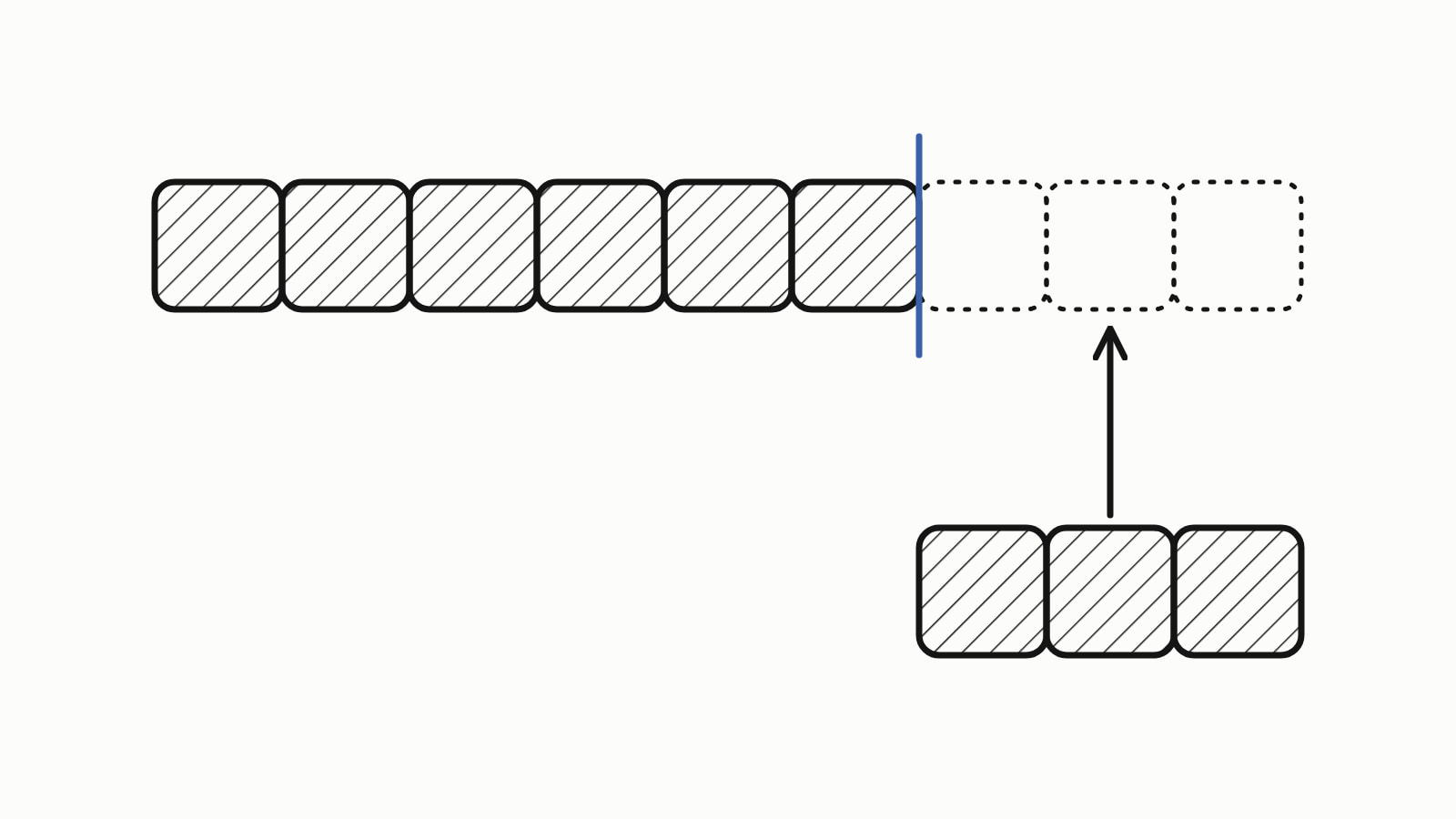
A C++ string is a std::string, the standard library’s type for text, declared in the header <string>. It owns its characters, grows as needed and frees its memory by itself. Create one with std::, join strings with +, get the length with size(), and search with find(), which returns std::string::npos when nothing is found.
#include <iostream>
#include <string>

int main() {
    std::string name = "Ada";
    std::string greeting = "Hello, " + name + "!";
    std::cout << greeting << '\n';                    // Hello, Ada!
    std::cout << "size: " << greeting.size() << '\n'; // size: 11
}
— end example]
It printed:
Hello, Ada!
size: 11
— end example]
This answer is written for C++17, which added std::string_view (Since When’s C++17 table). The samples were built with MSVC 19.44, Clang 19.1 (MSVC STL), GCC 16.2 and Clang 23.1 (libc++), and all four printed the same unless a sentence says otherwise.
How do you create a string in C++?
You create a std::string from a literal, empty, from one character repeated, or as a copy of another string:
std::string email = "ada@example.com";  // from a literal
std::string blank;                      // empty: size 0
std::string line(10, '-');              // 10 copies of '-'
std::string copy = email;               // its own characters

copy[0] = 'A';                          // email is unchanged
— end example]
A copy owns its characters, so after the change email still printed ada@example.com and copy printed Ada@example.com. An empty std::string is a valid string of length 0, not a null pointer: even its c_str(), which gives the text as a C string, was not null. Each sample below starts from this email.
How do you get the length of a string in C++?
Call size() or length(): they return the same number, 15 for "ada@example.com", and empty() tells you whether that number is 0. The number counts bytes (chars), not letters. The word “café”, written as its UTF-8 bytes "caf\xC3\xA9", has a size() of 5 for four letters: UTF-8 stores the é in two bytes.
How do you concatenate strings in C++?
For string concatenation, use + to make a new string, and += or append() to add to an existing one; push_back() adds a single character:
std::string user = "ada";
std::string domain = "example.com";

std::string email = user + "@" + domain;   // a new string
std::cout << email << '\n';                // ada@example.com

std::string greeting = "Hello";
greeting += ", ";              // adds to greeting itself
greeting.append(user);         // the same, as a function
greeting.push_back('!');       // one character
std::cout << greeting << '\n'; // Hello, ada!
— end example]
append() has no overload that takes one char, so add one with push_back() or append(1, '!').
One side of + must be a std::string. A literal such as "Hello, " is an array of const char, not a std::string, and + has no overload for two of them:
std::string s = "Hello, " + "world"; // error: two literals— end example]
GCC’s error names both array types: invalid operands of types 'const char [8]' and 'const char [6]' to binary 'operator+'. MSVC says '+': cannot add two pointers. Make one side a string, std::, and it works. That is also why the first example compiled: "Hello, " + name has a std::string on one side, its result is a std::string, and so the + "!" after it has one too.
How do you read or change one character in a string?
Write s[i] to read or change the character at position i, counting from 0, or s.at(i) to have the position checked. Past the end, [] is undefined behavior, meaning the program may do anything, while at() throws std::out_of_range:
std::cout << email[0] << '\n';       // a: positions start at 0
std::cout << email.back() << '\n';   // m: the last character
email[0] = 'A';                      // change one character
std::cout << email << '\n';          // Ada@example.com

int dots = 0;
for (char c : email) {               // every character in turn
    if (c == '.') ++dots;
}
std::cout << "dots: " << dots << '\n';   // dots: 1

try {
    std::cout << email.at(99) << '\n';   // checked: throws
} catch (const std::out_of_range& e) {
    std::cout << "out_of_range: " << e.what() << '\n';
}
— end example]
The range-for loop, for (char c : email), hands you each character in turn, here to count the dots. All four caught the std::out_of_range from at(99); each standard library words the message from what() its own way.
How do you find text in a C++ string? (find and npos)
find() returns the position of the first match, or std::string::npos when there is none, so compare the result with npos:
std::cout << email.find('@') << '\n';         // 3
std::cout << email.find("example") << '\n';   // 4

std::size_t pos = email.find("xyz");
if (pos == std::string::npos) {               // the right test
    std::cout << "xyz: not found\n";
}
std::cout << std::string::npos << '\n';       // the largest size_t

if (email.find("ada")) {             // wrong: the match is at 0
    std::cout << "ada: found\n";
} else {
    std::cout << "ada: not found\n"; // printed, though it is there
}
if (email.find("xyz")) {             // npos is not 0, so true
    std::cout << "xyz: found\n";     // printed, though it is not
}
— end example]
npos is the largest value of the unsigned type that positions use: on a 64-bit build, all four printed 18446744073709551615. A test such as if (email.find("ada")) asks whether the position is nonzero, not whether there was a match. A match at position 0 converts to false, and npos, being nonzero, converts to true, so the program printed ada: not found and xyz: found. No compiler warned about either test, at /W4 or at -Wall -Wextra.
How do you get a substring in C++? (substr)
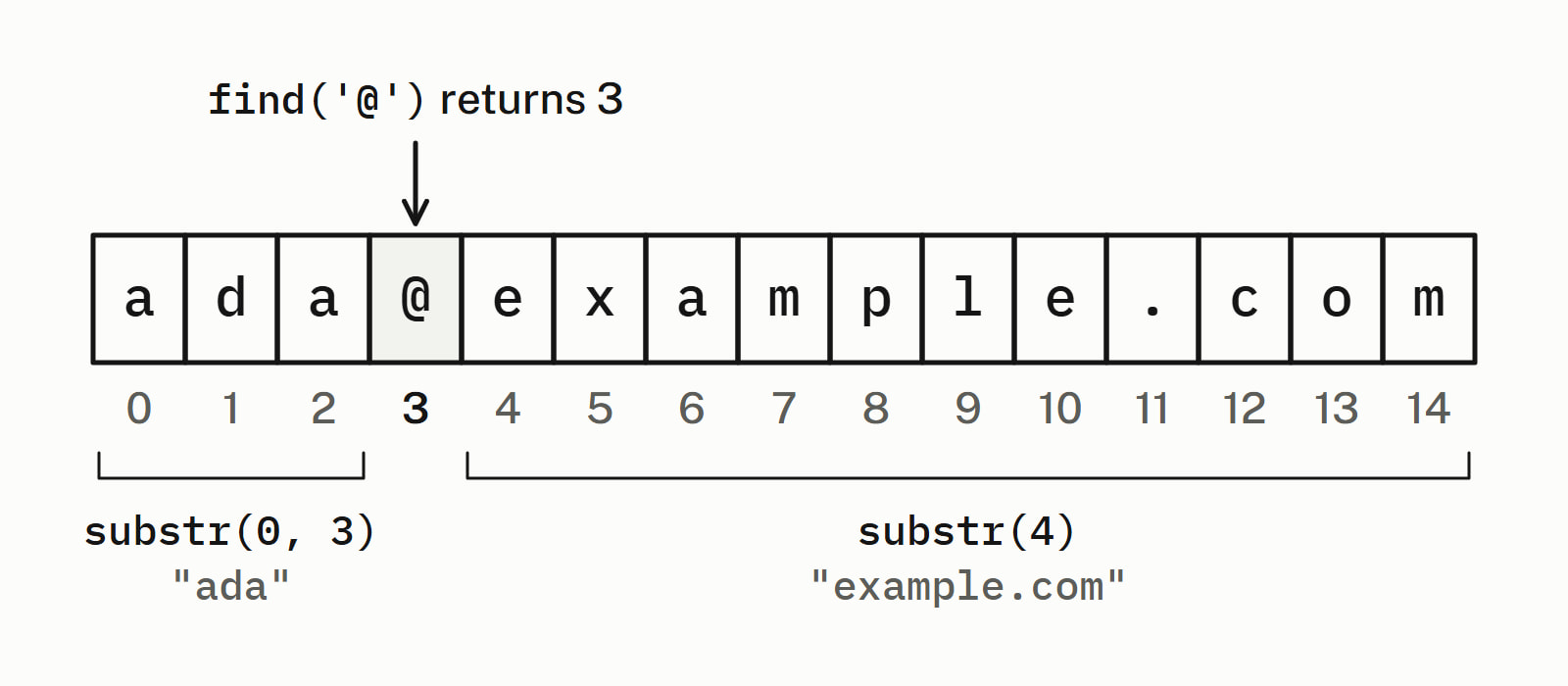
substr(pos, count) returns a new string holding count characters from position pos; leave count out to take everything to the end. With find(), it splits the address in two:
std::size_t at = email.find('@');            // 3
std::string user = email.substr(0, at);      // 3 characters from 0
std::string domain = email.substr(at + 1);   // from 4 to the end
std::cout << user << '\n';                   // ada
std::cout << domain << '\n';                 // example.com

std::cout << email.substr(4, 100) << '\n';   // cut short at the end
try {
    std::cout << email.substr(99) << '\n';   // past the end: throws
} catch (const std::out_of_range& e) {
    std::cout << "out_of_range: " << e.what() << '\n';
}
— end example]
A count that runs past the end is cut short, so substr(4, 100) printed example.com. A pos past the end throws std::out_of_range. The substring is a copy: changing user leaves email as it was.
How should a function take a string?
Take a string the function only reads as const std::string& or, since C++17, as std::string_view, a view of characters someone else owns. Passed a std::string, neither copies the text. Passed a literal, they differ: a const std::string& parameter needs a temporary std::string built from it, a copy of the text, while a std::string_view points at the literal’s own characters.
std::string_view domain_of(std::string_view email) {
    return email.substr(email.find('@') + 1);
}
— end example]
When to pass by value or by const reference covers every other parameter type.
The std::string functions you will use most
Each example works on email unless it names another string.
| Call | What it does | Example | Result |
|---|---|---|---|
size(), length() |
the number of chars |
email.size() |
15 |
empty() |
whether the size is 0 | email.empty() |
false |
+, +=, append() |
join; += and append() change the left string |
user + "@" + domain |
ada@example.com |
[], at() |
one character; at() checks the position |
email[0] |
a |
find() |
the first match, or npos |
email.find('@') |
3 |
rfind() |
the last match | rfind('.') on ada.lovelace@example.com |
20 |
substr() |
a copy of part of the string | email.substr(0, 3) |
ada |
insert() |
put text in at a position | email.insert(3, ".lovelace") |
ada.lovelace@example.com |
erase() |
remove characters | erase(3, 9) on ada.lovelace@example.com |
ada@example.com |
replace() |
swap characters for other text | email.replace(4, 7, "school") |
ada@school.com |
clear() |
remove every character | email.clear() |
size 0 |
starts_with(), ends_with() (C++20) |
test the start or the end | email.ends_with(".org") |
false |
contains() (C++23) |
test for a match anywhere | email.contains('@') |
true |
Numbers to and from strings have their own answers: C++ string to int with std::stoi, and C++ int to string with std::to_string. To read a line of input into a string, use std::getline; to compare two, see C++ string comparison. Standard library has the answers on the library’s other types.
Questions
What is the difference between a C string and std::string?
A C string is an array of char that ends in a null character, and its size is fixed when the array is made. A std::string manages its own memory, grows as text is added and knows its length. Its c_str() member gives you the text as a C string when a function needs one.
Is size() the same as length() for a C++ string?
Yes. Both return the number of char elements in the string as an unsigned number, and both printed 15 for “ada@example.com” on all four compilers. The count is in bytes, so a word stored as UTF-8 can have more chars than letters.
What is std::string::npos?
It is the value find() returns when it finds nothing, and the largest value of the unsigned type that string positions use: 18446744073709551615 on a 64-bit build. Passed as a count, as in substr(pos, npos), it means “to the end”. Test a search with == std::string::npos, not as a bool, because a match at position 0 converts to false.
How do you convert a string to an int in C++?
Call std::stoi(s), which returns the number the text spells: std::stoi(“42″) is 42. std::to_string(42) goes the other way and returns the string “42″. Cpp Next has an answer for each direction, including what std::stoi does with text that is not a number.
How do you compare two strings in C++?
Use ==, which compares the text when one side is a std::string: email == “ada@example.com” is true when email holds exactly those characters, and != is its opposite. Between two C strings, == compares their addresses instead.
How do you read a line of text into a string?
Call std::getline(std::cin, line), where line is a std::string. Unlike std::cin >> line, which stops at the first space, it reads the whole line into line and drops the newline at its end.
Sources
- std::basic_stringcppreference.com
- std::basic_string::findcppreference.com
- std::basic_string::nposcppreference.com
- std::basic_string::substrcppreference.com
- std::basic_string::atcppreference.com
- std::operator+ (std::basic_string)cppreference.com
- std::basic_string_viewcppreference.com