Standard Library[lib]
C++ string comparison: ==, compare() and strcmp

- Section
- Standard Library [lib]
- Standard
- C++17
- Compilers
- MSVC 19.44, Clang 19.1 (MSVC STL), GCC 16.2, Clang 23.1 (libc++)
- Published
- Length
- 7 min read
In this answer7 clauses
- 1How do you compare two strings in C++?
- 2How do you tell which string comes first?
- 3What does std::string::compare() return?
- 4Why does == fail on C strings, and how do you use strcmp?
- 5How do you compare strings ignoring case?
- 6How do you check how a string starts or ends?
- 7Which comparison should you use?
Abstract
Test two std::string values with == and !=, which compare the text and are case sensitive, and order them with < and >, which compare character codes, so “Zebra” comes before “apple”. compare() returns a negative number, zero or a positive number, and only the sign is promised. For C strings use std::strcmp, because == on two char pointers compares addresses, not text.
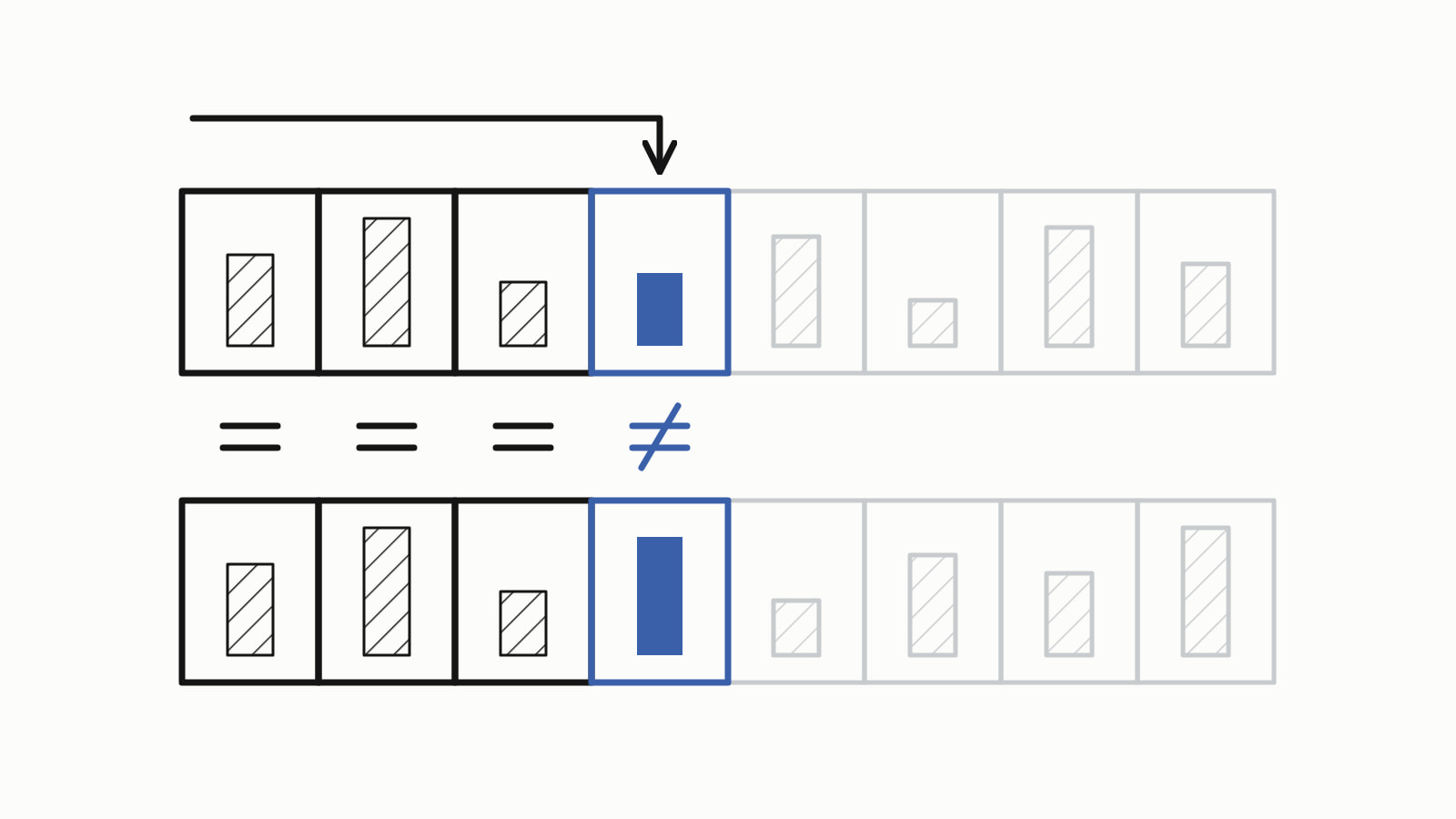
For C++ string comparison, use == to test whether two std::string values hold the same text, and < or > to see which comes first. compare() gives both answers as one number: negative, zero or positive. For C strings (char*), use strcmp, because == on two pointers compares addresses, not text.
#include <iostream>
#include <string>

int main() {
    std::string a = "apple";
    std::string b = "banana";

    std::cout << std::boolalpha;
    std::cout << (a == b) << '\n';        // false
    std::cout << (a != b) << '\n';        // true
    std::cout << (a < b) << '\n';         // true
    std::cout << (a == "apple") << '\n';  // true
}
— end example]
It printed:
false
true
true
true
— end example]
This answer is written for C++17; the lines that need C++20 say so. The samples were built with MSVC 19.44, Clang 19.1 (MSVC STL), GCC 16.2 and Clang 23.1 (libc++), and all four printed the same unless a sentence says otherwise.
How do you compare two strings in C++?
Compare two strings with == and !=: two std::strings are equal when they have the same length and the same character at every position (the string comparison operators on cppreference). The same operators work between a std::string and a string literal, as a == "apple" did above: the string’s own operator compares the literal’s characters.
Comparison is case sensitive. “Ada” and “ada” differ in their first character, so == calls them different; ignoring case takes a few lines of your own, shown below. If std::string itself is new to you, how a C++ string works covers creating, joining and searching one.
How do you tell which string comes first?
Use <, >, <= and >=, which, like ==, also take a literal on one side: they compare in dictionary order by character code. The first character that differs decides, and if one string ends before any character differs, the shorter string comes first.
std::cout << (zebra < apple) << '\n';    // true: 'Z' is 90, 'a' is 97
std::cout << (ten < nine) << '\n';       // true: '1' comes before '9'
std::cout << (app < apple) << '\n';      // true: the prefix is shorter
std::cout << (apple < apricot) << '\n';  // true: 'p' comes before 'r'
— end example]
The variables are std::strings: zebra holds “Zebra”, ten “10”, nine “9”, app “app” and apricot “apricot”.
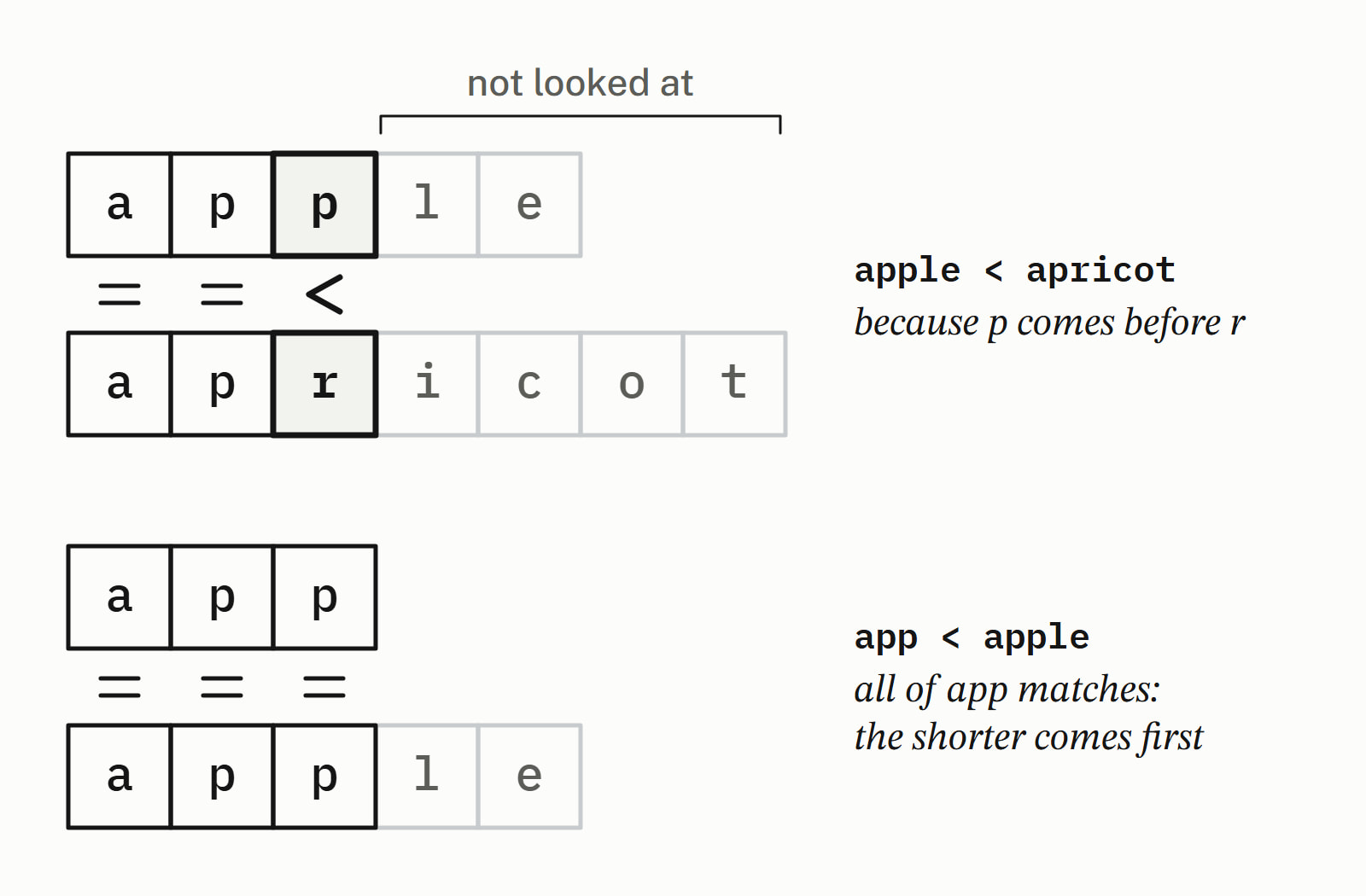
Three of those results surprise people who sort by eye:
| Strings | Comes first | Why |
|---|---|---|
| “Zebra” and “apple” | “Zebra” | ‘Z’ is 90, ‘a’ is 97 |
| “10” and “9” | “10” | digits compare as characters, not numbers |
| “app” and “apple” | “app” | all of it matches, so the shorter wins |
In ASCII every uppercase letter has a lower code than every lowercase one, so a capitalized word sorts before every lowercase word. To put “9” before “10”, compare them as numbers: convert each string to an int first.
What does std::string::compare() return?
a.compare(b) returns a negative number when a comes first, zero when both hold the same text, and a positive number when a comes after, by the same rule as < (std::basic_string::compare). Only the sign is promised: for “apple” against “cherry”, compare() returned -2 with GCC’s library and -1 with Microsoft’s and with libc++. So test < 0, == 0 or > 0, never == -1. Here sign() turns the result into -1, 0 or 1:
int sign(int n) {
    return (n > 0) - (n < 0);
}

int main() {
    std::string a = "apple";
    std::string b = "banana";

    std::cout << std::boolalpha;
    std::cout << sign(a.compare(b)) << '\n';        // -1: a comes first
    std::cout << sign(a.compare("apple")) << '\n';  // 0: the same text
    std::cout << sign(b.compare(a)) << '\n';        // 1: b comes after

    std::string pie = "apple pie";
    // The 5 characters from position 0, against "apple":
    std::cout << (pie.compare(0, 5, "apple") == 0) << '\n';  // true
}
— end example]
It printed:
-1
0
1
true
— end example]
The last line compares part of a string. compare() comes in three shapes:
| Call | Compares |
|---|---|
a.compare(b) |
all of a with b, a string or a C string |
a.compare(pos, count, b) |
count characters of a from pos with b |
a.compare(pos, count, b, pos2, count2) |
that part of a with count2 characters of b from pos2 |
A pos beyond the string’s size throws std::out_of_range. When a yes or no is all you need, == and < say it more plainly than compare().
Why does == fail on C strings, and how do you use strcmp?
A C string is a null-terminated array of char that you handle through a pointer, and == on two pointers asks whether they point at the same memory, not whether the text matches ([expr.eq]). Two arrays that both hold “apple” are two places in memory:
char first[] = "apple";
char second[] = "apple";
const char* p = first;
const char* q = second;

std::cout << std::boolalpha;
std::cout << (p == q) << '\n';               // false: two addresses
std::cout << std::strcmp(p, q) << '\n';      // 0: the same text
std::cout << (std::string(p) == q) << '\n';  // true: text again
— end example]
It printed:
false
0
true
— end example]
std::strcmp, from <cstring>, compares the text; its name is “string compare” cut to str and cmp. std::string(p) makes a std::string from p, and as soon as one side is a std::string, == compares text again. A pointer against a literal, p == "apple", compiles too and still compares addresses: every compiler here warns about it. Here it is false; when the pointer was itself set from a literal, the result is unspecified, because two copies of one literal may or may not share an address.
strcmp returns a negative number, zero or a positive number, like compare(), and again only the sign is promised: it is the sign of the difference between the first pair of characters that differ, each read as an unsigned char (std::strcmp). With the same sign() helper, and s a std::string holding “apple”:
std::cout << sign(std::strcmp("apple", "banana")) << '\n';  // -1
std::cout << sign(std::strcmp("banana", "apple")) << '\n';  // 1
std::cout << std::strcmp("apple", "apple") << '\n';         // 0
std::cout << std::strcmp(s.c_str(), "apple") << '\n';       // 0
— end example]
s.c_str() hands a std::string’s text to a function that wants a C string. Both arguments must point at null-terminated text; anything else is undefined behavior, which means the program may do anything at all.
How do you compare strings ignoring case?
The standard library has no case-insensitive string comparison, so write one: compare character by character after std::tolower, converting each char to unsigned char first.
bool equals_ignore_case(std::string_view a, std::string_view b) {
    return std::equal(a.begin(), a.end(), b.begin(), b.end(),
        [](char x, char y) {
            // tolower needs a value that fits in unsigned char
            return std::tolower(static_cast<unsigned char>(x)) ==
                   std::tolower(static_cast<unsigned char>(y));
        });
}
— end example]
This form of std::equal, from <algorithm>, takes both ranges whole: it returns false when the lengths differ, and otherwise compares the characters pair by pair with the lambda. The cast is not decoration: std::tolower from <cctype> has undefined behavior for a value that is neither EOF nor representable as an unsigned char (std::tolower). equals_ignore_case("Ada", printed true and equals_ignore_case("Ada", false on all four. std::tolower follows the program’s locale, its language settings; in the “C” locale every program starts in, it folds only the ASCII letters A to Z, not accented ones.
How do you check how a string starts or ends?
Since C++20, call starts_with() and ends_with() (std::basic_string::starts_with); before that, test a prefix with compare(0, n, prefix) == 0, where n is the prefix’s length:
std::cout << name.starts_with("report") << '\n';  // C++20: true
std::cout << name.ends_with(".pdf") << '\n';      // C++20: true
std::cout << (name.compare(0, 6, "report") == 0) << '\n';  // true
— end example]
With name holding “report.pdf”, every line prints true. As C++17 the first two do not compile; GCC says std::string “has no member named ‘starts_with’”. The C++20 flag is -std=c++20 for GCC and Clang and /std:c++20 for MSVC; Since When’s C++20 table gives the first GCC, Clang and MSVC releases for its features.
Before C++20, test a suffix with compare() from size() - n, after checking that the string is at least n long; without that check, a string shorter than the suffix throws std::out_of_range:
std::cout << (name.size() >= 4 &&
              name.compare(name.size() - 4, 4, ".pdf") == 0)
          << '\n';  // true
— end example]
Built as C++17 on all four, it printed true; on “a”, the form without the size check threw std::out_of_range.
Which comparison should you use?
| Task | Write |
|---|---|
| Same text? | a == b |
| Which comes first? | a < b |
| Before, equal or after, in one call | a.compare(b), then test the sign |
| Two C strings | std:: |
| Ignoring case | equals_ignore_case(a, b), from above |
| Prefix or suffix | starts_with(), ends_with() (C++20) |
| Sorting a list of strings | std::sort, which uses < |
std::sort puts “Zebra” before “apple” for the reason in the table of surprises; writing a comparator for std::sort and std::map changes the order. Standard library has the other answers on strings and containers.
Questions
Is string comparison in C++ case sensitive?
Yes. The operators and compare() compare character codes, and an uppercase letter has a different code from its lowercase form, so “Ada” and “ada” are not equal. To ignore case, compare the two strings character by character after std::tolower, casting each char to unsigned char first.
What is the difference between == and compare() in C++?
The == operator answers one question, equal or not, with a bool. compare() also tells which string comes first, as a negative number, zero or a positive number, and can compare part of a string, as in s.compare(0, 5, “apple”). Use == or < when a yes or no is all you need.
Can you compare a std::string with a char* or a string literal?
Yes. When either side of == is a std::string, the text is compared: with a holding “apple”, a == “apple” is true. Only when both sides are C strings does == compare their addresses instead; compare those with std::strcmp.
What does strcmp return?
A negative number if the first C string comes first, zero if both hold the same text, and a positive number if it comes after. Only the sign is promised, and the numbers differ between C libraries, so test strcmp(p, q) < 0, == 0 or > 0, never == -1 or == 1.
Can you use a string in a switch statement in C++?
No. A switch cannot test a std::string, so write a chain of if and else if, each comparing with ==: if (fruit == “apple”) first, then else if (fruit == “banana”), and so on.
What is the <=> operator for strings?
It is C++20’s three-way comparison: a <=> b gives one result for before, equal and after, an ordering you compare with 0. With a holding “apple” and b holding “banana”, (a <=> b) < 0 is true.
Sources
- operator==, !=, <, <=, >, >=, <=> (std::basic_string)cppreference.com
- std::basic_string::comparecppreference.com
- std::strcmpcppreference.com
- [expr.eq] Equality operatorsC++ standard working draft
- std::tolowercppreference.com
- std::equalcppreference.com
- std::basic_string::starts_withcppreference.com