Standard Library[lib]
C++ cout: how to print with std::cout

- Section
- Standard Library [lib]
- Standard
- C++17
- Compilers
- MSVC 19.44, Clang 19.1 (MSVC STL), GCC 16.2, Clang 23.1 (libc++)
- Published
- Length
- 7 min read
In this answer7 clauses
- 1How do you print variables and numbers with cout?
- 2How do you start a new line:
'\n'orstd::endl? - 3Why does cout not work without std::?
- 4How do you fix “undefined reference to std::cout”?
- 5How do you format numbers with cout?
- 6How do you print a bool as true or false?
- 7std::cout vs printf vs std::println: which one?
Abstract
std::cout, declared in <iostream>, prints to standard output: std::cout << count << " x " << item << '\n'; sends each piece in order, and '\n' ends the line. Write std::cout, or using std::cout; once. "undefined reference to std::cout" means the C++ library was not linked: build with g++ (or clang++), not gcc. For two decimals, send std::fixed << std::setprecision(2) (setprecision is from <iomanip>); std::boolalpha prints a bool as true or false.
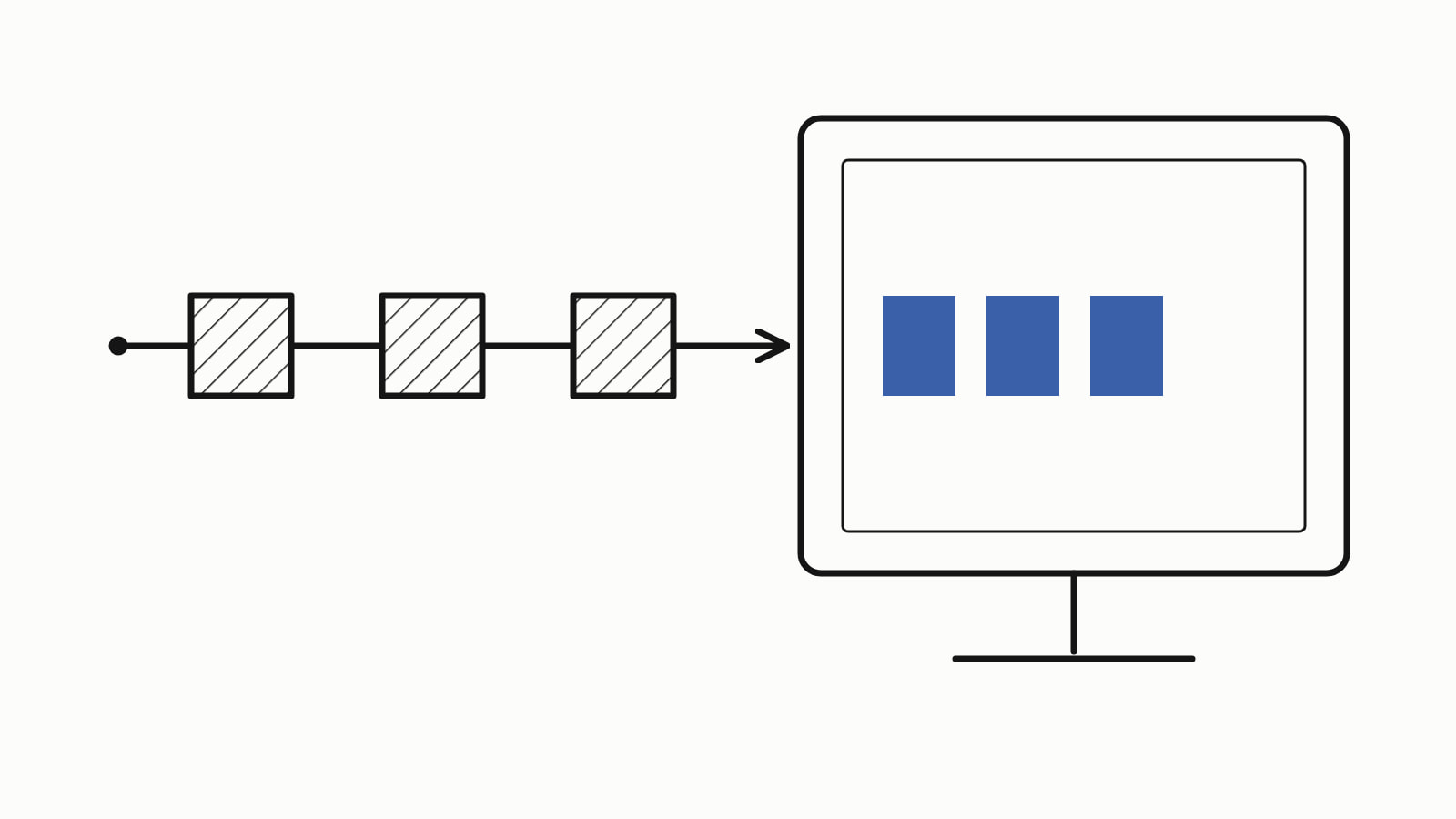
In C++, cout prints to the screen: std:: sends the text to standard output, and each further << adds one more piece. It is declared in the header <iostream>, a library file you #include, and lives in the namespace std, the group that holds the library’s names, which is why it is written std::cout. End a line with '\n'.
#include <iostream>

int main() {
    std::cout << "Hello, world!\n";
}
— end example]
It prints Hello, world! and ends the line. Everything on this page is C++17 or older, except std::println in the last section, which needs C++23 (Since When lists the compiler releases for each standard). The samples were built with MSVC 19.44, Clang 19.1 (MSVC STL), GCC 16.2 and Clang 23.1 (libc++), and all four printed the same.
How do you print variables and numbers with cout?
Give each one its own <<: text in double quotes, a variable, a number or a calculation, in the order they should appear. Here, a shopping total:
#include <iostream>
#include <string>

int main() {
    std::string item = "coffee";
    int count = 3;
    double price = 4.5;

    std::cout << "Item: " << item << '\n';            // a std::string
    std::cout << "Price: " << price << '\n';          // a double
    std::cout << count << " x " << item << '\n';      // an int, text
    std::cout << "Total: " << price * count << '\n';  // a calculation
}
— end example]
All four printed:
Item: coffee
Price: 4.5
3 x coffee
Total: 13.5
— end example]
std::cout is a stream, an object you send output into, and << is the insertion operator. Each << sends the value on its right into the stream on its left, then hands the stream back, so the next << sends to std::cout again. That is why one statement can chain as many as you need:
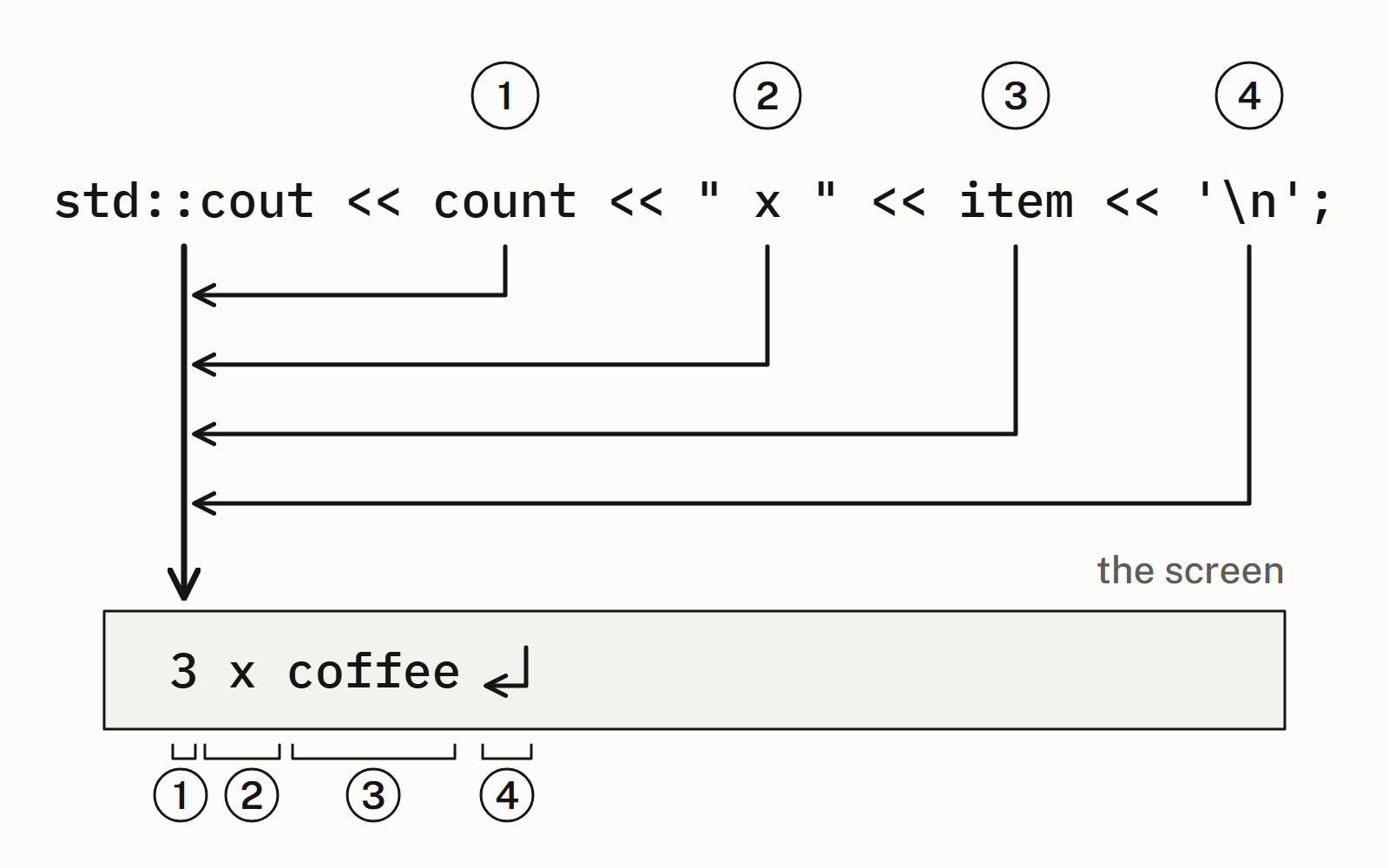
cout adds no spaces or line breaks of its own: the spaces in " x " are the ones you see. By default a double prints without trailing zeros, so 4.5 times 3 printed 13.5; formatting numbers, below, fixes the decimals. A type of your own prints the same way once it has an operator<< (C++ operator overloading shows how).
How do you start a new line: '\n' or std::endl?
Write '\n': it ends the line. std::endl ends it too, and also flushes the output: it makes the stream write out at once whatever it has collected so far, which you rarely need.
std::cout << "coffee" << '\n';
std::cout << "tea\n";
std::cout << "milk" << std::endl;  // also flushes the output
— end example]
All three ended a line: the program printed coffee, tea and milk on three lines, so "\n" inside the text works as well as '\n' after it. A flush on every line is extra work in a loop that prints many of them; when output must appear at once, std::flush flushes without a newline. What the flush does, and std::endl vs '\n' has the longer answer.
Why does cout not work without std::?
Because cout lives in the namespace std, and the compiler does not find the bare name outside it. With <iostream> included and no std:::
cout << "Hello, world!\n"; // error: cout lives in std— end example]
GCC stopped with:
04-no-std-fail.cpp:5:5: error: 'cout' was not declared in this scope; did you mean 'std::cout'?— end example]
Clang says the same in other words; MSVC says only 'cout': undeclared identifier. cout and std::cout are the same object, and the short name works only after a using. Any of three fixes works:
std::coutevery time, as on this page.using std::cout;once, after whichcoutalone meansstd::cout.using namespace std;, which lets you leavestd::off every name in the library, with the name clashes that using namespace std explains.
The second names only what you use:
#include <iostream>

using std::cout;  // from here on, cout means std::cout

int main() {
    cout << "Hello, world!\n";
}
— end example]
It printed Hello, world! on all four. The other error a first program meets is a missing #include <iostream>, with std::cout written in full. The compilers word that one differently: GCC and MSVC say cout is not a member of std, and Clang that there is no member cout in std or, in a file that includes nothing, that std itself is undeclared. The fix is the same: add the include at the top.
How do you fix “undefined reference to std::cout”?
Build with g++, not gcc. The message is a linker error: the code compiled, but the linker, the step that joins your compiled code with the libraries it uses, was not given the C++ standard library, where std::cout is defined. gcc compiles a .cpp file as C++ but does not add that library; g++ adds it by itself.
Built as C++ by GCC 16.2’s gcc on Compiler Explorer, which names the file <source>, the first example compiled and then failed to link. Two of the four lines it printed:
<source>:4:(.text+0xa): undefined reference to `std::cout'
collect2: error: ld returned 1 exit status
— end example]
Adding -lstdc++, the flag that names GCC’s C++ library, made the same build link and print Hello, world!. So build with g++, or clang++ with Clang.
How do you format numbers with cout?
Send manipulators, values that change how the stream prints what comes after them: std::fixed with std::setprecision(2) gives two decimals, and std::setw(10) pads the next item to 10 characters. std::setprecision and std::setw need #include <iomanip>; std::fixed comes with <iostream>.
double total = price * count;

std::cout << total << '\n';                          // plain
std::cout << std::setprecision(3) << total << '\n';  // 3 digits
std::cout << std::fixed << std::setprecision(2);     // 2 decimals
std::cout << total << '\n';
std::cout << price << '\n';                          // still on
std::cout << count << " x " << item << ": " << total << '\n';

std::cout << '[' << std::setw(10) << item << ']'     // padded
          << '[' << item << "]\n";                   // not padded
std::cout << '[' << std::left << std::setw(10) << item << "]\n";
— end example]
All four printed:
13.5
13.5
13.50
4.50
3 x coffee: 13.50
[    coffee][coffee]
[coffee    ]
— end example]
std::setprecision(3) alone counts significant digits, not decimals: 13.5 stayed 13.5, and 3.14159 printed 3.14. After std::fixed it counts digits after the point, and both settings stay on: price printed 4.50 with nothing new sent. std::left puts the padding after the text. std::defaultfloat turns std::fixed off again, but the precision stays: 13.5 then printed 14 until std::setprecision(6), the default, brought back 13.5.
| Manipulator | What it does | Stays on? |
|---|---|---|
std::setprecision(n) |
n significant digits; n decimals after std::fixed |
yes |
std::fixed |
fixed decimals, as many as the precision | yes |
std::setw(n) |
pads to n characters | no, the next item only |
std::boolalpha |
a bool as true or false |
yes |
How do you print a bool as true or false?
Send std::boolalpha first: by default a bool prints as 1 or 0.
bool in_stock = true;
bool on_sale = false;

std::cout << in_stock << ' ' << on_sale << '\n';
std::cout << std::boolalpha;  // from here on: true and false
std::cout << in_stock << ' ' << on_sale << '\n';
— end example]
The first line printed 1 0 and the second true false. std::noboolalpha switches back to digits.
std::cout vs printf vs std::println: which one?
In C++17 code, use std::cout; from C++23 on, std::println gives you a short format string and still checks the types. The same line three ways:
std::cout << count << " x " << item << ": " << std::fixed
          << std::setprecision(2) << total << '\n';
std::printf("%d x %s: %.2f\n", count, item.c_str(), total);
std::println("{} x {}: {:.2f}", count, item, total);  // C++23
— end example]
Built as C++23, all three printed 3 x coffee: 13.50. As C++17 the std::println line does not compile, and it needs #include <print>. std::printf needs <cstdio>, and it takes a std::string as item.c_str(), the C string inside it.
| Call | How you format | Types checked? |
|---|---|---|
std::cout << |
manipulators, item by item: verbose | yes |
std::printf |
a compact format string: %d, %.2f |
no, unless the compiler warns |
std::println |
a format string: {}, {:.2f}, since C++23 |
yes |
std::println in C++23 shows its format strings, and Since When lists the compiler releases that have it. Reading input, the other direction, is std::cin and C++ getline; Standard library has the rest of the library’s answers.
Questions
Which header do you need for cout?
std::cout is declared in <iostream>, so a program that prints starts with #include <iostream>. Without it the compiler stops at the first std::cout, and the fix is to add the include. The manipulators that take a number, std::setprecision and std::setw, need #include <iomanip> as well.
What is the difference between cout and cerr?
std::cout is for the program's normal output and writes to standard output; std::cerr is for error messages and writes to standard error, a separate stream. std::cerr flushes after every output operation, so each message is written at once. Both are declared in <iostream> and print with << the same way.
How do you print a double with two decimal places?
Send std::fixed and std::setprecision(2) before the number: std::cout << std::fixed << std::setprecision(2) << value; with #include <iomanip>. A total of 13.5 then prints as 13.50. Both settings stay on for every later floating-point number on that stream until you change them.
How do you print without a new line?
Leave the ‘\n’ out. std::cout adds no line break and no space of its own, so whatever you print next continues on the same line. End the line with ‘\n’ when you want the break.
Is std::endl slower than ‘\n’?
It does more work: std::endl writes a newline and then flushes the stream, and a flush on every line is extra work in a loop that prints many lines. ‘\n’ ends the line without the flush. Write ‘\n’, and std::flush where the output must appear at once; Cpp Next’s std::println answer covers std::endl vs ‘\n’ in depth.
How do you read input, the opposite of cout?
With std::cin, also from <iostream>: std::cin >> count reads one word or one number into a variable. std::getline(std::cin, line) reads a whole line, spaces included, into a std::string. Cpp Next's getline answer covers both, and the leftover newline that trips up mixing them.
Sources
- std::cout, std::wcoutcppreference.com
- [narrow.stream.objects] Narrow stream objectsC++ standard working draft
- std::endlcppreference.com
- std::setprecisioncppreference.com
- std::setwcppreference.com
- std::fixed, std::scientific, std::hexfloat, std::defaultfloatcppreference.com
- std::boolalpha, std::noboolalphacppreference.com
- std::cerr, std::wcerrcppreference.com