Standard Library[lib]
std::array in C++: how to declare and use one

- Section
- Standard Library [lib]
- Standard
- C++17
- Compilers
- MSVC 19.44, Clang 19.1 (MSVC STL), GCC 16.2, Clang 23.1 (libc++)
- Published
- Length
- 6 min read
In this answer6 clauses
Abstract
std::array in C++ is a fixed-size container from the <array> header: std::array<int, 3> scores{72, 95, 41}; holds three ints, and scores.size() returns 3. Unlike a built-in array, it can be assigned with =, compared with == and returned from a function, and at() checks the index, which [] is not required to do. Its size is part of its type and never changes, so use std::vector when the count is known only at run time.
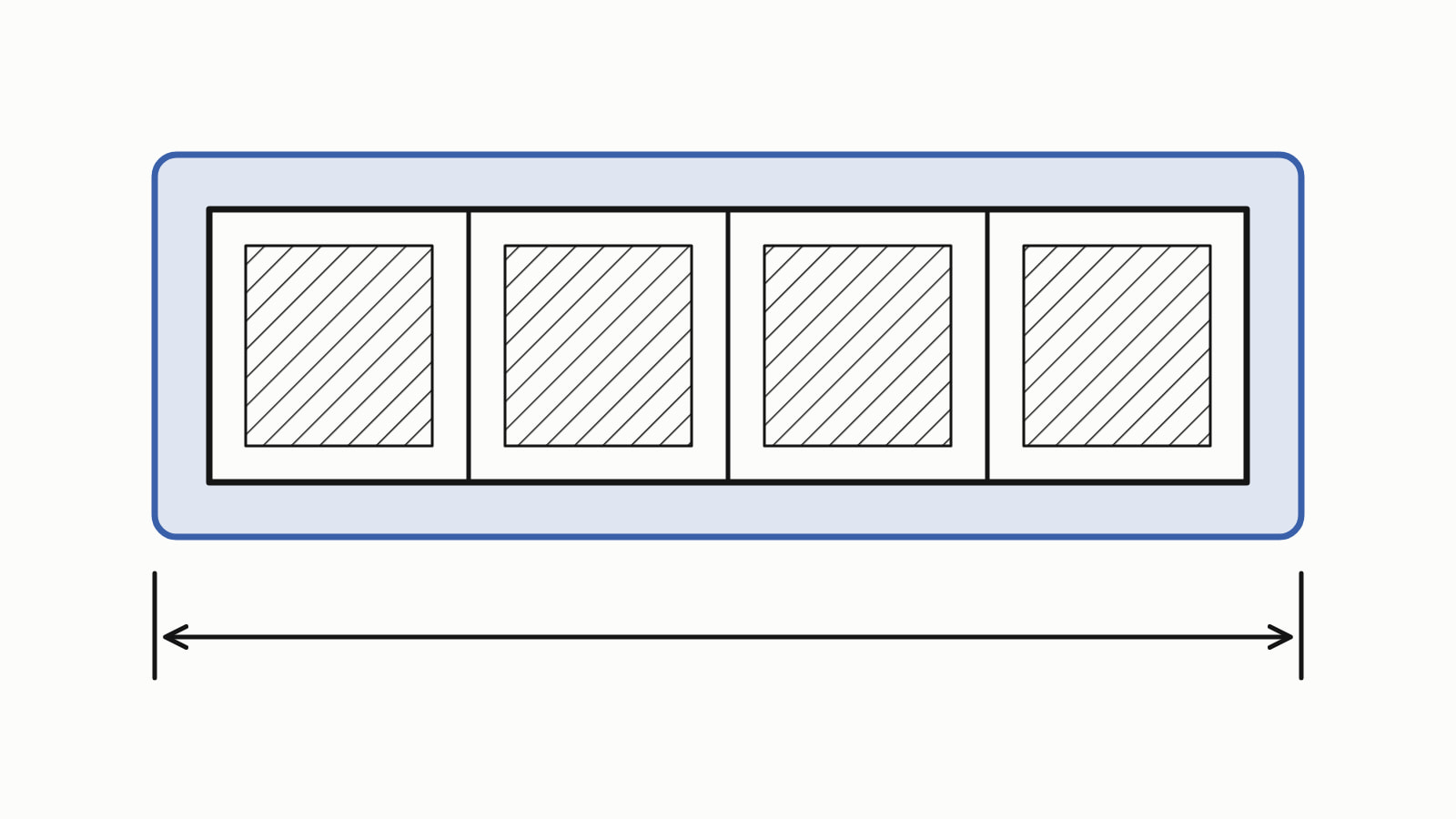
std::array in C++ is a fixed-size container from the <array> header: std:: holds exactly three ints. It wraps a built-in array and adds what that lacks: scores.size(), a checked scores.at(i), and the ability to be copied, compared and returned. Its size never changes; for one that grows, use std::vector.
A whole program that declares one, asks its size, prints each element and changes one:
#include <array>
#include <iostream>

int main() {
    std::array<int, 3> scores{72, 95, 41};

    std::cout << scores.size() << '\n';  // 3

    for (int score : scores) {
        std::cout << score << '\n';  // 72, then 95, then 41
    }

    scores[2] = 60;
    std::cout << scores[2] << '\n';  // 60
}
— end example]
It printed:
3
72
95
41
60
— end example]
The samples are C++17, built with MSVC 19.44, Clang 19.1 (MSVC STL), GCC 16.2 and Clang 23.1 (libc++), and this program printed the same on all four. std::array itself has been in the standard since C++11. Since When lists, for each standard, the first compiler releases that support it.
How do you declare and initialize a std::array?
Write the element type and the size in the angle brackets, then the values in braces. Since C++17 the compiler can also work both out from the values, which is called class template argument deduction:
std::array<int, 3> all{72, 95, 41};  // 72, 95, 41
std::array<int, 3> two{72, 95};      // 72, 95, 0
std::array<int, 3> none{};           // 0, 0, 0
// ...
std::array scores{72, 95, 41};  // C++17: type and size worked out
bool same = std::is_same_v<decltype(scores), std::array<int, 3>>;
std::cout << std::boolalpha << same << '\n';  // true
— end example]
Printed one per line, all four gave 72, 95, 41, then 72, 95, 0, then three zeros, then true. std::is_same_v is true when two types are the same, so the deduced scores is a std::array<int, 3>.
The standard makes std::array an aggregate, a type filled straight from a braced list, that takes “up to N elements” ([array.overview]). So:
- Fewer values than the size: the remaining
ints are 0. - Empty braces,
{}: every element is 0. - More values than the size: it does not compile. GCC says
too many initializers for 'std::, and the other three refuse it too.array<int, 3>'
C++20 adds std::to_array, which builds a std::array from a braced list or a built-in array and counts the elements for you:
auto scores = std::to_array({72, 95, 41}); // C++20— end example]
All four compiled it as C++20 and rejected it as C++17.
How do you get the size of a std::array?
Call size(): scores.size() returns 3, the number of elements. empty(), front() and back() answer the next questions, whether it has none and what the first and last elements are, and data() gives a pointer to the first element, for a C function that takes one.
std::cout << std::boolalpha;
std::cout << scores.size() << '\n';   // 3
std::cout << scores.empty() << '\n';  // false
std::cout << scores.front() << '\n';  // 72
std::cout << scores.back() << '\n';   // 41

// the size is part of the type: these are two different types
bool same = std::is_same_v<std::array<int, 3>, std::array<int, 4>>;
std::cout << std::boolalpha << same << '\n';  // false
— end example]
All four printed 3, false, 72 and 41, then false for the two types. The size is written into the type, so an array’s size is fixed when you write the code. There is no push_back.
std::array [] vs at(): which is safe?
at() is: it checks the index and throws std::out_of_range, an exception, when the index is not less than size() (cppreference on std::array::at). [] is not required to check. An index past the end is undefined behavior, which means the standard promises nothing about what the program does (cppreference on the subscript operator). You catch the exception with try and catch:
std::cout << scores.at(1) << '\n';  // 95

try {
    std::cout << scores.at(3) << '\n';  // there is no index 3
} catch (const std::out_of_range&) {
    std::cout << "index 3 is out of range\n";
}
— end example]
All four printed 95, then index 3 is out of range. The sample prints a message of its own because each standard library words the exception’s what() text differently. Use at() when the index comes from outside the program, such as user input or a file, and [] in a loop that stays below size().
How do you loop over a std::array and pass it to a function?
A range-for, the loop for (int score : scores) in the first program, visits every element in order. To pass one to a function, write its whole type and take it by const reference, which reads the caller’s array without copying it:
int total(const std::array<int, 3>& values) {
    int sum = 0;
    for (int v : values) {
        sum += v;
    }
    return sum;
}

int main() {
    std::array<int, 3> scores{72, 95, 41};
    // ...
    std::cout << total(scores) << '\n';  // 208
}
— end example]
All four printed 208. For an array of any size, make the function a template on the size N, with the same body; the compiler works N out from the array you pass:
template <std::size_t N>
int total(const std::array<int, N>& values) {
    // ...
}

int main() {
    std::array<int, 3> scores{72, 95, 41};
    std::array<int, 5> more{72, 95, 41, 60, 88};
    std::cout << total(scores) << '\n';  // 208, with N = 3
    std::cout << total(more) << '\n';    // 356, with N = 5
}
— end example]
It printed 208 and 356 on all four. Since C++20 a function can take std::span, a view that replaces a pointer and a size, instead of the template.
What can a std::array do that a built-in array cannot?
A std::array behaves like a struct holding a built-in array, so it can be returned from a function and assigned with =; the library also gives it ==, which compares the elements with their own ==:
std::array<int, 3> make_scores() {
    return {72, 95, 41};
}

int main() {
    std::array<int, 3> scores = make_scores();
    std::array<int, 3> copy{};
    copy = scores;  // copies all three elements
    std::cout << copy[1] << '\n';  // 95
    std::cout << std::boolalpha << (copy == scores) << '\n';  // true
}
— end example]
All four printed 95 and true: = copied the three elements, and == compared them value by value. A built-in array refuses the same assignment. copy = scores; on two int[3] arrays does not compile, and Clang says array type 'int[3]' is not assignable. The built-in C++ array has the rest, including why it loses its length when passed to a function.
std::array vs vector: which should you use?
Use std::array when you know the number of elements as you write the code and it never changes, and std::vector for anything else. The difference is where the elements live:
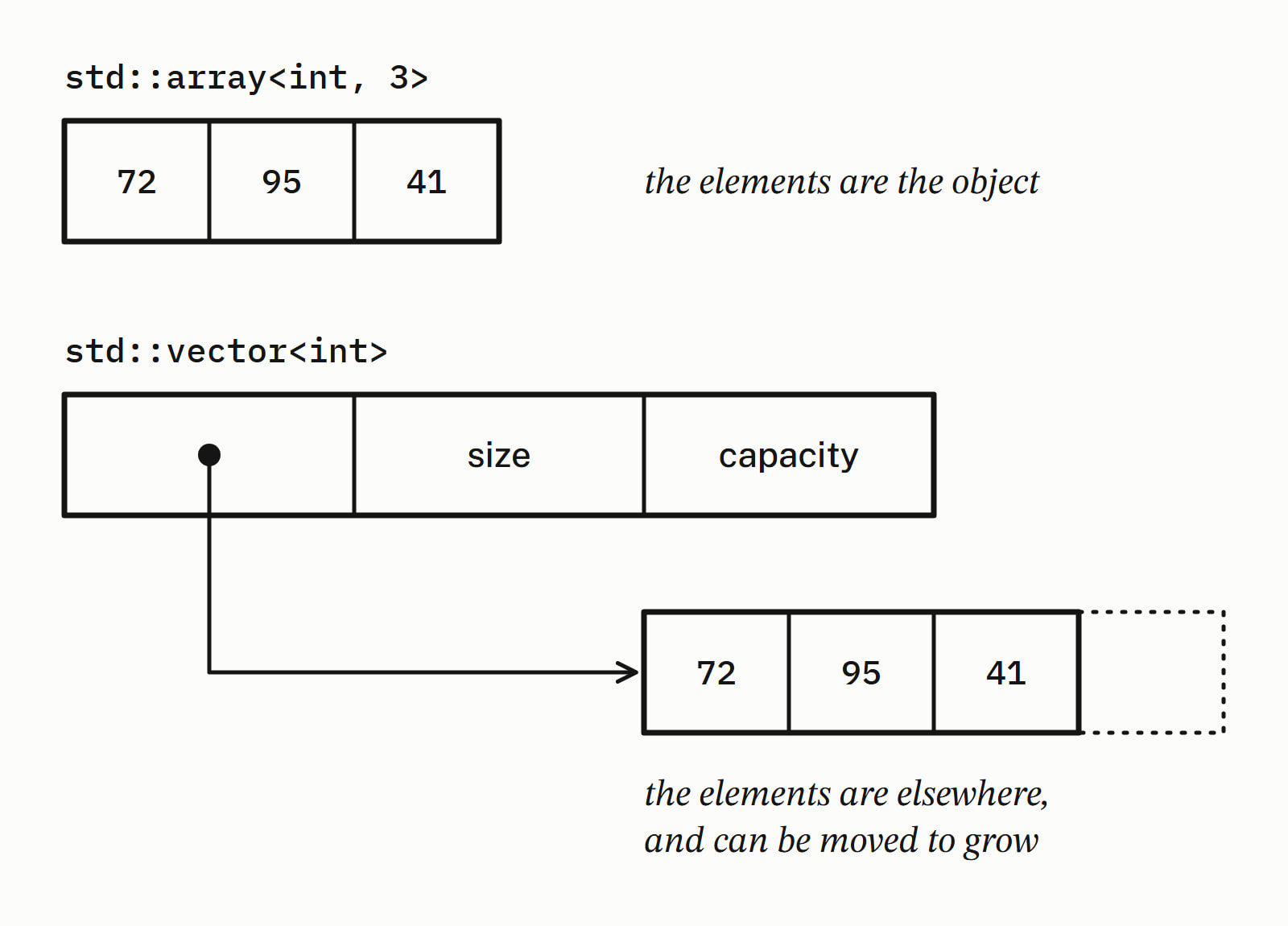
A std::array is its elements: sizeof(std:: and sizeof(int[3]) both printed 12 on all four, so the wrapper adds no bytes here. A vector holds, in effect, a pointer, a size and a capacity, and its elements live elsewhere, in memory it can reallocate to grow.
| Question | Built-in array | std::array |
std::vector |
|---|---|---|---|
| Can the size change? | no | no | yes |
| Keeps its size when passed to a function | no | yes | yes |
Copied with = and returned |
no | yes | yes |
| Pick it for | code shared with C | a size known as you write the code | a size known only at run time, or one that grows |
Standard library has the rest of the site’s container answers.
Questions
Which header is std::array in?
std::array is declared in the <array> header: write #include <array> before you use it. It has been part of the standard library since C++11.
How do you fill a std::array with one value?
Call its fill() member: scores.fill(0); sets every element of scores to 0, and the samples printed 0 three times on all four compilers. To start from zeros instead, declare it with empty braces: std::array<int, 3> scores{};.
Can you change the size of a std::array?
No. The size is part of the type, so a std::array<int, 3> holds three elements for its whole life, and it has no push_back. When the number of elements is known only at run time, or has to grow, use a std::vector.
How do you make a 2D std::array?
Make an array of arrays: std::array<std::array<int, 3>, 2> grid is two rows of three ints; the row length, 3, comes before the number of rows, 2, the reverse of int grid[2][3]. With a brace for each row, its initializer needs three levels, {{{1, 2, 3}, {4, 5, 6}}}: one for the grid, one for the built-in array inside it and one for each row; two levels, {{1, 2, 3}, {4, 5, 6}}, did not compile on any of the four compilers.
How do you sort a std::array?
Pass its begin() and end() to std::sort from the <algorithm> header: std::sort(scores.begin(), scores.end()); put 72, 95, 41 in the order 41, 72, 95 on all four compilers. The array keeps its size; only the order of the elements changes.
What is std::to_array?
A C++20 function in <array> that builds a std::array from a braced list or a built-in array and counts the elements for you: auto scores = std::to_array({72, 95, 41}); is a std::array<int, 3>. A compiler set to C++17 rejects it.
Sources
- std::arraycppreference.com
- [array.overview] Class template array overviewC++ standard working draft
- std::array::atcppreference.com
- std::array::operator[]cppreference.com
- std::to_arraycppreference.com