Standard Library[lib]
C++ std::find: search a vector, array or string

- Section
- Standard Library [lib]
- Standard
- C++17
- Compilers
- MSVC 19.44, Clang 19.1 (MSVC STL), GCC 16.2, Clang 23.1 (libc++)
- Published
- Length
- 7 min read
In this answer7 clauses
- 1What does std::find return when the value is not found?
- 2How do you check if a vector contains a value?
- 3How do you get the index of the element std::find found?
- 4How do you find by a condition with std::find_if?
- 5Can you use std::find on an array or a string?
- 6How do you find a key in a std::map or std::set?
- 7Which find should you use?
Abstract
std::find, from <algorithm>, searches a range for a value and returns an iterator to the first match, or the end iterator when nothing matches, so compare the result with end() before reading it. std::distance turns that iterator into an index, std::find_if searches by a condition, and a std::set or std::map has its own find() that searches its sorted keys in logarithmic time.
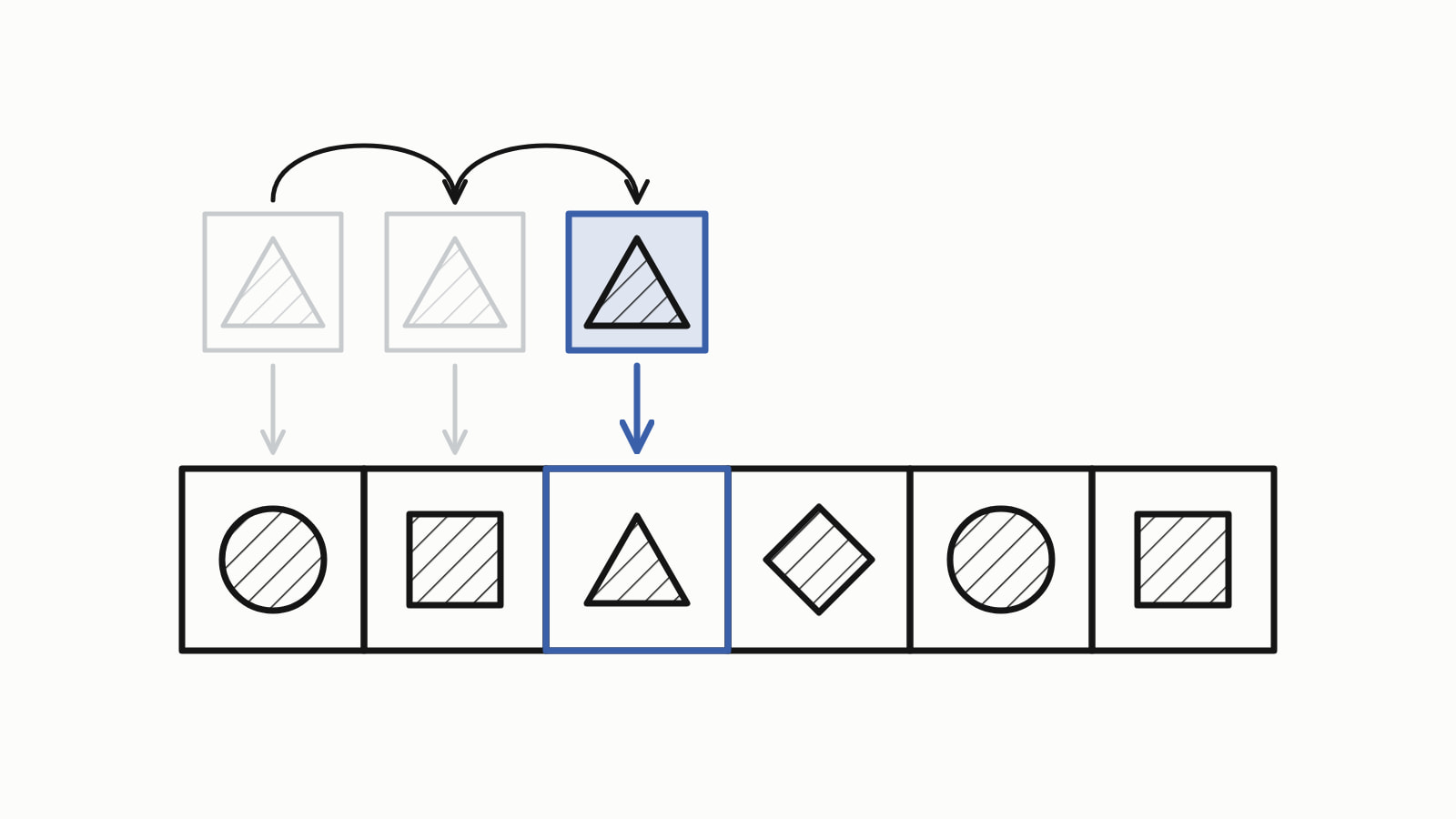
std::find in C++ searches a range for a value: std:: returns an iterator, a position in the container, to the first 15, or numbers.end() when there is none. Include <algorithm>, and always compare the result with end() before using it. It checks the elements one by one, so it works on any container.
Finding a lottery number in a vector, as a whole program:
#include <algorithm>
#include <iostream>
#include <iterator>
#include <vector>

int main() {
    std::vector<int> numbers{4, 8, 15, 16, 23, 42};

    auto it = std::find(numbers.begin(), numbers.end(), 15);
    if (it != numbers.end()) {
        auto index = std::distance(numbers.begin(), it);
        std::cout << "found " << *it << " at index " << index << '\n';
    }
}
— end example]
It printed:
found 15 at index 2— end example]
The answer is written for C++17 (Since When’s C++17 table). The samples were built with MSVC 19.44, Clang 19.1 (MSVC STL), GCC 16.2 and Clang 23.1 (libc++), as C++20 or C++23 where a line says so, and all four printed the same.
What does std::find return when the value is not found?
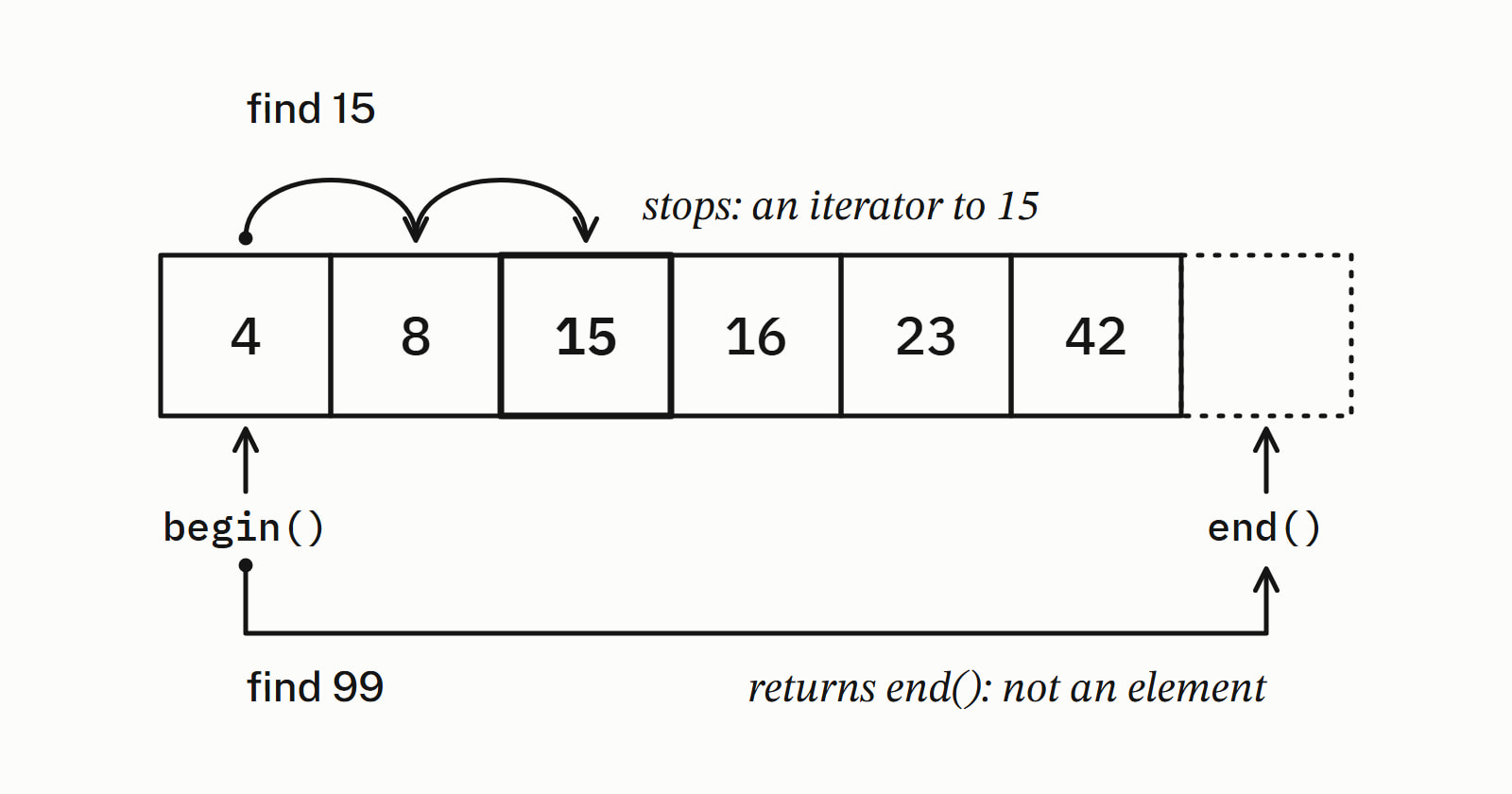
std::find returns the end iterator you passed in, which points one past the last element. That position is not an element, so compare the result with end() first and read *it only when they differ:
auto it = std::find(numbers.begin(), numbers.end(), 99);
if (it == numbers.end())
    std::cout << "not found\n";    // it is end(): never read *it
else
    std::cout << "found " << *it << '\n';
— end example]
It printed not found. Both searches start at begin(): find 15 stops at the third cell and returns an iterator to it, while find 99 compares every value, matches none and returns end().
How do you check if a vector contains a value?
Test whether std::find returned end(): std:: is true when x is in the std::vector v. Wrapped in a small function, the call reads like the question:
bool contains(const std::vector<int>& v, int x) {
    return std::find(v.begin(), v.end(), x) != v.end();
}

int main() {
    std::vector<int> numbers{4, 8, 15, 16, 23, 42};
    std::cout << std::boolalpha;
    std::cout << contains(numbers, 23) << '\n';    // true
    std::cout << contains(numbers, 7) << '\n';     // false
}
— end example]
It printed true, then false: 23 is one of the numbers and 7 is not. Since C++23, std:: does the same in one call, without the function.
How do you get the index of the element std::find found?
Pass the container’s begin() and the iterator std::find returned to std::distance, from <iterator>, which counts the steps from the first to the second. In the first program, std:: is 2, the index of 15. It works on every container; call it only once the != end() test has passed, as that program does: on a miss it counts every element and returns the container’s size, which is no element’s index.
How do you find by a condition with std::find_if?
Call std::find_if with a predicate, a function that returns true or false, in place of the value: it returns an iterator to the first element for which the predicate returns true, or end(). The predicate is usually a lambda, a function written in place. Here it finds the first number above 15 and the player named Bo:
struct Player {
    std::string name;
    int score;
};
// ...
std::vector<int> numbers{4, 8, 15, 16, 23, 42};
auto big = std::find_if(numbers.begin(), numbers.end(),
                        [](int n) { return n > 15; });
if (big != numbers.end())
    std::cout << *big << '\n';                 // 16

std::vector<Player> players{{"Ada", 75}, {"Bo", 92}, {"Lin", 60}};
auto bo = std::find_if(
    players.begin(), players.end(),
    [](const Player& p) { return p.name == "Bo"; });
if (bo != players.end())
    std::cout << bo->name << ' ' << bo->score << '\n';   // Bo 92
— end example]
All four printed 16, then Bo 92. The predicate must not change the element it is given.
Plain std::find compares each element with the value using ==, so on a vector of Player, a struct with no operator==, it does not compile:
Player bo{"Bo", 92};
auto it = std::find(players.begin(), players.end(), bo);
// error: Player has no operator==, so find cannot compare
— end example]
MSVC’s first line of the error:
error C2676: binary '==': 'Player' does not define this operator or a conversion to a type acceptable to the predefined operator— end example]
The other three compilers reject it too, at greater length. To fix it, overload operator== for Player, comparing the name and the score, or search with std::find_if as above.
Can you use std::find on an array or a string?
Yes. For a built-in array, pass std::begin and std::end of the array as the range; on a std::string, std::find looks for one character. To find a word or any longer piece of text, call the string’s own find() member, which returns a position, or std::string::npos when the text is not there:
int numbers[] = {4, 8, 15, 16, 23, 42};
auto it = std::find(std::begin(numbers), std::end(numbers), 23);
if (it != std::end(numbers))
    std::cout << "found " << *it << '\n';          // found 23

std::string word = "lottery";
auto t = std::find(word.begin(), word.end(), 't');
if (t != word.end())
    std::cout << "first t at " << (t - word.begin()) << '\n';  // 2

std::string text = "pick six numbers";
std::size_t at = text.find("six");
if (at != std::string::npos)
    std::cout << "six at " << at << '\n';          // six at 5
if (text.find("seven") == std::string::npos)
    std::cout << "no seven\n";                     // npos: a miss
— end example]
All four printed found 23, first t at 2, six at 5 and no seven. On the string, subtracting word.begin() from the iterator gave the position. The find() member belongs to std::string, not to <algorithm>, and it works with positions instead of iterators.
How do you find a key in a std::map or std::set?
Call the container’s own find() with the key: it returns an iterator to the element, or end() when the key is missing. A std::set and a std::map keep their keys sorted, so their find() takes logarithmic time: far fewer steps than std::find, which checks the elements one by one:
std::set<int> drawn{4, 8, 15, 16, 23, 42};
auto it = drawn.find(16);                 // the set's own search
if (it != drawn.end())
    std::cout << "drawn " << *it << '\n';             // drawn 16

std::map<std::string, int> scores{{"Ada", 75}, {"Bo", 92}};
auto bo = scores.find("Bo");
if (bo != scores.end())
    std::cout << bo->first << ' ' << bo->second << '\n';  // Bo 92
if (scores.find("Zed") == scores.end())
    std::cout << "no Zed\n";                          // no Zed

// std::find on a map walks the pairs: it needs key and value
std::pair<const std::string, int> wanted{"Bo", 92};
auto walked = std::find(scores.begin(), scores.end(), wanted);
if (walked != scores.end())
    std::cout << "walked to " << walked->first << '\n';  // Bo
— end example]
All four printed drawn 16, Bo 92, no Zed and walked to Bo. A map’s element is a pair of key and value (first and second), so std::find on a map needs the whole pair and walks the elements in turn; the map’s find("Bo") takes the key alone. The other containers are in Standard library.
Which find should you use?
Use std::find for a value, std::find_if for a condition, and the container’s own find() for a set, a map or text in a string. Since C++20, std::ranges::find takes the container itself instead of two iterators, and C++23 adds std:: for a plain yes or no:
std::cout << std::boolalpha;

auto it = std::ranges::find(numbers, 15);  // C++20: ranges::find
if (it != numbers.end())
    std::cout << "found " << *it << '\n';             // found 15

bool has = std::ranges::contains(numbers, 15);  // C++23: contains
std::cout << has << '\n';                              // true
— end example]
As C++23, all four printed found 15 and true. As C++20, all four rejected the contains line, and as C++17 all four rejected std::ranges::find. On MSVC 19.44, C++23 is the /std:c++23preview switch.
| You have | Write |
|---|---|
| A value in a vector or an array | std:: |
| A condition | std:: |
| A key in a set or a map | c.find(key) |
| Text in a string | text.find("six") |
| A yes or no question | std:: |
| A yes or no, in C++23 | std:: |
| A whole container, in C++20 | std:: |
Questions
Is std::find O(n)?
Yes. For a range of N elements, std::find makes at most N comparisons with operator==, because it may have to look at every element before it finds a match or reaches the end. A std::set or std::map finds a key with its own find() in logarithmic time instead.
What is the difference between std::find and std::find_if?
std::find looks for an element equal to a value, compared with ==. std::find_if takes a predicate, usually a lambda, and returns an iterator to the first element for which it returns true, such as the first number above 15. Both return the end iterator when nothing matches.
Does std::find work on a std::map?
Only with a whole element: each element of a map is a pair of key and value, so std::find needs both, walks the elements one by one, and with the key alone does not compile. To look up a key, call the map’s own find(), which takes the key alone, runs in logarithmic time and returns the map’s end() when the key is missing.
What is the difference between std::find and std::binary_search?
std::find works on any range, sorted or not, and returns an iterator to the match. std::binary_search requires the range to be sorted, or at least partitioned around the value, or the behavior is undefined; it makes at most about log2(N) comparisons and returns only true or false. For a position in a sorted range, std::lower_bound returns an iterator to the first element not less than the value, or last; the value is there only if that iterator is not last and the element equals it.
Which header is std::find in?
std::find is in <algorithm>, along with std::find_if and, since C++20, std::ranges::find. std::distance, which turns the iterator it returns into an index, is in <iterator>.
Sources
- std::find, std::find_if, std::find_if_notcppreference.com
- std::ranges::find, std::ranges::find_if, std::ranges::find_if_notcppreference.com
- std::ranges::containscppreference.com
- std::distancecppreference.com
- std::map::findcppreference.com
- std::set::findcppreference.com
- std::binary_searchcppreference.com
- std::basic_string::findcppreference.com