Standard Library[lib]
C++ set (std::set): sorted unique values explained

- Section
- Standard Library [lib]
- Standard
- C++17
- Compilers
- MSVC 19.44, Clang 19.1 (MSVC STL), GCC 16.2, Clang 23.1 (libc++)
- Published
- Length
- 7 min read
In this answer9 clauses
- 1How do you insert into a std::set, and what does insert return?
- 2How do you check if a value is in a set?
- 3How do you erase from a std::set?
- 4How do you loop through a set?
- 5How do you sort a set in descending order?
- 6Can you change an element in a set?
- 7How do you make a set of your own type?
- 8How do you remove duplicates from a vector?
- 9std::set vs unordered_set vs multiset: which one?
Abstract
A std::set in C++, from <set>, stores each value once and keeps the values sorted. insert() returns a pair whose bool says whether the value went in, contains() (since C++20) or find() checks for one, and erase() removes it, each in logarithmic time. Its elements cannot be changed in place: erase the old value and insert the new one. A set of your own type needs an operator< or a comparator.
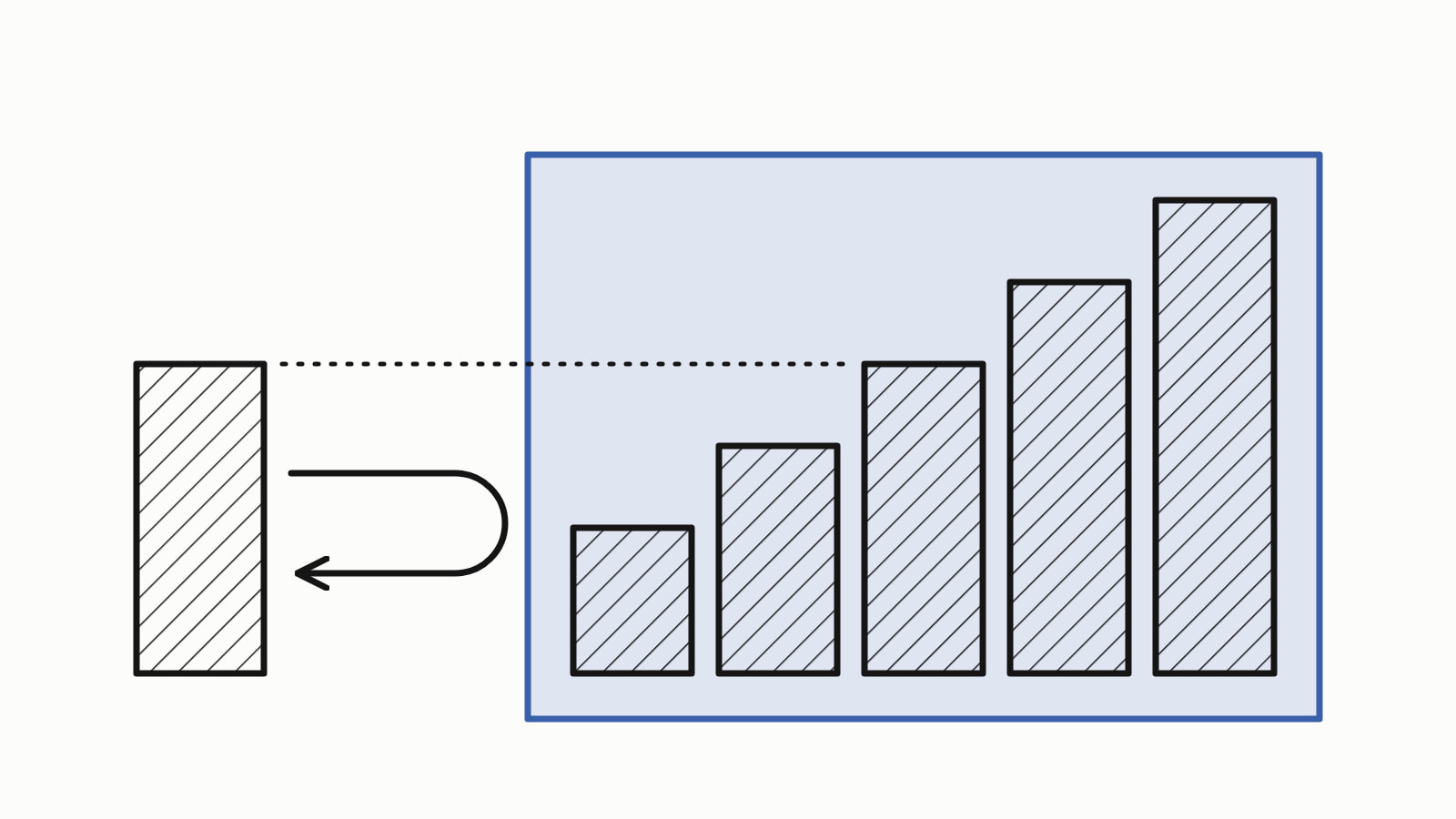
A std::set in C++ is a container that keeps each value once, in sorted order. Include <set>, then insert() adds a value (a duplicate is ignored), contains() (C++20) or find() checks for one, and erase() removes it. Adding, checking and removing each take logarithmic time, which grows slowly as the set grows. A loop visits the values in ascending order.
Players signing up, in a whole program:
#include <iostream>
#include <set>
#include <string>

int main() {
    std::set<std::string> players;
    players.insert("Lin");
    players.insert("Ada");
    players.insert("Bo");
    players.insert("Ada");                 // already there: ignored

    for (const std::string& name : players)
        std::cout << name << '\n';         // Ada, Bo, Lin: sorted
    std::cout << players.size() << " players\n";    // 3 players
}
— end example]
It printed:
Ada
Bo
Lin
3 players
— end example]
The answer is written for C++17 (Since When’s C++17 table). The samples were built with MSVC 19.44, Clang 19.1 (MSVC STL), GCC 16.2 and Clang 23.1 (libc++), as C++20 where a line says so, and all four printed the same.
How do you insert into a std::set, and what does insert return?
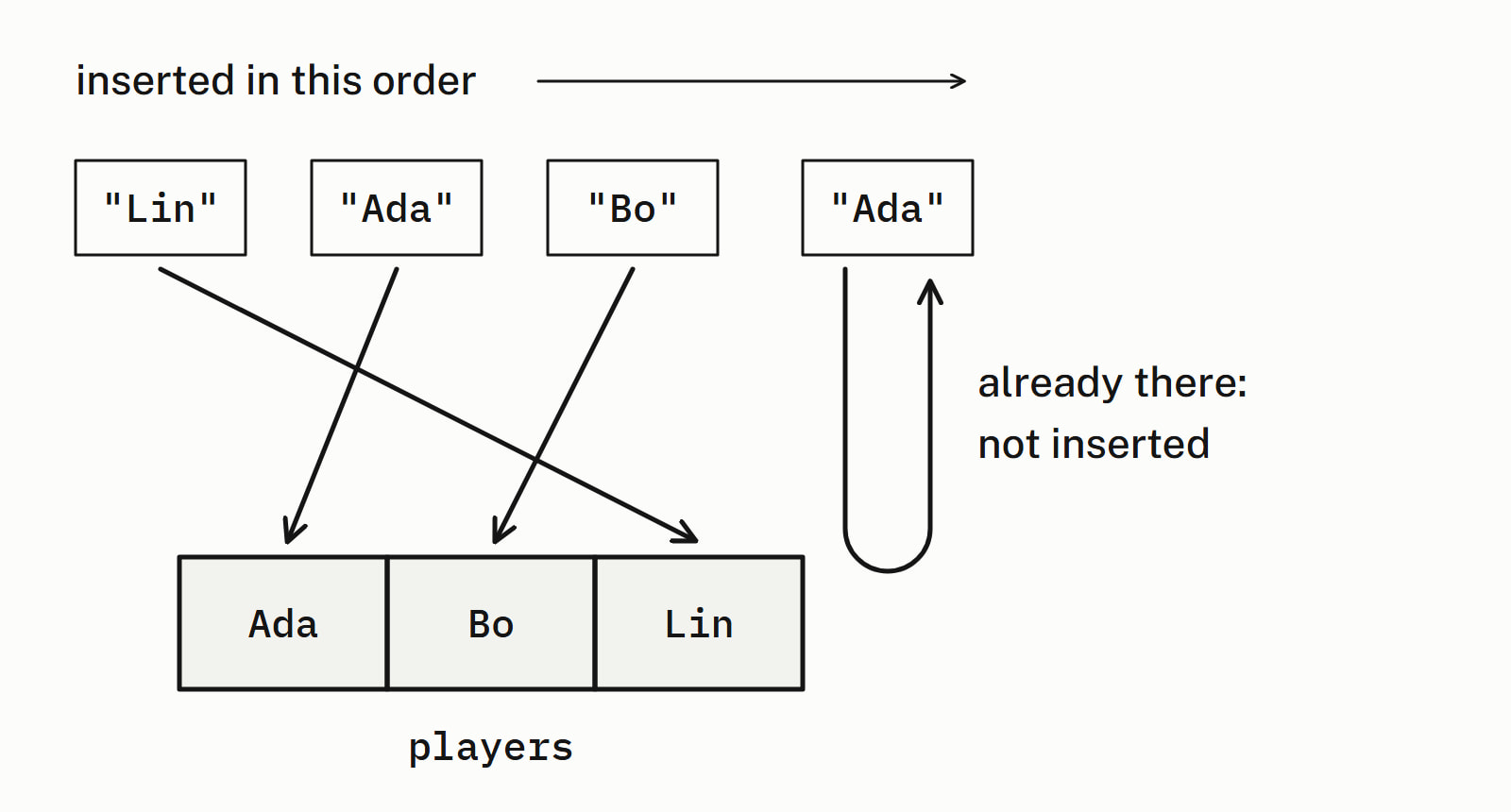
insert(value) adds the value unless the set already holds it, and returns a pair: an iterator, an object that points at one element, and a bool that is true only when the insertion took place. Since C++17 a structured binding unpacks the pair into two names:
std::set<std::string> players{"Lin", "Bo"};
std::cout << std::boolalpha;

auto [position, inserted] = players.insert("Ada");
std::cout << *position << ' ' << inserted << '\n';    // Ada true

auto [again, inserted_again] = players.insert("Ada");
std::cout << *again << ' ' << inserted_again << '\n'; // Ada false
— end example]
It printed:
Ada true
Ada false
— end example]
The second call added nothing; its iterator points at the Ada that prevented the insertion. Test inserted to know whether a name was new.
How do you check if a value is in a set?
Call contains(x), which returns true or false; it is in the library since C++20. Before C++20, use find(x), which returns an iterator to the value, or end(), the position one past the last element, when it is missing; count(x) returns 1 or 0:
std::cout << std::boolalpha;

auto it = players.find("Bo");
if (it != players.end())
    std::cout << "found " << *it << '\n';      // found Bo

std::cout << players.count("Zed") << '\n';     // 0: not there

bool has_ada = players.contains("Ada");        // C++20: contains
std::cout << has_ada << '\n';                  // true
— end example]
As C++17, all four rejected the contains line (GCC: has no member named 'contains') and built the rest. Use find when you also want the element.
How do you erase from a std::set?
erase(value) removes the value and returns how many it removed, 1 or 0; erase(iterator) removes the element an iterator points at, such as one that find returned:
std::set<std::string> players{"Ada", "Bo", "Lin", "Max"};

std::cout << players.erase("Bo") << '\n';     // 1: removed
std::cout << players.erase("Zed") << '\n';    // 0: was not there

auto it = players.find("Max");
if (it != players.end())
    players.erase(it);                        // removes Max
— end example]
To remove every value that matches a condition, call std::erase_if (C++20) with a lambda, a function written in place, that tests each value; it returns how many it removed:
std::set<int> scores{40, 55, 60, 75, 90};

auto low = [](int s) { return s < 60; };
auto removed = std::erase_if(scores, low);    // C++20
std::cout << removed << " removed\n";         // 2 removed
— end example]
It printed 2 removed, and 60, 75 and 90 were left. Before C++20, write the loop it stands for: it = scores.erase(it); when the value matches and ++it when it does not, because an iterator to an erased element must not be used again.
How do you loop through a set?
A range-for visits the values from smallest to largest, and rbegin() with rend(), reverse iterators, walks from largest to smallest. Once you know the set is not empty, the smallest value is *players.begin() and the largest *players.rbegin():
for (const std::string& name : players)
    std::cout << name << '\n';                // Ada, Bo, Lin

for (auto it = players.rbegin(); it != players.rend(); ++it)
    std::cout << *it << '\n';                 // Lin, Bo, Ada

if (!players.empty()) {
    std::cout << "smallest " << *players.begin() << '\n';  // Ada
    std::cout << "largest " << *players.rbegin() << '\n';  // Lin
}
— end example]
How do you sort a set in descending order?
Pass std::greater<int>, from <functional>, as the second template argument: the set keeps its values largest first, and begin() is the largest:
std::set<int, std::greater<int>> scores{60, 75, 40, 90};
for (int s : scores)
    std::cout << s << '\n';                   // 90, 75, 60, 40
std::cout << "first " << *scores.begin() << '\n';   // first 90
— end example]
It printed 90, 75, 60 and 40, then first 90.
Can you change an element in a set?
No: a set lets you read its elements but not assign to them, because changing one in place could leave it out of order. Even its plain iterator is a constant iterator ([associative.reqmts.general]), so this does not compile:
std::set<std::string> players{"Ada", "Bo", "Lin"};
*players.begin() = "Zed";   // error: the elements are const
— end example]
GCC said:
error: no match for 'operator=' (operand types are 'const std::__cxx11::basic_string<char>' and 'const char [4]')— end example]
No message mentions the set: the const in the type is the clue. To change a value, erase the old one and insert the new one: players.erase("Ada");, then players.insert("Mia");. The new value takes its own sorted place: in a set of Ada and Lin, the swap leaves Lin, then Mia.
How do you make a set of your own type?
Tell the set how to order the values: give the type an operator<, or pass a comparator, a class with an operator() that says whether one value goes before another, as the set’s second template argument. Here Player orders by name and ByScore by score:
struct Player {
    std::string name;
    int score;

    bool operator<(const Player& other) const {
        return name < other.name;                 // ordered by name
    }
};

struct ByScore {
    bool operator()(const Player& a, const Player& b) const {
        return a.score < b.score;
    }
};
// ...
std::set<Player> by_name{{"Lin", 40}, {"Ada", 75}, {"Bo", 60}};
for (const Player& p : by_name)
    std::cout << p.name << ' ' << p.score << '\n';
// Ada 75, Bo 60, Lin 40

auto [position, inserted] = by_name.insert(Player{"Ada", 90});
std::cout << std::boolalpha << inserted << ' '
          << position->score << '\n';           // false 75
std::cout << by_name.size() << '\n';            // 3

std::set<Player, ByScore> by_score{{"Lin", 40}, {"Ada", 75},
                                   {"Bo", 60}};
— end example]
The set by score printed Lin 40, Bo 60 and Ada 75. The second Ada, with 90, was rejected on all four, and the stored score stayed 75.
Player has no ==: two values of which neither is less than the other count as the same, so by_name keeps one player per name and by_score one per score: inserting Mia with 60 beside Bo’s 60 was rejected too. The rules a comparator must follow are in how to write comparators for std::sort and std::map.
With neither an operator< nor a comparator, a std::set<Player> with one insert does not compile; the error is long, and not every compiler names the missing operator first. Look for < next to your type’s name: Clang says invalid operands to binary expression ('const Player' and 'const Player'), MSVC binary '<' with _Ty=Player a few lines down, and GCC’s is the clearest: no match for 'operator<' (operand types are 'const Player' and 'const Player').
How do you remove duplicates from a vector?
Build a set from the std::vector’s elements, then a vector from the set: the values come back sorted, each one once.
std::vector<int> scores{60, 75, 40, 75, 60, 90};

std::set<int> distinct(scores.begin(), scores.end());
std::vector<int> sorted(distinct.begin(), distinct.end());
— end example]
sorted holds 40, 60, 75 and 90: four of the six scores. The set sorts as it removes, so the vector’s original order is gone.
std::set vs unordered_set vs multiset: which one?
Use std::set for unique values in sorted order, std::unordered_set for unique values in no particular order, and std::multiset when duplicates must stay:
std::multiset<int> rolls{2, 5, 2, 3};
std::cout << "count(2): " << rolls.count(2) << '\n';   // 2
for (int r : rolls)
    std::cout << r << '\n';                   // 2, 2, 3, 5

std::unordered_set<std::string> players;
players.insert("Lin");
players.insert("Ada");
players.insert("Ada");                        // ignored
std::cout << "count(Ada): " << players.count("Ada") << '\n';
std::cout << "size: " << players.size() << '\n';      // 2
— end example]
All four printed what the comments show, and count(Ada): 1. The other containers are in Standard library.
| You need | Use | Header |
|---|---|---|
| Unique values, sorted | std::set |
<set> |
| Unique values, any order, constant time on average | std::unordered_set |
<unordered_set> |
| Sorted values, duplicates kept | std::multiset |
<set> |
| A value stored under each key | std::map |
<map> |
Questions
Is std::set sorted?
Yes. A std::set keeps its values sorted at all times, in ascending order by default, using the type’s < operator. A comparator passed as the second template argument sorts them by something else, and a loop over the set visits them in that order.
Does std::set allow duplicates?
No. Inserting a value the set already holds changes nothing, and the bool in the pair insert() returns is false. To keep duplicates, use std::multiset from the same header, <set>: a multiset of 2, 5, 2 and 3 has a count(2) of 2.
What is the time complexity of std::set?
Inserting, finding and erasing a value take logarithmic time: the work grows with the logarithm of the number of values, so a much larger set costs only a little more. contains(), added in C++20, is logarithmic too. A std::unordered_set does the same operations in constant time on average.
What is the difference between std::set and std::unordered_set?
A std::set keeps its values sorted and inserts, finds and erases in logarithmic time. A std::unordered_set, from <unordered_set>, keeps them in no particular order and does the same in constant time on average. Both store each value once; pick std::set when you need the order, such as the smallest value or a sorted loop.
What is the difference between a set and a map in C++?
A std::set stores values alone, and a std::map stores a value under each key. Use a set to record whether something is present, such as a name that signed up, and a map to look something up by a key, such as a score by player name.
How do you get the first or last element of a set?
*s.begin() is the first value in the set’s order and *s.rbegin() the last: the smallest and the largest with the default order. Check that the set is not empty first, with !s.empty(): an empty set has neither.
Sources
- std::setcppreference.com
- std::set::insertcppreference.com
- std::set::findcppreference.com
- std::set::containscppreference.com
- std::set::erasecppreference.com
- [associative.reqmts.general] Associative containers: generalC++ standard working draft
- std::unordered_setcppreference.com
- std::multisetcppreference.com