Standard Library[lib]
C++ data structures: which container to use

- Section
- Standard Library [lib]
- Standard
- C++17
- Compilers
- MSVC 19.44, Clang 19.1 (MSVC STL), GCC 16.2, Clang 23.1 (libc++)
- Published
- Length
- 7 min read
Abstract
C++ data structures come ready-made as standard library containers: std::array and std::vector for arrays, std::deque, std::list, std::stack, std::queue and std::priority_queue, std::set and std::map for sorted data, and std::unordered_set and std::unordered_map for hash tables. Start with std::vector and switch when you look things up by a key, only take the next item, or add at the front often. Trees, graphs and tries are not in the library: you build them from these containers.
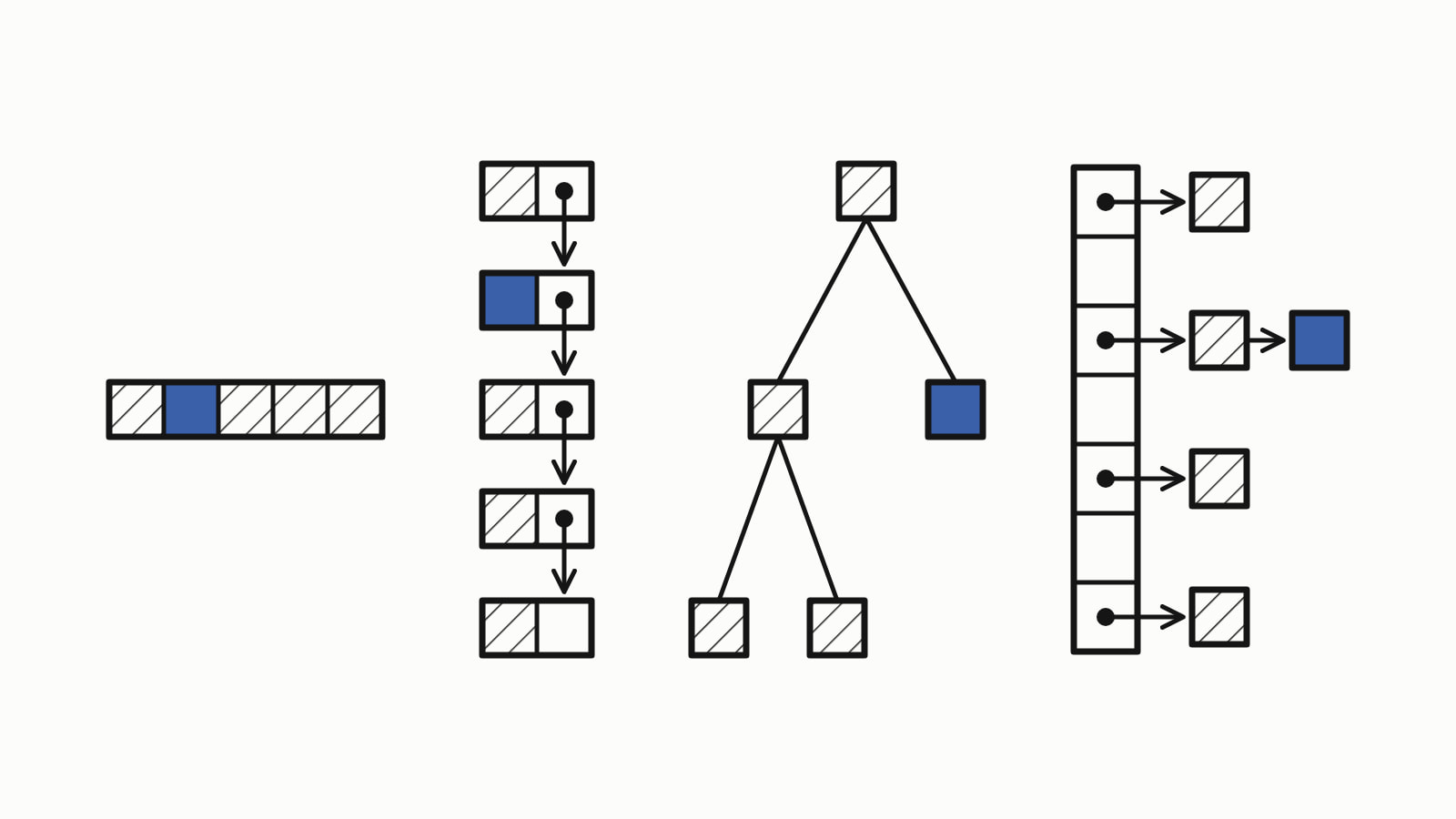
C++ data structures come ready-made, as containers in the standard library: std::vector for a dynamic array, std::array for a fixed one, std::list for a linked list, std::stack and std::queue, std::set and std::map for sorted data, and std::unordered_set and std::unordered_map for hash tables. Start with std::vector, and switch when you need what another one does better.
Three of them in one program: scores in a vector, the same scores by name in a map, and the latest ones on a stack.
#include <iostream>
#include <map>
#include <stack>
#include <string>
#include <vector>

int main() {
    std::vector<int> scores{90, 75};        // a dynamic array
    scores.push_back(82);
    std::cout << scores[0] << ", " << scores.size() << " scores\n";

    std::map<std::string, int> by_name;     // sorted by key
    by_name["Zoe"] = 90;
    by_name["Ana"] = 75;
    by_name["Max"] = 82;
    for (const auto& [name, score] : by_name)
        std::cout << name << ' ' << score << '\n';   // Ana, Max, Zoe

    std::stack<int> recent;                 // last in, first out
    for (int score : scores)
        recent.push(score);
    std::cout << "top " << recent.top() << '\n';     // 82
    recent.pop();
    std::cout << "top " << recent.top() << '\n';     // 75
}
— end example]
It printed:
90, 3 scores
Ana 75
Max 82
Zoe 90
top 82
top 75
— end example]
In the map’s loop, [name, score] is a structured binding (since C++17), which names the key and the value of each entry.
The samples are C++17 (Since When’s C++17 table), built with MSVC 19.44 and Clang 19.1 (MSVC STL) on Windows and with GCC 16.2 and Clang 23.1 (libc++) on Linux, and all four printed the same.
Which data structures does C++ have?
The standard library has a container for each common data structure, in four groups: sequences, adaptors that let you take only the next item, sorted containers and hash tables (cppreference’s containers library lists them all). In the costs, n is the number of elements: O(1) takes the same time at any size, O(log n) grows slowly with n, and O(n) in proportion to it. Amortized means on average over many calls. Each linked name has an answer of its own, most of them in the Standard library section.
| Data structure | Container | Header | Main costs |
|---|---|---|---|
| fixed-size array | std::array |
<array> |
index O(1) |
| dynamic array | std::vector |
<vector> |
index O(1); add at the end O(1) amortized; insert elsewhere O(n) |
| double-ended queue | std::deque |
<deque> |
index O(1); add at either end O(1) |
| doubly linked list | std::list |
<list> |
insert or erase at a known position O(1); no index |
| singly linked list | std::forward_list |
<forward_list> |
add at the front O(1) |
| stack: last in, first out | std::stack |
<stack> |
push, top, pop O(1) |
| queue: first in, first out | std::queue |
<queue> |
push, front, pop O(1) |
| priority queue (a heap) | std::priority_queue |
<queue> |
top O(1); push, pop O(log n) |
| sorted set | std::set |
<set> |
find, insert O(log n) |
| sorted map | std::map |
<map> |
find, insert O(log n) |
| sorted, with repeated keys | std::multiset, std::multimap |
<set>, <map> |
as std::set and std::map |
| hash set | std::unordered_set |
<unordered_set> |
find, insert O(1) average, O(n) worst |
| hash map | std::unordered_map |
<unordered_map> |
find, insert O(1) average, O(n) worst |
The standard sets the costs ([associative.reqmts] for the sorted containers, [unord.req] for the hashed ones) but not the sorted containers’ structure: std::set and std::map are usually red-black trees, one kind of balanced tree, but a library may meet O(log n) another way. The adaptors wrap another container: std::stack and std::queue keep their elements in a std::deque by default, and std::priority_queue in a std::vector.
The language has an array of its own too: the built-in array, such as int scores[3], fixed in size like std::array. On std::array, std::vector and std::deque, at(i) checks the index and throws std::out_of_range; [i] is not required to check.
How do you choose a data structure?
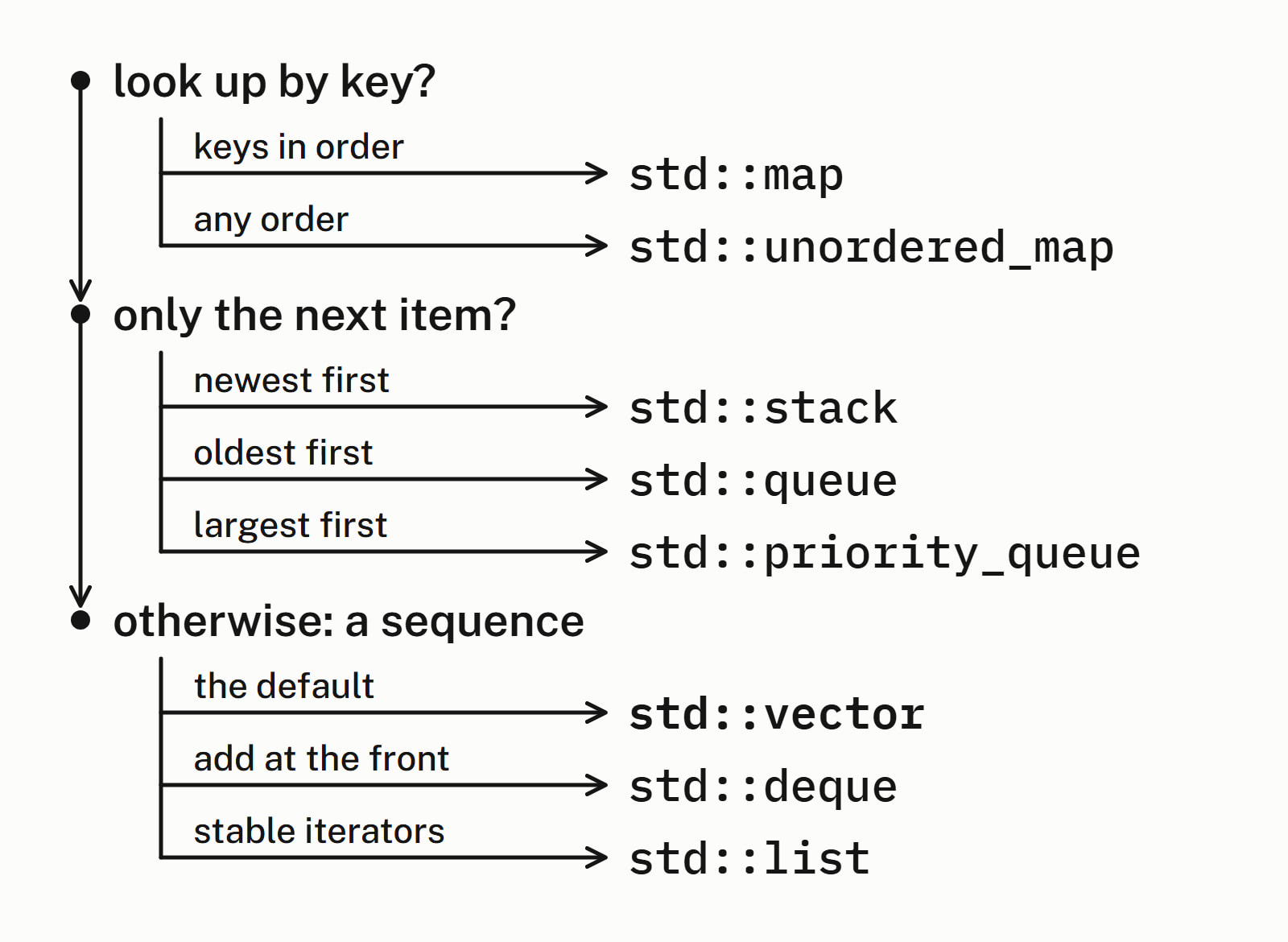
Start from what you do with the data, and ask three questions in order:
- Do you look things up by a key, such as a name? Use
std::unordered_map, orstd::mapif you need the keys in order. If you only need to know whether a value is there, the sets are the same pair:std::unordered_setorstd::set.std::unordered_mapneeds a hash for its key: the library has one for numbers and strings, but not for astd::pairor a struct of your own, whichstd::maptakes as long as the key has a<. - Do you only ever take the next item?
std::stackgives you the newest,std::queuethe oldest andstd::priority_queuethe largest. - Otherwise you have a sequence: use
std::vector, unless you add at the front often (std::deque) or need iterators, the library’s pointers into a container, to stay valid while you insert in the middle (std::list).
std::vector is the default because its elements sit side by side in one block of memory, with nothing stored between them, so a loop over it reads memory in order; std::deque and std::list do not keep theirs in one block. That is the C++ Core Guidelines’ reason for making it the default.
A lookup by name shows why the choice matters. In a vector of pairs, std::find_if compares each pair in turn, O(n); a std::unordered_map goes to the key’s bucket, the slot its hash picks, O(1) on average:
std::vector<std::pair<std::string, int>> roster{
    {"Zoe", 90}, {"Ana", 75}, {"Max", 82}};
auto is_max = [](const auto& p) { return p.first == "Max"; };
auto it = std::find_if(roster.begin(), roster.end(), is_max);
if (it != roster.end())                 // checks every pair in turn
    std::cout << "vector: " << it->second << '\n';

std::unordered_map<std::string, int> by_name{
    {"Zoe", 90}, {"Ana", 75}, {"Max", 82}};
auto found = by_name.find("Max");       // looks in one bucket
if (found != by_name.end())
    std::cout << "unordered_map: " << found->second << '\n';
— end example]
Both found 82: it printed vector: 82, then unordered_map: 82. The code is the same size; the cost is not: the vector’s search grows with the number of names, and the map’s, on average, does not.
What about structs, strings and pairs?
Except std::string, itself a container of characters, they are not containers but the pieces you put in one:
- A
structgroups named fields into one record, such as a name and a score. std::stringholds text, a sequence of characters you can index.std::pairholds two values together, as in the roster above; for more than two, usestd::tuple.std::bitsetholds a fixed row of bits, set and tested one by one.
Which data structures are not in the standard library?
There is no general tree, graph or trie among the standard containers; you build them from the ones that are there:
- a tree as nodes that own their children, in a
std::vectorfor example; - a trie as a node with a map of children, one per next letter;
- a graph as an adjacency list: for each node, a vector of its neighbours.
An undirected graph of four nodes as an adjacency list:
std::vector<std::vector<int>> graph(4);     // nodes 0, 1, 2, 3
auto add_edge = [&graph](int a, int b) {
    graph[a].push_back(b);                  // undirected: store
    graph[b].push_back(a);                  // the edge both ways
};
add_edge(0, 1);
add_edge(0, 2);
add_edge(1, 2);
add_edge(2, 3);

std::cout << "neighbours of 2:";
for (int next : graph[2])
    std::cout << ' ' << next;               // 0 1 3
std::cout << '\n';
— end example]
It printed neighbours of 2: 0 1 3.
What did C++23 and C++26 add?
C++23 added std::flat_map and std::flat_set, sorted like std::map and std::set but kept, by default, in std::vectors, side by side in memory: lookup is O(log n), insert and erase O(n) (cppreference on std::flat_set). C++26 adds std::inplace_vector, a vector with a fixed capacity and no heap allocation.
Of the compilers used for this article, std::flat_map built with GCC 16.2 and with Clang 23.1 on libc++, and std::inplace_vector with GCC 16.2 only. Microsoft’s library in MSVC 19.44 (Visual Studio 2022) has neither header; Since When’s C++23 table lists std::flat_map from Visual Studio 2026 18.6.
Questions
What are the data structures in C++?
The standard library’s containers: the sequences std::array, std::vector, std::deque, std::list and std::forward_list; the adaptors std::stack, std::queue and std::priority_queue; the sorted std::set and std::map; and the hash tables std::unordered_set and std::unordered_map. The language itself adds the built-in array, and a struct for a record.
Which data structure should I use by default in C++?
std::vector, from the header <vector>. It keeps its elements side by side in one block of memory, with nothing stored between them, so a loop over it reads memory in order; it reads any element by index in constant time and adds at the end in amortized constant time. Switch when you look things up by a key, only take the next item, or add at the front often.
Does C++ have a built-in hash map?
Yes, in the standard library: std::unordered_map, from the header <unordered_map>, since C++11, and std::unordered_set is the hash set. Finding or inserting a key takes constant time on average and, in the worst case, time linear in the size. Use std::map when you need the keys in sorted order.
Does C++ have a tree data structure?
Not a general one: no standard container gives you nodes and children to walk. std::set and std::map are sorted containers that libraries usually build as a red-black tree, a kind of balanced binary tree, but the standard requires their logarithmic costs, not a tree. For a tree of your own, write a node type that owns its children, for example in a std::vector.
What is the difference between the STL and the standard library?
STL, the Standard Template Library, was Alex Stepanov’s library of containers, iterators and algorithms, and it became the basis of that part of the C++ standard library; people still call that part the STL. The standard library is the whole of it, std::string and the input and output streams included. “STL containers” means std::vector, std::map and the other containers on this page.
Is an array a data structure in C++?
Yes. An array is a fixed-size row of elements of one type, read by index in constant time, and C++ has two: the built-in array, such as int scores[3], and std::array from the header <array>, since C++11. For a row that grows, use std::vector, the dynamic array.
Sources
- Containers librarycppreference.com
- [sequence.reqmts] RequirementsC++ standard working draft
- [associative.reqmts] Associative containers: requirementsC++ standard working draft
- [unord.req] Unordered associative containers: requirementsC++ standard working draft
- [priority.queue] Class template priority_queueC++ standard working draft
- std::flat_setcppreference.com
- SL.con.2: Prefer using STL vector by defaultC++ Core Guidelines