Standard Library[lib]
printf in C++: format specifiers, std::string and snprintf

- Section
- Standard Library [lib]
- Standard
- C++17
- Compilers
- MSVC 19.44, Clang 19.1 (MSVC STL), GCC 16.2, Clang 23.1 (libc++)
- Published
- Length
- 7 min read
In this answer7 clauses
- 1What are the printf format specifiers?
- 2How do width and precision work?
- 3How do you print a std::string with printf?
- 4What happens when the specifier is wrong?
- 4.1How do you print a size_t with printf?
- 5How do you printf to a string with snprintf?
- 6Can you mix printf and cout?
- 7printf, cout or std::print: which should you use?
Abstract
printf in C++ comes from <cstdio>: std::printf takes a format string and prints each argument where its specifier stands, %d for an int, %.2f for a double with two decimals, %s for a C string, %zu for a std::size_t. Pass a std::string as name.c_str(). A specifier that does not fit its argument is undefined behavior, so turn compiler warnings on. To format into a buffer or a std::string, use std::snprintf, which takes the buffer's size.
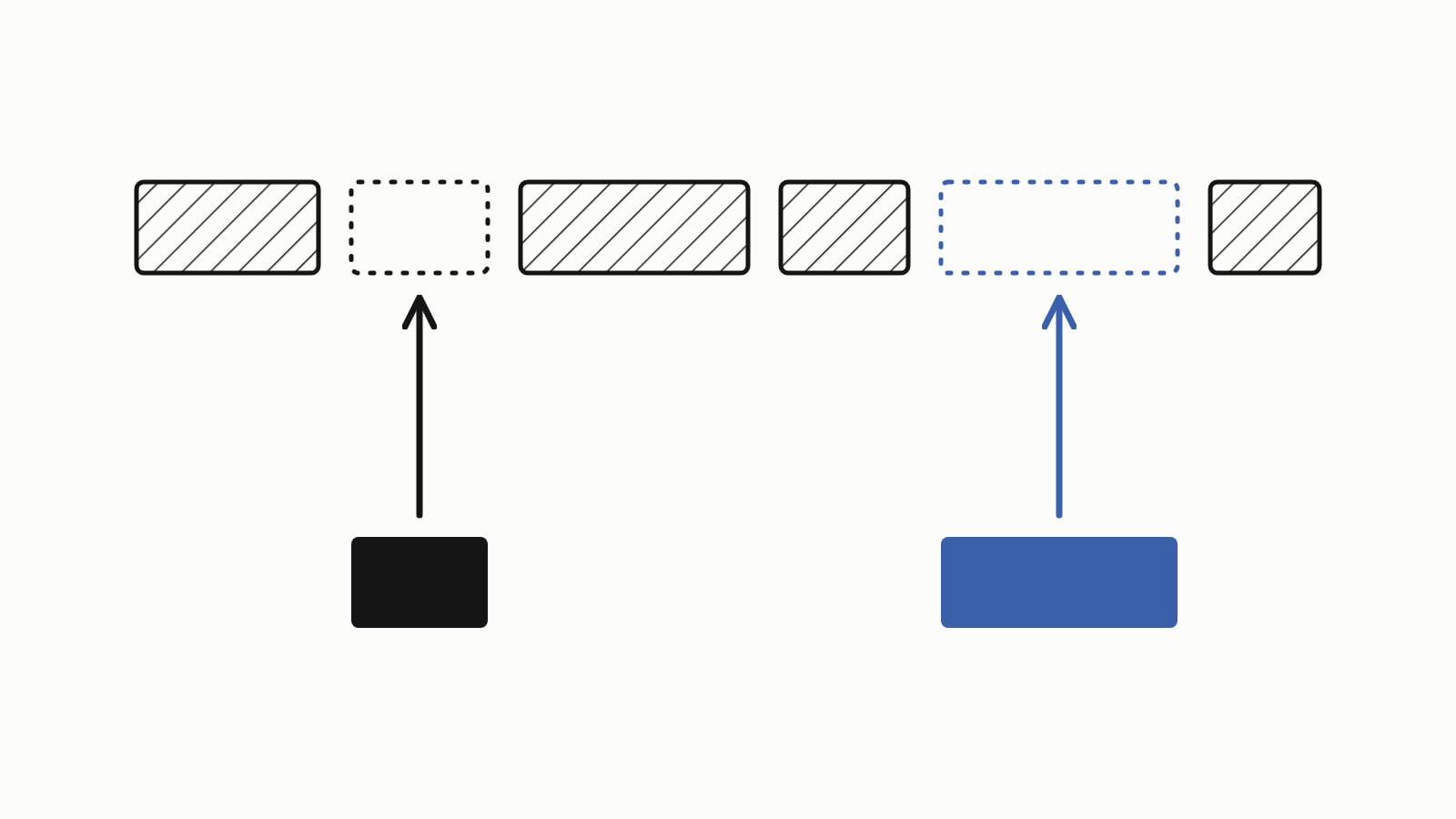
You can use printf in C++: include <cstdio> and call std::printf with a format string and the values to print. Each % specifier in the format string prints the next value: %d an int, %f a double, %s a C string. A std::string needs .c_str(), and a specifier that does not fit its value is undefined behavior.
#include <cstdio>

int main() {
    int items = 3;
    double price = 9.5;
    const char* customer = "Ada Lovelace";

    std::printf("%s: %d items at %.2f\n", customer, items, price);
}
— end example]
It printed Ada Lovelace: 3 items at 9.50. The samples on this page are C++17 (the last section’s is C++23), built with MSVC 19.44, Clang 19.1 (MSVC STL), GCC 16.2 and Clang 23.1 (libc++); all four printed the same unless a section says otherwise. Since When lists which compiler releases support each standard.
What are the printf format specifiers?
A specifier is a % and a letter that names the type of the argument it prints; a length modifier before the letter (l, ll, z) changes which integer type it expects. Each row is one line of a sample program, and all four printed the same (the full list of conversions):
| Specifier | Argument type | Value passed | Printed |
|---|---|---|---|
%d |
int |
3 |
3 |
%u |
unsigned int |
3u |
3 |
%ld |
long |
100000L |
100000 |
%lld |
long long |
10000000000LL |
10000000000 |
%zu |
std::size_t |
std::size_t{3} |
3 |
%f |
double |
9.5 |
9.500000 |
%.2f |
double |
9.5 |
9.50 |
%e |
double |
9.5 |
9.500000e+00 |
%c |
char, passed as an int |
'A' |
A |
%s |
const char*, a C string |
"Ada Lovelace" |
Ada Lovelace |
%x |
unsigned int, in hex |
255u |
ff |
%% |
no argument | nothing | % |
A float argument is converted to double, so %f prints a float too. %p prints a pointer, cast to const void*, in an implementation-defined form, one each implementation chooses: a null pointer printed as 0000000000000000 on the Windows builds and (nil) on the Linux ones.
How do width and precision work?
Between the % and the type letter go flags, a minimum width and, after a dot, a precision (decimals for %f, the most characters for %s): %8.2f prints a double with two decimals, padded to at least eight characters. Each specifier takes the next argument, in order (%*d takes two: the width, then the value):
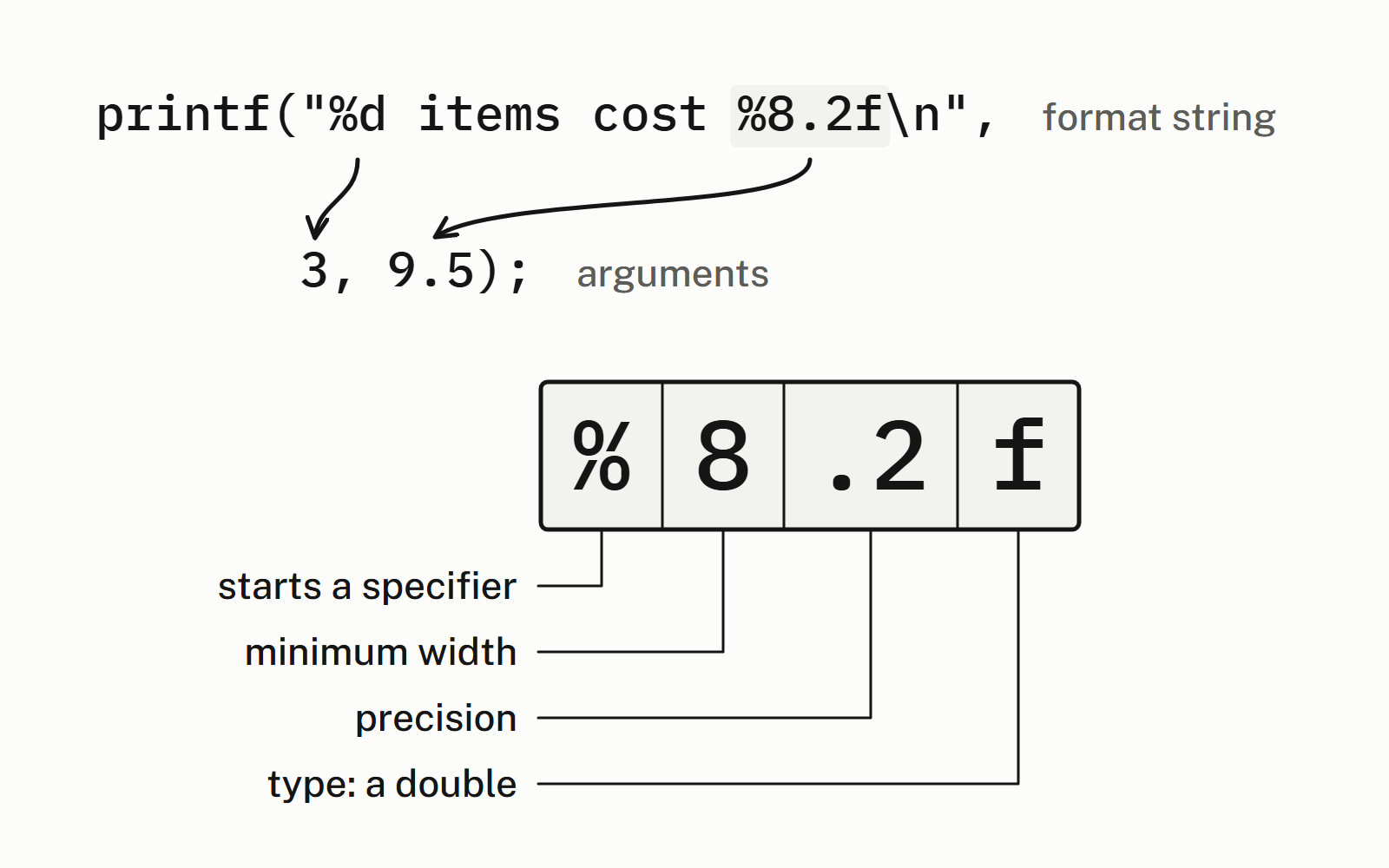
The first line is the figure’s call; below it, the bars show the padding and the comments give what all four printed:
std::printf("%d items cost %8.2f\n", 3, 9.5);  // width 8, 2 decimals
std::printf("|%5d|\n", 3);        // |    3|  width 5, right-aligned
std::printf("|%-5d|\n", 3);       // |3    |  - aligns left
std::printf("|%05d|\n", 3);       // |00003|  0 pads with zeros
std::printf("|%+d|\n", 3);        // |+3|     + always shows a sign
std::printf("|%8.2f|\n", 9.5);    // |    9.50|  width 8, 2 decimals
std::printf("|%.3s|\n", "Ada Lovelace");  // |Ada|  at most 3
std::printf("|%*d|\n", 5, 3);     // |    3|  width from an argument
std::printf("|%2d|\n", 12345);    // |12345|  width never cuts
— end example]
How do you print a std::string with printf?
Pass c_str(): %s wants a pointer to characters that end in '\0', and a std::string hands you one through c_str().
std::string customer = "Ada Lovelace";

std::printf("Customer: %s\n", customer.c_str());
std::printf("Name length: %zu\n", customer.size());
— end example]
It printed Customer: Ada Lovelace and Name length: 12. Passing the string itself, std::, is wrong. Clang refused to compile it on both libraries, because it cannot pass a non-trivial object (one whose copying or destruction runs code of its own) to a variadic function, one like printf that takes any number of arguments; it asked “did you mean to call the c_str() method?”. MSVC and GCC compiled it with only a warning (GCC’s needs -Wall).
What happens when the specifier is wrong?
The behavior is undefined, which means the standard places no requirement on what the program does. std::printf cannot check while the program runs that each value fits its specifier; compilers check it while compiling, when the format string is a literal. All four warned at the levels the samples use, /W4 and -Wall -Wextra, but GCC checks only with -Wall or -Wformat on, so turn the warnings on.
std::printf("%d\n", price); // wrong: %d wants an int— end example]
Clang’s warning names both types and suggests the fix:
warning: format specifies type 'int' but the argument has type 'double' [-Wformat]
   12 |     std::printf("%d\n", price);  // wrong: %d wants an int
      |                  ~~     ^~~~~
      |                  %f
— end example]
How do you print a size_t with printf?
Use %zu: the z says the argument is a std::size_t and the u that it is unsigned. A common mistake is %d for a count, since size() returns a std::size_t, not an int. Here items is a std::vector of three strings:
std::printf("%d items\n", items.size());  // wrong: not an int
// ...
std::printf("%zu items\n", items.size());  // prints 3 items
— end example]
All four warned, but only Clang suggested %zu; GCC’s %ld and MSVC’s %zd name signed types, so do not take their fix.
How do you printf to a string with snprintf?
std:: prints into a character array instead of the screen: it writes at most size - 1 characters and a closing '\0', and returns the length of the whole text, not counting the '\0', whether or not it fit. Here the buffer holds 16 characters:
char line[16];

int n = std::snprintf(line, sizeof line, "%d items", 3);
std::printf("[%s] returned %d\n", line, n);  // fits

// GCC and Clang warn here: they can see the text will not fit.
n = std::snprintf(line, sizeof line, "%s ordered %d items",
                  "Ada Lovelace", 3);
std::printf("[%s] returned %d\n", line, n);  // cut
if (n >= static_cast<int>(sizeof line)) {
    std::printf("cut: the full text needs %d characters\n", n);
}
— end example]
It printed [3 items] returned 7, then [Ada Lovelace or] returned 28 and cut: the full text needs 28 characters. A return value of size or more means the text was cut, and a negative one means an error.
To get a std::string, call snprintf twice. With a null buffer and a size of 0 it writes nothing and returns the length; then make a string one character longer, for the '\0', write into it and drop the '\0':
std::string order_line(const char* customer, int items, double price) {
    int size = std::snprintf(nullptr, 0, "%s: %d items at %.2f",
                             customer, items, price);
    if (size < 0) {
        return {};  // an encoding error
    }
    std::string text(size + 1, '\0');  // room for the final '\0'
    std::snprintf(text.data(), text.size(), "%s: %d items at %.2f",
                  customer, items, price);
    text.resize(size);  // drop the '\0'
    return text;
}
// ...
std::string text = order_line("Ada Lovelace", 3, 9.5);
std::printf("%s (%zu characters)\n", text.c_str(), text.size());
— end example]
It printed Ada Lovelace: 3 items at 9.50 (29 characters). Writing through text.data() needs C++17; before it, pass &text[0]. Since C++20, std::format returns the std::string in one call. Avoid sprintf: it takes no size, so nothing stops it writing past the end of the buffer.
Can you mix printf and cout?
Yes. By default the C++ streams are synchronized with C’s, so output from std::printf and std::cout comes out in the order your code writes it: four lines alternating the two came out in source order on all four. After std:: the C++ streams may buffer on their own, and that order is no longer promised (std::ios_base::sync_with_stdio).
printf, cout or std::print: which should you use?
Use std::print where your compilers have it, std::cout where they do not, and std::printf in code that is already written around it, with the warnings on. Here is the order line three ways:
std::printf("%s: %d items at %.2f\n",
            customer.c_str(), items, price);

std::cout << customer << ": " << items << " items at "
          << std::fixed << std::setprecision(2) << price << '\n';

std::println("{}: {} items at {:.2f}",
             customer, items, price);  // C++23: std::println
— end example]
All four built it as C++23 and printed Ada Lovelace: 3 items at 9.50 three times. Where the three ways differ:
| Way | Standard | A wrong type | A std::string |
|---|---|---|---|
std::printf |
any C++ | undefined behavior; a compiler warning at best | needs .c_str() |
std::cout |
any C++ | no format string to get wrong | passed as it is |
std::format, std::print |
C++20, C++23 | a compile error | passed as it is |
std::print is in GCC 14.1, Clang 18 and Visual Studio 2022 17.7 and later, as Since When lists. std::cout and its manipulators and std::print and std::println have pages of their own, and the rest of the standard library has its section.
Questions
Which header do you need for printf in C++?
Include <cstdio>, the C++ header that declares std::printf and std::snprintf. The C header <stdio.h> also works, but it declares them without the std::, so you call printf, not std::printf.
What does printf return?
The number of characters it wrote, or a negative value if an error occurred. For the line “Ada Lovelace: 3 items at 9.50″ and its newline, std::printf returned 30 with MSVC, GCC and both Clang builds: 29 characters and the newline.
What is the difference between printf and cout?
printf takes a format string whose specifiers tell it the type of each argument, and it cannot check them while the program runs: a wrong one is undefined behavior that only a compiler warning catches. std::cout takes values with the << operator, and the compiler picks the output for each type, std::string included. cout formats numbers through manipulators such as std::setprecision.
How do you print a double with two decimals in C++?
Use %.2f: the precision after the dot sets the number of decimals, so 9.5 prints as 9.50. Without a precision, %f prints six decimals (9.500000). Add a width, as in %8.2f, to pad the number to at least eight characters.
Is printf faster than cout?
It depends on the standard library and how it is set up, and nothing on this page measured it. Choose by what keeps the code correct, and time your own program if its output speed matters.
What is the difference between sprintf and snprintf?
snprintf takes the size of the buffer and never writes past it: when the size is not zero, it writes at most size - 1 characters and a closing null character, and it returns the length the full text needs, so you can tell when it was cut. sprintf takes no size, so nothing stops a long text from running past the end of the buffer. Use snprintf.
Sources
- std::printf, std::fprintf, std::sprintf, std::snprintfcppreference.com
- printf, fprintf, sprintf, snprintf (C)cppreference.com
- std::ios_base::sync_with_stdiocppreference.com
- std::formatcppreference.com
- std::printcppreference.com
- Options to Request or Suppress WarningsGCC