Tooling[tools]
clang-format: format C++ with a .clang-format file

- Section
- Tooling [tools]
- Standard
- C++17
- Compilers
- MSVC 19.44, Clang 19.1 (MSVC STL), GCC 16.2, Clang 23.1 (libc++)
- Published
- Length
- 8 min read
In this answer7 clauses
Abstract
clang-format is the LLVM tool that rewrites C++ source into one layout. Run clang-format -i main.cpp to format a file in place; it takes its rules from the nearest .clang-format file going up from the file’s folder, and the LLVM style when there is none. Start a file with clang-format --style=llvm --dump-config and edit it, and check formatting in CI with clang-format --dry-run --Werror, which exits with status 1 when a file would change.
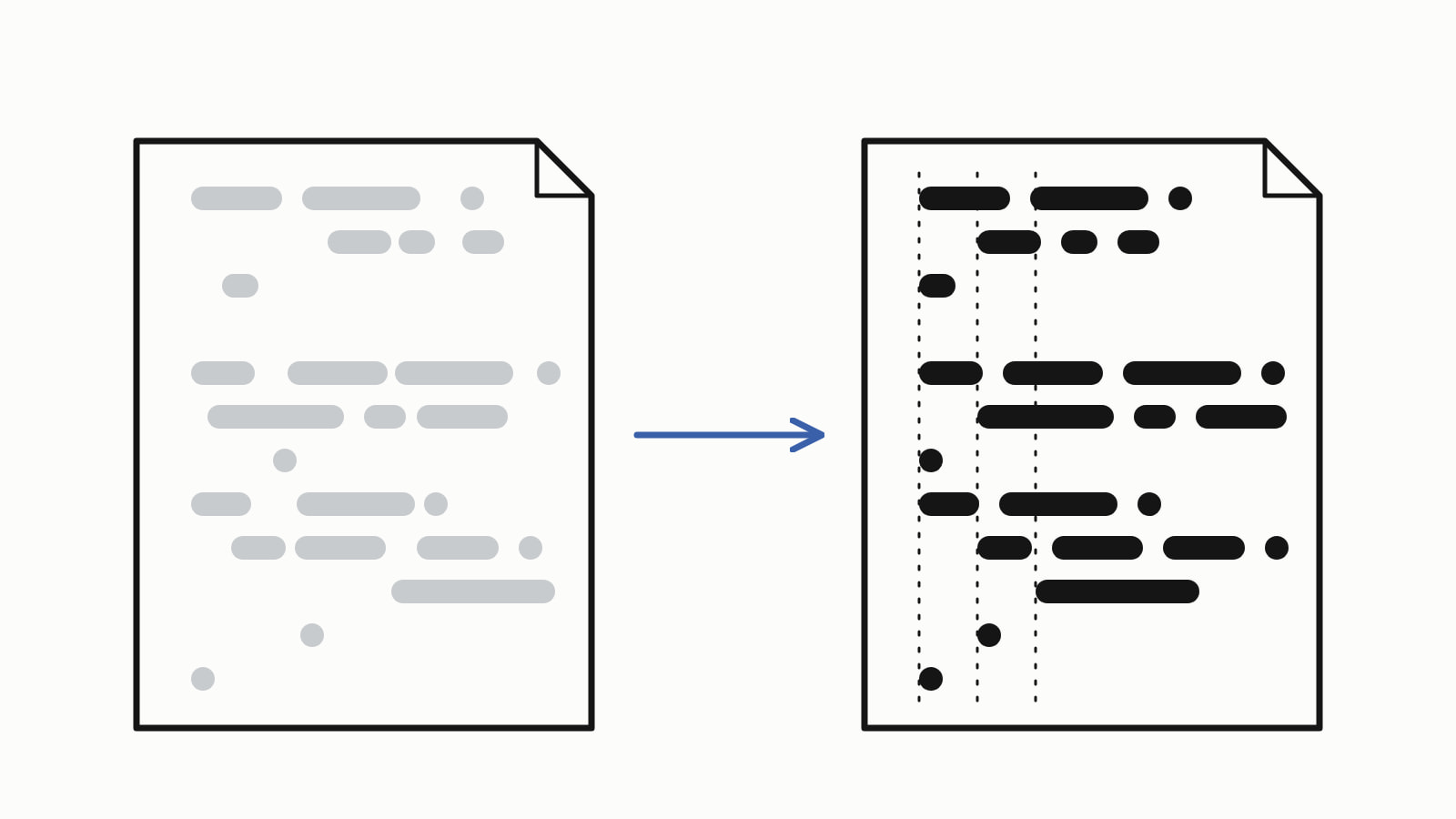
clang-format is the LLVM tool that rewrites C++ source code into one layout: indentation, spacing, line breaks, brace placement and, by default, the order of #include lines. Run clang-format -i main.cpp to format a file in place. It reads its rules from a .clang-format file in the file’s folder or a parent, and uses the LLVM style when it finds none.
Here is main.cpp, typed in a hurry: indents of 2 to 8 spaces, two brace styles, Item * beside Item*, operators without spaces. It builds and prints total: 1340 cents.
#include <string>
#include <iostream>

struct Item {
  std::string name;
      int qty;
  int price_cents;
};

int order_total(const Item *items,int count){
    int total=0;
  for(int i=0;i<count;++i)
  {
        const Item* item = &items[i];
        total += item->qty*item->price_cents;
  }
    return total;
}

int main()
{
    Item cart[] = {{"pen",3,120},{"pad",2,450},{"ink",1,80}};
      std::cout<<"total: "<<order_total(cart,3)<<" cents\n";
}
— end example]
Format it in place:
clang-format -i main.cpp— end example]
clang-format printed nothing and rewrote the file:
#include <iostream>
#include <string>

struct Item {
  std::string name;
  int qty;
  int price_cents;
};

int order_total(const Item *items, int count) {
  int total = 0;
  for (int i = 0; i < count; ++i) {
    const Item *item = &items[i];
    total += item->qty * item->price_cents;
  }
  return total;
}

int main() {
  Item cart[] = {{"pen", 3, 120}, {"pad", 2, 450}, {"ink", 1, 80}};
  std::cout << "total: " << order_total(cart, 3) << " cents\n";
}
— end example]
That is the LLVM style, because no .clang-format existed in the folder or above it: two-space indents, opening braces at the end of the line, the * beside the name, spaces around operators. It also sorted the two #include lines, <iostream> before <string>: all seven predefined styles sort includes.
Both versions are C++17 and print total: 1340 cents when built with MSVC 19.44, Clang 19.1 (MSVC STL), GCC 16.2 and Clang 23.1 (libc++); Since When has the first compiler release of each C++ feature. The clang-format runs here used clang-format 19.1.5, the copy Visual Studio 2022’s C++ Clang tools install. clang-format handles layout; clang-tidy, its sibling linter, checks what the code does.
Where does the .clang-format file go?
Put it at the root of your project. For each source file, clang-format uses the .clang-format or _clang-format in the closest folder going up from that file (Clang-Format Style Options), so a subfolder of vendored code can carry its own:
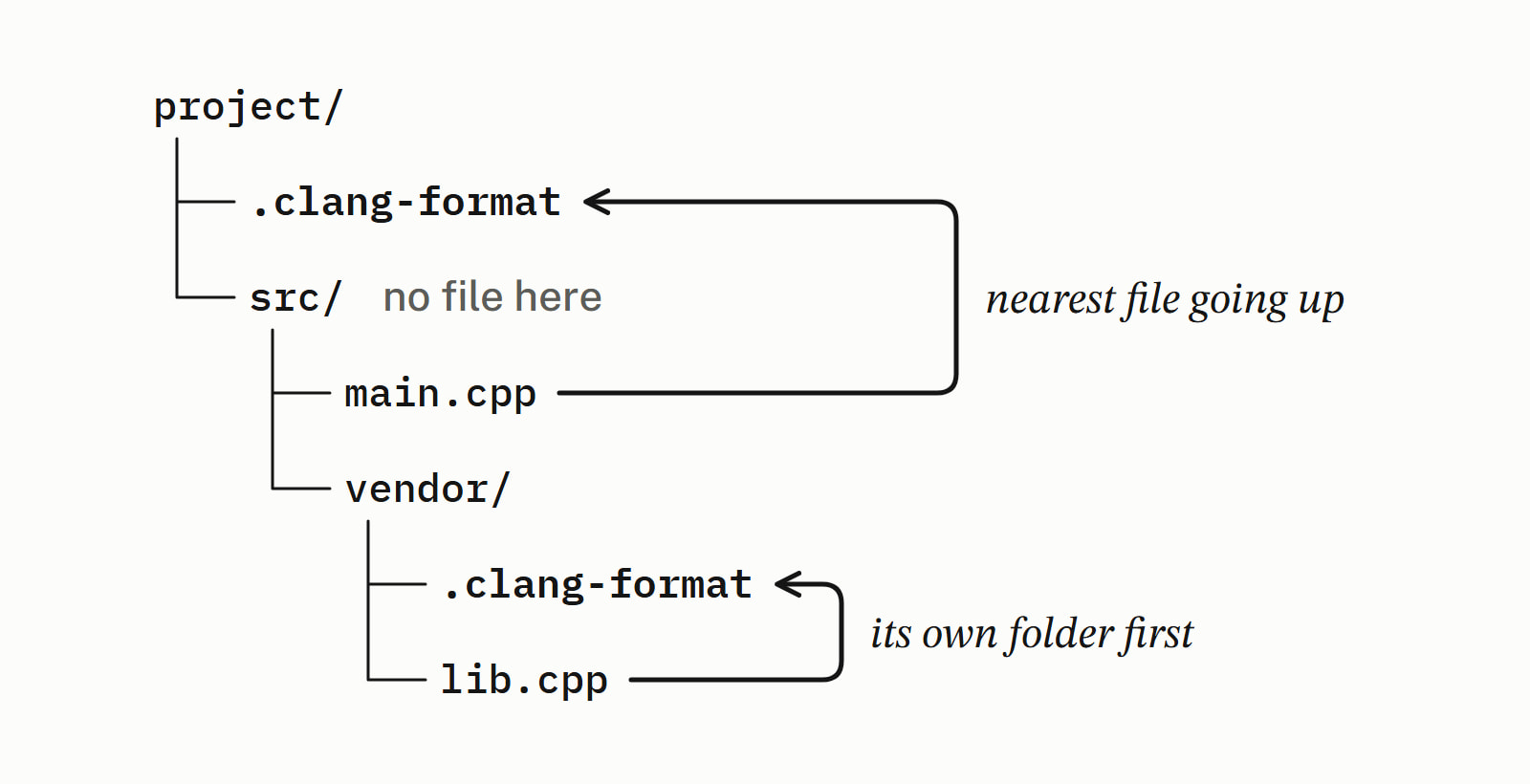
The nearer file replaces the farther one whole: a subfolder file holding only IndentWidth: 2 gave the LLVM style with that one change and nothing from the root’s file. Start it with BasedOnStyle: InheritParentConfig to build on the parent’s file instead. clang-format --dump-config src/main.cpp prints the settings a file gets.
The file is YAML: a BasedOnStyle line naming the style to start from, then only the options you change. This one keeps LLVM’s rules but indents by four, allows 100 columns, puts the * beside the type and each block’s opening brace on its own line:
BasedOnStyle: LLVM
IndentWidth: 4
ColumnLimit: 100
PointerAlignment: Left
BreakBeforeBraces: Allman
— end example]
With it in the project folder, clang-format -i main.cpp turned the first program into this (main changes the same way):
struct Item
{
    std::string name;
    int qty;
    int price_cents;
};

int order_total(const Item* items, int count)
{
    int total = 0;
    for (int i = 0; i < count; ++i)
    {
        const Item* item = &items[i];
        total += item->qty * item->price_cents;
    }
    return total;
}
— end example]
A misspelt key is an error, not a warning: with PointerAlignmnet: Left, clang-format printed error: unknown key 'PointerAlignmnet', exited with status 1 and left the file untouched. Enumerated values are case-sensitive, so PointerAlignment: left fails too, with unknown enumerated scalar.
What are the clang-format styles?
clang-format has seven predefined styles: LLVM, GNU, Google, Chromium, Microsoft, Mozilla and WebKit. clang-format --style=google --dump-config prints every option of a style. Here is how three of them set the options people change, as clang-format 19.1.5 dumped them:
| Option | LLVM | Microsoft | |
|---|---|---|---|
IndentWidth |
2 | 2 | 4 |
ColumnLimit |
80 | 80 | 120 |
BreakBeforeBraces |
Attach |
Attach |
Custom |
PointerAlignment |
Right |
Left |
Right |
DerivePointerAlignment |
false |
true |
false |
Allow |
All |
All |
None |
SortIncludes |
CaseSensitive |
CaseSensitive |
CaseSensitive |
Microsoft’s Custom braces go on their own line after classes, structs, functions, control statements, namespaces and enums, but not unions. Google’s DerivePointerAlignment: true follows the side a file already uses most: on a file that wrote Item * both times, --style=google kept Item *.
To start your own file, redirect a dump into .clang-format and edit it; the cheat sheet has the command for Git Bash and for PowerShell.
Which clang-format options do people change?
These six set indentation, line length, braces, pointers, include order and one-line functions; Clang-Format Style Options documents every other option.
| Option | What it controls | Common values |
|---|---|---|
IndentWidth |
Columns per indentation level | 2, 4 |
ColumnLimit |
The longest line; 0 means no limit |
80, 100, 120 |
BreakBeforeBraces |
Where an opening brace goes | Attach, Allman, Stroustrup, Custom |
PointerAlignment |
Where the * of a pointer sits |
Left, Right, Middle |
SortIncludes |
Whether #include lines are sorted |
Never, CaseSensitive, CaseInsensitive |
Allow |
Which short functions are joined onto one line | None, Empty, Inline, All |
On clang-format 19.1.5, SortIncludes takes those single words, and Never keeps the order you typed. Today’s documentation marks them deprecated in favor of a nested form (Enabled, IgnoreCase), which 19.1.5 rejected with unknown enumerated scalar, formatting nothing: check the documentation for your release.
How do you turn clang-format off for a block?
Put // clang-format off and // clang-format on around lines whose layout carries meaning, such as a matrix written row by row. The lines between keep their layout, indentation included; the two comments themselves are formatted. Both matrices below were typed in the same aligned rows, and the project’s .clang-format was applied:
// clang-format off
const int sobel_x[3][3] = {{ -1,  0,  1 },
                           { -2,  0,  2 },
                           { -1,  0,  1 }};
// clang-format on
const int sobel_y[3][3] = {{-1, -2, -1}, {0, 0, 0}, {1, 2, 1}};
— end example]
sobel_y, outside the markers, came out on one line. A reason may follow a colon, as in // clang-format off: one row per line, and /* clang-format off */ works as well.
How do you check formatting in CI?
Run clang-format --dry-run --Werror on the files: it changes nothing, reports each place that would change, and exits with status 1 if there is one. On the unformatted main.cpp it printed 40 diagnostics for 24 lines; the first two:
main.cpp:1:1: error: code should be clang-formatted [-Wclang-format-violations]
#include <string>
^
main.cpp:5:20: error: code should be clang-formatted [-Wclang-format-violations]
  std::string name;
                   ^
— end example]
1:1 is the include order; 5:20 is the end of line 5, where line 6’s wrong indent begins. The exit status was 1, and on the formatted file the same command printed nothing and exited 0. Without --Werror the same places are warnings and the status is 0, so a CI step without it passes unformatted code.
To check a whole tree in Git Bash, run find . \( -name '*.cpp' -o -name '*.h' \) -exec clang-format --dry-run --Werror {} +. To format only the lines you changed, the ClangFormat documentation gives git clang-format, which with no arguments formats your staged changes.
How do you use clang-format in VS Code, Visual Studio and CLion?
All three can use the project’s .clang-format:
- VS Code’s C/C++ extension formats with clang-format by default (an
.editorconfigwith formatting settings switches it to vc_format), with its style set tofile; with no file, itsC_Cpp.setting applies (Editing and Navigating C++ Code). Turn onclang_format_fallback Style editor.formatOnSaveto format on every save. - Visual Studio has ClangFormat support on by default and uses a
.clang-formatfile in a project folder for that folder and its subfolders; Format Document is Ctrl+K, Ctrl+D (Visual Studio’s C/C++ formatting options). - CLion, once you enable ClangFormat in its status bar (it is off by default), reads
.clang-formatand_clang-formatfiles through the project tree, each applying to its folder and below (CLion’s ClangFormat help).
To choose among them, see which C++ IDE to install; Toolchain lists the compilers, IDEs and analyzers a C++ team installs, and Tooling has more answers on builds and analysis.
A clang-format cheat sheet
| You want | Command |
|---|---|
| Format a file in place | clang-format -i main.cpp |
| Print the formatted file, change nothing | clang-format main.cpp |
| Check without changing (CI) | clang-format --dry-run --Werror main.cpp |
| Use another style once | clang-format --style=google main.cpp |
| See the settings a file gets | clang-format --dump-config src/main.cpp |
Write a starting .clang-format (Git Bash) |
clang-format --style=llvm --dump-config > .clang-format |
Write a starting .clang-format (PowerShell) |
clang-format --style=llvm --dump-config | Out-File -Encoding utf8 .clang-format |
Format every .cpp and .h in a folder (Git Bash) |
find . \( -name '*.cpp' -o -name '*.h' \) -exec clang-format -i {} + |
Format every .cpp and .h in a folder (PowerShell) |
Get-ChildItem -Recurse -Include *.cpp, *.h | ForEach-Object { clang-format -i $_.FullName } |
Questions
Where do I get clang-format?
On Windows, Visual Studio 2022’s C++ Clang tools install it in VC\Tools\Llvm\x64\bin under the Visual Studio folder. That folder is not on PATH in an ordinary shell; a Developer Command Prompt for VS 2022 puts it there, and clang-format --version prints the release. On Ubuntu it is the clang-format package (sudo apt install clang-format), and on macOS Homebrew has a clang-format formula. VS Code’s C/C++ extension and CLion each ship their own copy for formatting in the editor.
What style does clang-format use by default?
The one in the nearest .clang-format file, since --style=file is the default. With no such file in the folder or above it, clang-format falls back to the LLVM style: two-space indents, an 80-column limit and the opening brace at the end of the line. --fallback-style=none makes it skip formatting instead.
How do I create a .clang-format file?
Dump a predefined style into it and edit the result: clang-format --style=llvm --dump-config > .clang-format in Git Bash. In Windows PowerShell, whose > can write UTF-16 that clang-format cannot read, use clang-format --style=llvm --dump-config | Out-File -Encoding utf8 .clang-format. A short file works too: a BasedOnStyle line and only the options you change.
What is the difference between clang-format and clang-tidy?
clang-format changes how the code is laid out: indentation, spaces, line breaks, braces and the order of #include lines. clang-tidy is LLVM’s linter: it parses the code the way the compiler does and reports bugs, outdated constructs and style problems, many with a fix it can write into the file.
Can clang-format break my code?
It can reorder your #include lines: all seven predefined styles sort them (SortIncludes: CaseSensitive), and with no .clang-format, clang-format 19.1.5 moved iostream above string. That changes behavior when the order of the headers matters; SortIncludes: Never keeps the order you typed. Options that edit tokens, such as InsertBraces, RemoveParentheses and QualifierAlignment, are off in those styles, and the documentation warns that each could lead to incorrect code.
Does clang-format work for C?
Yes. Its documentation says clang-format formats C, C++, Java, JavaScript, JSON, Objective-C, Protobuf and C# code. On clang-format 19.1.5, a .c file in the project folder was formatted by the same .clang-format as main.cpp.
Sources
- ClangFormatClang documentation
- Clang-Format Style OptionsClang documentation
- Options, Text Editor, C/C++, FormattingMicrosoft Learn
- Editing and Navigating C++ CodeVisual Studio Code
- ClangFormat as alternative formatterJetBrains