Tooling[tools]
Best C++ IDE: which to install on Windows, Mac or Linux

- Section
- Tooling [tools]
- Standard
- C++17
- Compilers
- MSVC 19.44, Clang 19.1 (MSVC STL), GCC 16.2, Clang 23.1 (libc++)
- Published
- Length
- 6 min read
In this answer7 clauses
Abstract
The best C++ IDE depends on your system: Visual Studio on Windows, whose Community edition is free for individual developers, classroom learning, academic research and open source; Xcode or VS Code on a Mac; VS Code or CLion on Linux or for a CMake project on several systems; Qt Creator for Qt applications. An IDE is not a compiler: it runs one, such as MSVC, GCC or Clang; Visual Studio installs MSVC for you, and with VS Code you install one yourself.

The best C++ IDE depends on your system. On Windows it is Visual Studio, whose Community edition is free for individual developers. On a Mac it is Xcode, or Visual Studio Code with a C++ extension. On Linux, or for a CMake project that must build everywhere, it is CLion or Visual Studio Code. For a Qt application it is Qt Creator.
| Your case | Install | Runs on | License |
|---|---|---|---|
| Windows | Visual Studio Community | Windows | Free for individuals, classroom learning, research and open source |
| macOS | Xcode, or VS Code | Xcode: macOS; VS Code: all three | Both free |
| Linux | VS Code or CLion | Windows, macOS, Linux | VS Code: free; CLion: free for non-commercial use |
| One CMake project on several systems | CLion or VS Code | Windows, macOS, Linux | CLion: free for non-commercial use; VS Code: free |
| A Qt application | Qt Creator | Windows, macOS, Linux | GPL version 3 with Qt’s exception, or commercial |
Every product fact here comes from the vendor’s own pages, checked on November 12, 2026. The sample programs near the end are C++17, built with MSVC 19.44, Clang 19.1 (MSVC STL), GCC 16.2 and Clang 23.1 (libc++); Since When lists the first compiler releases for each C++ feature.
Visual Studio: the best C++ IDE on Windows
On Windows, install Visual Studio: Microsoft’s IDE brings its own compiler (MSVC), its debugger and its code completion (IntelliSense) in one installer. Choose the “Desktop development with C++” workload when the installer asks (Microsoft’s install guide). Visual Studio opens CMake projects directly, to edit, build and debug them.
The Community edition “is for individual developers, classroom learning, academic research, and open source development”; a company that is not an enterprise may also use it for up to five users, and other uses need Professional or Enterprise. Its C++ tools are for Windows: the same guide says Visual Studio for Mac doesn’t support Microsoft C++. To target Linux from Windows, add the “Linux development with C++” workload.
Visual Studio Code: an editor you turn into a C++ IDE
Visual Studio Code is a free code editor for Windows, macOS and Linux that becomes a C++ IDE once you add an extension and a compiler. Microsoft’s C/C++ extension adds code completion and hovers (IntelliSense), error checking and debugging, but it “doesn’t include a C++ compiler or debugger” (C/C++ for Visual Studio Code). You install one yourself: the extension supports MSVC, Clang and GCC on Windows, and Clang and GCC on macOS and Linux.
For a CMake project, add the CMake Tools extension, which “integrates Visual Studio Code and CMake to make it easy to configure, build, and debug your C++ project”. VS Code is “free for private or commercial use”, its FAQ says. Pick VS Code when you want one editor for several languages or several machines.
CLion: one C++ IDE on Windows, macOS and Linux
CLion is JetBrains’ C++ IDE for all three systems. It opens CMake, Makefile and Meson projects out of the box, debugs with GDB everywhere and with LLDB on macOS and Linux, and has clang-tidy built in. On Windows it comes with its own compiler toolchain, MinGW, as the default, and can use MSVC, which its Windows guide lists for Visual Studio 2017, 2019 and 2022.
The license is the catch. JetBrains gives “a free non-commercial license for CLion”, and its examples of non-commercial use are “learning and self-education, any form of content creation, open source, and hobby development” (CLion’s licensing help). Work that brings you commercial benefit, “either now or in the future”, needs a commercial license; if you are unsure, JetBrains says, “it is safer to choose a commercial license”.
Xcode on a Mac, Qt Creator for Qt apps
Xcode is the pick for apps on Apple platforms, Qt Creator the pick for Qt applications. Xcode is Apple’s IDE, free on the Mac App Store and for macOS only, and it builds C++: Apple supports C++ “with the Apple Clang compiler (included in Xcode) and the libc++ C++ standard library runtime” (C++ Language Support).
Qt Creator runs on Windows, macOS and Linux, works with CMake, and drives GDB on most platforms, LLDB on macOS and Linux, and CDB with Microsoft’s toolchain on Windows. It is available under the GPL version 3 with The Qt Company GPL Exception 1.0, or under a commercial license from The Qt Company.
Longer lists of C++ IDEs also name Code::Blocks: open source under the GPLv3, on all three systems, with GCC, MSVC or Clang and the GDB debugger.
IDE vs compiler: is an IDE a compiler?
No. An IDE is the workbench: the editor, code completion, a build button and a debugger window. The compiler is a separate program, MSVC, GCC or Clang, that turns your source into a program (what a compiler does); when you press build, the IDE runs it, directly or through a build system such as CMake that runs it for you.
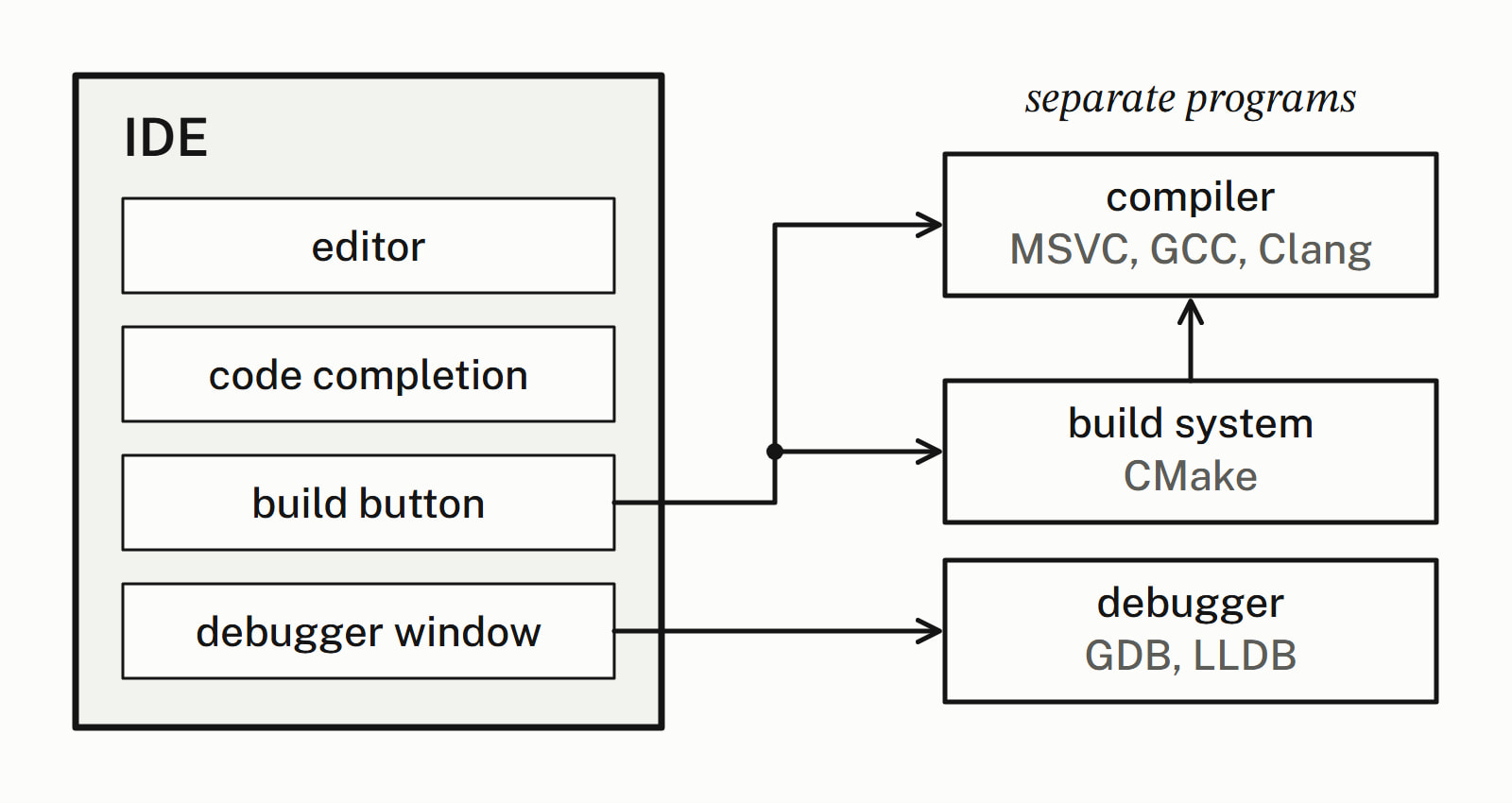
Visual Studio installs MSVC with the IDE, and CLion brings MinGW on Windows. With VS Code you install the compiler yourself. On a Mac, VS Code’s macOS guide has you run one command for “the command line developer tools, which include Clang”:
xcode-select --install— end example]
On Ubuntu, VS Code’s Linux guide installs GCC and the GDB debugger with sudo apt-get update and then sudo apt-get install build-essential gdb. Which of the two compilers to prefer is answered in GCC or Clang. Toolchain lists compilers and debuggers with their platforms, and Tooling covers build systems, debuggers and analyzers.
What should a beginner install first?
Install the pick for your system: Visual Studio on Windows, Xcode or VS Code on a Mac, VS Code or CLion on Linux. Then build the smallest whole program, to prove the compiler and the IDE work together:
#include <iostream>

int main() {
    std::cout << "Hello, C++!\n";
}
— end example]
It printed Hello, C++! with all four compilers.
Next, turn the warnings on: /W4 for MSVC, -Wall -Wextra for GCC and Clang. The IDE shows a warning under the line as you type or build, and some warnings are bugs. Here = stores 0 where == was meant:
int passed = 2;  // students who passed the exam
if (passed = 0) {  // meant passed == 0: = stores 0 instead
    std::cout << "Nobody passed\n";
}
— end example]
All four compilers warned, and Clang’s wording is the only one that suggests the fix:
warning: using the result of an assignment as a condition without parentheses [-Wparentheses]
note: use '==' to turn this assignment into an equality comparison
— end example]
A debugger earns its place the first time a program prints the wrong number. An average of the exam scores 80, 90 and 95 printed Average: 88, not 88.33, and no compiler warned; stepping through it and watching total / 3 shows why: dividing an int by an int drops the fraction.
Best IDE for C++: the short rule
| You want | Install |
|---|---|
| Compiler, debugger and IDE in one installer, on Windows | Visual Studio |
| One editor on every machine, for several languages | VS Code |
| A full IDE on Linux or macOS, with CMake | CLion |
| Apps for Apple platforms | Xcode |
| A Qt application | Qt Creator |
Questions
Is Visual Studio Code an IDE for C++?
Not on its own: VS Code is a free code editor that works as a C++ IDE once you add a C++ extension and a compiler. Microsoft’s C/C++ extension adds IntelliSense, debugging and code formatting but includes no compiler or debugger, so you install MSVC, GCC or Clang yourself. The clangd extension, published by LLVM, is another way to get code completion.
Is Visual Studio free for C++?
The Community edition is free for individual developers, classroom learning, academic research and open source development. Microsoft’s Community page also allows a non-enterprise organization up to five users for other work, while an enterprise (over 250 PCs, or above a revenue limit) may use it only for open source, academic research and classroom learning. Other uses need Visual Studio Professional or Enterprise.
Is CLion free?
For non-commercial use, yes: JetBrains gives a free non-commercial license for learning, content creation, open source and hobby development. Work that brings commercial benefit, now or in the future, needs a commercial license, and JetBrains advises the commercial one when you are unsure. The free license lasts a year and renews if you used CLion in its last six months. Under it, CLion sends anonymized statistics to JetBrains, and the only way to opt out is a paid subscription or one of the complimentary licensing options.
What is the best C++ IDE for Mac?
Xcode, Apple’s free IDE from the Mac App Store, which includes the Apple Clang compiler, when you also build apps for Apple platforms; otherwise VS Code with Clang, which VS Code’s C/C++ extension supports on macOS. CLion and Qt Creator run on macOS too.
How do you get a C++ compiler on a Mac?
Run xcode-select --install: it installs Apple’s command line developer tools, a package separate from Xcode, which include Clang. Installing Xcode from the Mac App Store also gives you a compiler, because Apple supports C++ with the Apple Clang compiler included in Xcode. VS Code’s C/C++ extension supports Clang on macOS.
Do you need an IDE to write C++?
No. A text editor and a compiler run from the command line are enough, because the compiler, not the IDE, turns source code into a program. An IDE adds code completion, a build button, a debugger window and the compiler’s warnings shown under the line.
Sources
- Install C and C++ support in Visual StudioMicrosoft Learn
- Visual Studio CommunityMicrosoft
- C/C++ for Visual Studio CodeVisual Studio Code
- Register CLionJetBrains
- CLion featuresJetBrains
- Qt Creator: AcknowledgementsQt Documentation
- XcodeMac App Store
- C++ Language SupportApple Developer