Standard Library[lib]
Binary search in C++: code and std::binary_search

- Section
- Standard Library [lib]
- Standard
- C++17
- Compilers
- MSVC 19.44, Clang 19.1 (MSVC STL), GCC 16.2, Clang 23.1 (libc++)
- Published
- Length
- 7 min read
In this answer7 clauses
Abstract
Binary search finds a value in a sorted range by looking at the middle element and dropping the half that cannot hold it, so 1,000,000 elements take at most 20 steps. In C++, write the loop with mid = low + (high - low) / 2, or call std::binary_search for a yes or no and std::lower_bound for the position, both in <algorithm>. Unless the range is sorted by the ordering the search uses (or at least partitioned around the value), the behavior is undefined.
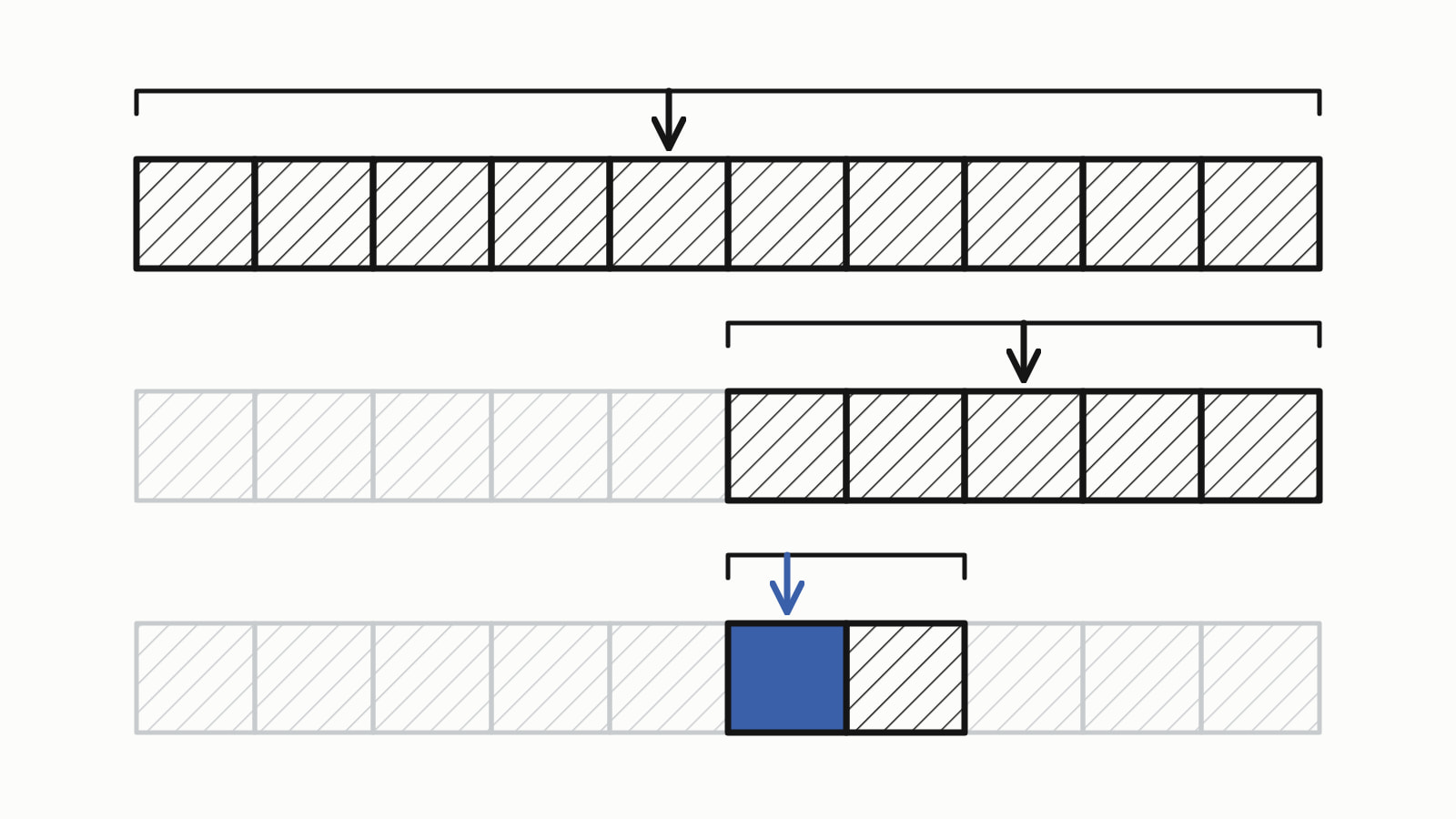
Binary search in C++ finds a value in a sorted range by comparing it with the middle element and throwing away the half that cannot hold it, so it needs about log2(n) steps instead of n. Write the loop yourself, or call std::binary_search for a yes or no and std::lower_bound for the position, both in <algorithm>.
The loop as a whole program, returning the index of the value in a sorted std::vector, or -1:
#include <iostream>
#include <vector>

int binary_search(const std::vector<int>& v, int target) {
    int low = 0;
    int high = static_cast<int>(v.size()) - 1;

    while (low <= high) {
        int mid = low + (high - low) / 2;

        if (v[mid] == target) {
            return mid;          // found: its index
        }
        if (v[mid] < target) {
            low = mid + 1;       // the value can only be right of mid
        } else {
            high = mid - 1;      // the value can only be left of mid
        }
    }
    return -1;                   // nothing left to search: not there
}

int main() {
    std::vector<int> v{3, 8, 15, 21, 34, 42, 57, 63, 71, 90};

    std::cout << binary_search(v, 57) << '\n';
    std::cout << binary_search(v, 40) << '\n';
}
— end example]
It printed 6 for 57 (indexes start at 0) and -1 for 40.
The code is written for C++17 (Since When’s C++17 table). The samples were built with MSVC 19.44, Clang 19.1 (MSVC STL), GCC 16.2 and Clang 23.1 (libc++), and for each one shown here all four printed the same.
How does binary search work?
Binary search keeps two indexes, low and high, around the part of the vector that can still hold the value, and looks at the element halfway between them, v[mid]:
- Equal to the value: found, return
mid. - Less than the value: the value can only be to its right, so
low = mid + 1. - Greater: it can only be to its left, so
high = mid - 1.
When low passes high, nothing is left to search and the function returns -1. The search for 57 takes four steps:
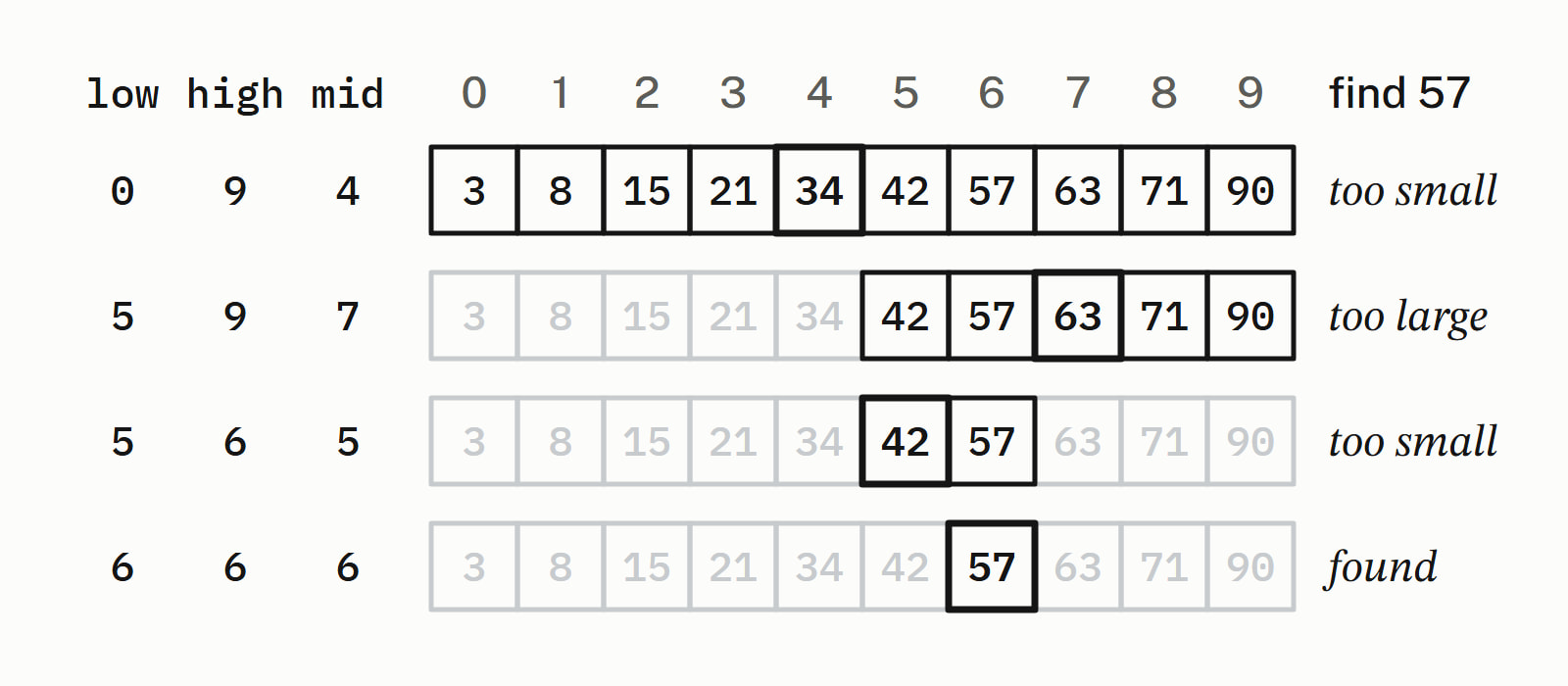
The search for 40 looks at the same 34, 63 and 42; then high drops to 4, below low at 5, and after three steps the function returns -1. Each step halves what is left, so the steps grow with the logarithm of the size: a sorted vector of 1,000,000 elements takes the loop at most 20 steps, found or not.
Why low + (high - low) / 2?
Because (low + high) / 2 can overflow and low + (high - low) / 2 cannot. When a range holds more than 2^30 (1,073,741,824) elements, two large int indexes can add up to more than the largest int, 2,147,483,647 with the 32-bit int of all four compilers. Signed overflow is undefined behavior: the standard puts no requirement on what the program does.
With indexes that large, (low + high) / 2 gave a negative middle on all four compilers, while low + (high - low) / 2 found the value, because high - low always fits in an int.
Since C++20, std:: from <numeric> computes the middle without overflowing.
What do std::binary_search, lower_bound and upper_bound return?
std::binary_search returns a bool: true when an element equivalent to the value, neither less nor greater, is in the range. The other three return iterators, positions in the vector, and all four are in <algorithm>:
| Function | Returns | Use it for |
|---|---|---|
std::binary_search |
true or false |
is the value there |
std::lower_bound |
the first element not less than the value | its position, or where it would go |
std::upper_bound |
the first element greater than the value | the end of a run of equal values |
std::equal_range |
both bounds, as a pair | every element equal to the value |
When no element qualifies, a bound is the end iterator. Here are the four calls on the same vector with a second 57, {3, 8, 15, 21, 34, 42, 57, 57, 63, 71, 90}, each iterator printed as an index (the iterator minus v.begin()):
bool found = std::binary_search(v.begin(), v.end(), target);
auto lower = std::lower_bound(v.begin(), v.end(), target);
auto upper = std::upper_bound(v.begin(), v.end(), target);
auto [first, last] = std::equal_range(v.begin(), v.end(), target);
— end example]
For 57 and 40 it printed:
57
  binary_search  true
  lower_bound    6
  upper_bound    8
  equal_range    6 to 8
40
  binary_search  false
  lower_bound    5
  upper_bound    5
  equal_range    5 to 5
— end example]
The two 57s sit at indexes 6 and 7, between the bounds. For the missing 40, both bounds point at 42, index 5, where 40 would be inserted, and equal_range is empty.
How do you get the index of the element?
Call std::lower_bound, check that the iterator is not end() and points at the value, and subtract begin(); std::binary_search only answers yes or no.
auto it = std::lower_bound(v.begin(), v.end(), target);
if (it != v.end() && *it == target) {
    std::cout << target << ": index " << it - v.begin() << '\n';
} else {
    std::cout << target << ": not found\n";
}
— end example]
It printed 57: index 6 and 40: not found. Both tests are needed: for 40, lower_bound returns the 42, a real element that is not the value, and for anything above 90 it returns end(), past the last element, where there is nothing to read.
On a built-in array a of n elements, pass a and a + n; it - a is the index.
How do you write binary search recursively?
Give the function low and high as parameters and let it call itself on the half that can still hold the value; a two-argument overload starts it on the whole vector:
int binary_search(const std::vector<int>& v, int target,
                  int low, int high) {
    if (low > high) {
        return -1;               // nothing left to search: not there
    }
    int mid = low + (high - low) / 2;
    if (v[mid] == target) {
        return mid;
    }
    if (v[mid] < target) {
        return binary_search(v, target, mid + 1, high);   // right
    }
    return binary_search(v, target, low, mid - 1);        // left
}

int binary_search(const std::vector<int>& v, int target) {
    return binary_search(v, target, 0, static_cast<int>(v.size()) - 1);
}
— end example]
It printed 6 and -1, like the loop. The recursive function reads closer to the definition, but every step is one more function call, where the loop only moves an index.
What if the vector is not sorted?
Then the behavior is undefined. The four functions require the elements to be sorted by the ordering the search uses, or at least partitioned around the value: the smaller elements first, the greater ones last.
In ordinary builds that meant a wrong answer and no error: on {42, 8, 90, 15, 57, 3, 71, 21, 63, 34}, std::binary_search returned false for 57 on all four compilers, while std::find found it. Only GCC’s library in its debug mode (-D_GLIBCXX_DEBUG) stopped the program, with a message that the range is not partitioned; the checking modes of Microsoft’s library and of libc++ reported nothing.
Sort first with std::sort, and search with the ordering you sorted by. A vector sorted from largest to smallest with std::greater<>() needs that same comparator, the function that decides which of two elements comes first, in the search too (how to write comparators for std::sort and std::map):
std::sort(v.begin(), v.end(), std::greater<>());   // 90 71 ... 3

bool found = std::binary_search(v.begin(), v.end(), 57,
                                std::greater<>());
// Wrong: v is sorted by >, but this call searches by <.
bool mismatch = std::binary_search(v.begin(), v.end(), 57);
— end example]
It printed true for the search with the comparator and false for the one without, on all four, though 57 is in the vector.
Binary search, std::find or a set: which one?
Use binary search on a sorted vector you search often, std::find on data that is not sorted, and a std::set or std::map when the data changes between searches:
| Your data | Call | Comparisons |
|---|---|---|
| Not sorted | std::find |
up to one per element |
| A sorted vector, searched often | std::lower_bound or std::binary_search |
at most about log2(n) |
| Changes between searches | the set’s or the map’s own find |
logarithmic |
On a std::list, or with a set’s iterators, std::lower_bound makes a logarithmic number of comparisons but a linear number of steps, walking from element to element to each middle; a set or a map has its own logarithmic lower_bound. The other algorithms and containers are in Standard library.
Questions
What is the worst case time complexity of binary search?
O(log n): each step halves the part of the range that can still hold the value, so a sorted range of 1,000,000 elements takes at most 20 steps, found or not. The best case is O(1), when the first middle element is the value. std::binary_search and std::lower_bound make at most about log2(n) comparisons.
Does binary search work on an unsorted array?
No. Binary search needs the elements sorted by the ordering the search uses (the standard asks only that they be partitioned around the value: the smaller ones first, the greater ones last); otherwise std::binary_search, std::lower_bound, std::upper_bound and std::equal_range have undefined behavior. In ordinary builds of four compilers, std::binary_search on an unsorted vector returned false for a value that was in it, with no error. Sort the range first with std::sort, or search it with std::find, which works in any order.
What is the difference between std::binary_search and std::lower_bound?
std::binary_search returns a bool: whether an element equal to the value is in the sorted range. std::lower_bound returns an iterator to the first element not less than the value, or the end iterator. The value is there only if that iterator is not the end and points at an equal element, and subtracting begin() from it gives the index.
Which header is std::binary_search in?
std::binary_search is in <algorithm>, with std::lower_bound, std::upper_bound and std::equal_range. Since C++20, std::, which can take the container itself instead of two iterators, is in <algorithm> too.
Can you binary search a vector of strings or structs?
Yes, as long as the vector is sorted by the same ordering the search uses: strings compare with operator<, and for a struct you pass the same comparator to std::sort and to the search. Since C++20, std:: also takes a projection, the member to compare: std::(parts, 15, {}, &Part::id) returns the first part whose id is not less than 15: the part with id 15, when there is one.
Is binary search faster than std::find?
On a large sorted range it makes far fewer comparisons: at most about log2(n), so at most 20 steps for 1,000,000 elements, where std::find may compare every element. std::find needs no sorting, though, so it is the call for data that is not sorted.
Sources
- std::binary_searchcppreference.com
- std::lower_boundcppreference.com
- std::upper_boundcppreference.com
- std::equal_rangecppreference.com
- std::midpointcppreference.com
- std::ranges::binary_searchcppreference.com
- [binary.search] Binary searchC++ standard working draft