Standard Library[lib]
std::transform in C++: apply a function to every element

- Section
- Standard Library [lib]
- Standard
- C++17
- Compilers
- MSVC 19.44, Clang 19.1 (MSVC STL), GCC 16.2, Clang 23.1 (libc++)
- Published
- Length
- 7 min read
In this answer6 clauses
- 1Why does std::transform crash on an empty vector?
- 2How do you convert a string to uppercase with std::transform?
- 3How do you add two vectors with std::transform?
- 4What is the difference between std::transform and std::for_each?
- 5What are std::ranges::transform and std::views::transform?
- 6Which transform should you use?
Abstract
std::transform, from <algorithm>, applies a function to every element of a range and writes each result to an output range, which must already have room: size it first, append through std::back_inserter, or pass the input's own begin() to change it in place. It returns an iterator past the last element written. Since C++20, std:: takes the container itself, and std:: computes each value only when it is read.
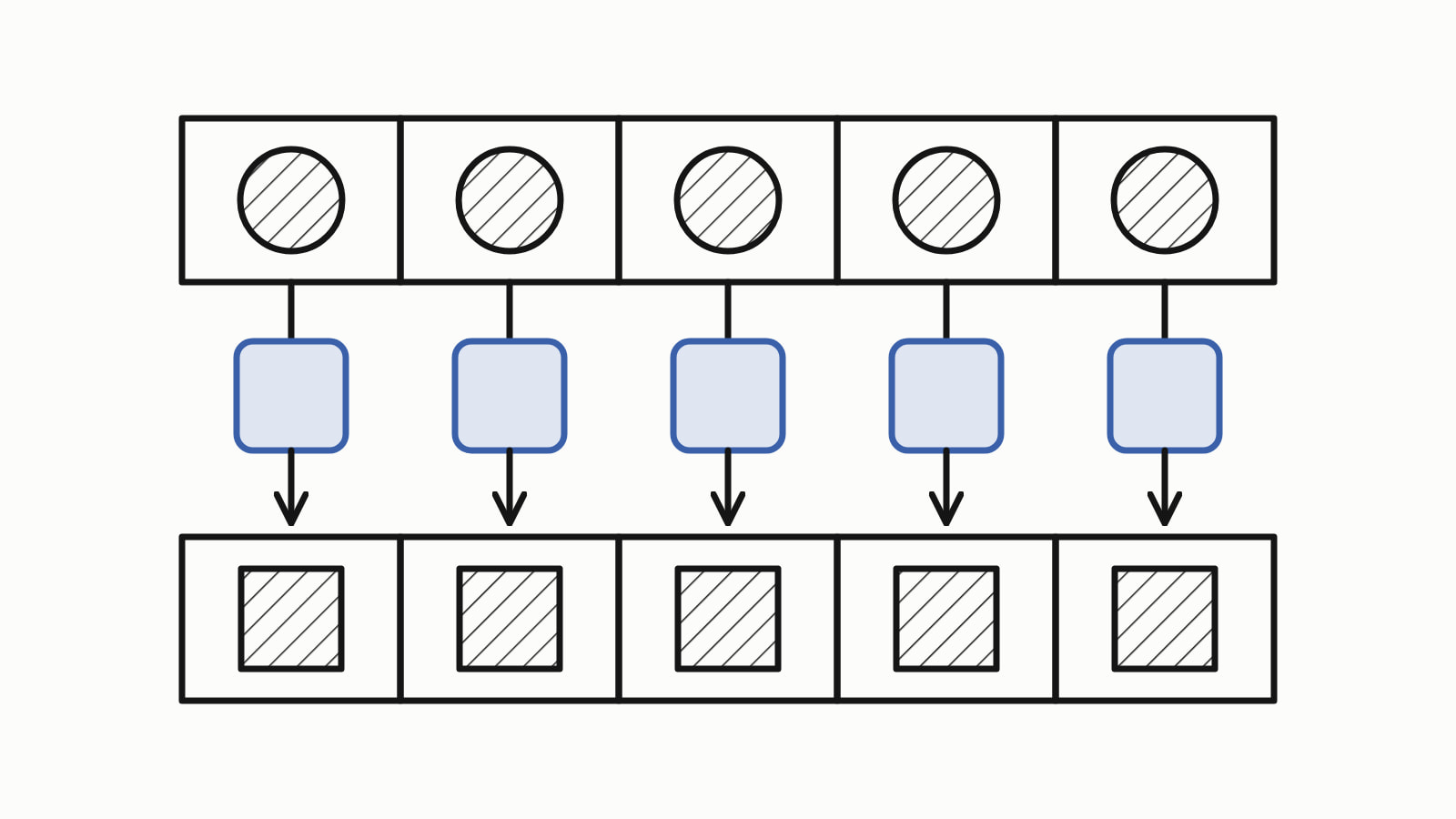
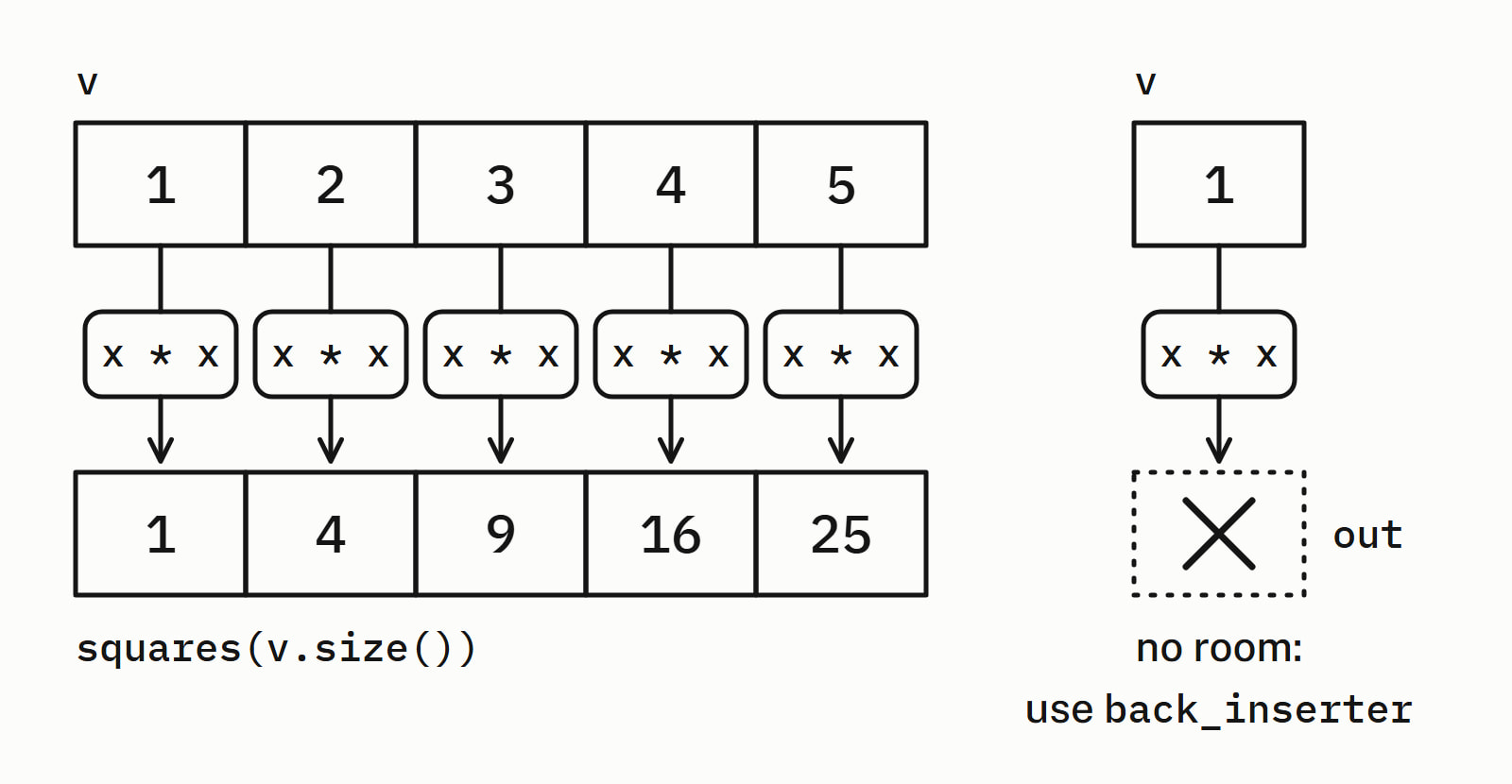
std::transform applies a function to every element of a range and writes the results to another range: std::, from the header <algorithm>. The output may be the input itself, which changes the elements in place. The output must already have room for every result, or grow through std::back_inserter.
Squaring the numbers of a std::vector into a second vector of the same size, as a whole program:
#include <algorithm>
#include <iostream>
#include <vector>

int main() {
    std::vector<int> v{1, 2, 3, 4, 5};
    std::vector<int> squares(v.size());

    std::transform(v.begin(), v.end(), squares.begin(),
                   [](int x) { return x * x; });

    std::cout << "squares:";
    for (int s : squares)
        std::cout << ' ' << s;
    std::cout << '\n';    // squares: 1 4 9 16 25
}
— end example]
It printed:
squares: 1 4 9 16 25— end example]
The fourth argument is a lambda, a function written in place: std::transform calls it once for each element and writes what it returns to the same place in squares. The answer is written for C++17 (Since When’s C++17 table). The samples were built with MSVC 19.44, Clang 19.1 (MSVC STL), GCC 16.2 and Clang 23.1 (libc++), as C++20 or C++23 where a line says so, and all four printed the same.
Why does std::transform crash on an empty vector?
Because it never grows the output: it writes through its third argument, an iterator (a position in a container), as if there were room for one result per input element. Passing the begin() of an empty vector as the output, or of any vector shorter than the input, is undefined behavior: the standard promises nothing, and with the libraries’ debug checks turned on the program crashed on all four.
Three ways that work, with prices in cents (print writes a label and the values):
std::vector<int> prices{250, 1199, 75};
auto twice = [](int cents) { return cents * 2; };

std::vector<int> doubled(prices.size());    // three zeros
auto end = std::transform(prices.begin(), prices.end(),
                          doubled.begin(), twice);
print("sized", doubled);           // sized: 500 2398 150
std::cout << std::boolalpha
          << (end == doubled.end()) << '\n';    // true

std::vector<int> appended;                  // empty
std::transform(prices.begin(), prices.end(),
               std::back_inserter(appended), twice);
print("appended", appended);       // appended: 500 2398 150

std::transform(prices.begin(), prices.end(), prices.begin(), twice);
print("in place", prices);         // in place: 500 2398 150
— end example]
All four printed 500 2398 150 three times, and true:
- Sized first:
doubled(prices.size())holds three zeros forstd::transformto overwrite. The call returns an iterator to the element past the last one written, heredoubled.end(). - Appended:
std::, fromback_inserter(appended) <iterator>, appends each result, so the empty vector grows by one per element. - In place: the input’s own
begin()as the output replaces each price with its double. The standard allows the output to be the input.
How do you convert a string to uppercase with std::transform?
Transform the std::string in place, with a lambda that takes each character as unsigned char, passes it to std::toupper from <cctype> and casts the result back to char:
std::string t = "hello, world";
std::transform(t.begin(), t.end(), t.begin(), [](unsigned char c) {
    return static_cast<char>(std::toupper(c));
});
std::cout << t << '\n';    // HELLO, WORLD
— end example]
It printed HELLO, WORLD on all four. The parameter is unsigned char because std::toupper has undefined behavior for a negative value other than EOF, and a char can hold one wherever it is signed, which the standard leaves to each implementation. The cast turns the int that std::toupper returns back into a char, so MSVC does not warn about it at /W4 (C4244). In the default “C” locale std::toupper changes only a to z, and it sees one byte at a time, so a UTF-8 letter such as é stays as it is.
Passing std::toupper by name, as in std::, compiles with Microsoft’s standard library but not with GCC or with Clang on libc++, which could not work out which toupper was meant. Since C++20 the standard does not promise it compiles anywhere: taking the address of a library function such as std::toupper is unspecified. Wrap it in a lambda, as above.
How do you add two vectors with std::transform?
Use the second form: two input ranges, one output, and a function of two arguments that receives one element from each input. Here prices plus shipping make totals, once with the standard function object std::plus<>() and once with a lambda:
std::vector<int> prices{250, 1199, 75};
std::vector<int> shipping{499, 0, 150};
std::vector<int> totals(prices.size());

std::transform(prices.begin(), prices.end(), shipping.begin(),
               totals.begin(), std::plus<>());
print("plus", totals);      // plus: 749 1199 225

std::transform(prices.begin(), prices.end(), shipping.begin(),
               totals.begin(),
               [](int price, int ship) { return price + ship; });
print("lambda", totals);    // lambda: 749 1199 225
— end example]
Both printed 749 1199 225. The second input gives only its start, so it must be at least as long as the first.
What is the difference between std::transform and std::for_each?
std::transform makes a new value from each element and writes it to an output; std::for_each calls a function on each element, from first to last, and has no output range. For an action that needs the order or changes the elements, use std::for_each, or a plain loop:
std::vector<int> prices{250, 1199, 75};
std::for_each(prices.begin(), prices.end(),
              [](int& cents) { cents *= 2; });
print("for_each", prices);     // for_each: 500 2398 150

std::vector<int> again{250, 1199, 75};
for (int& cents : again)
    cents *= 2;
print("range-for", again);     // range-for: 500 2398 150
— end example]
Both printed 500 2398 150: the lambda takes int&, a reference to the element, and changes it there. The range-based for loop does the same with no algorithm, and is often the plainer choice.
| Behavior | std::transform |
std::for_each |
|---|---|---|
| The function | returns a new value, leaves its input alone | acts on the element |
| Results | written to an output range | no output range |
| Order of the calls | not promised | first to last |
| Use it for | new values, or values replaced in place | an action per element, in order |
What are std::ranges::transform and std::views::transform?
They are the C++20 versions. std:: is the same algorithm taking the container itself, and std:: writes nothing: it makes a lazy view, one that calls the function each time you read an element. With the same prices and twice:
std::vector<int> doubled(prices.size());
std::ranges::transform(prices, doubled.begin(), twice);  // C++20
print("algorithm", doubled);    // algorithm: 500 2398 150

std::cout << "view:";
for (int cents : prices | std::views::transform(twice))  // C++20
    std::cout << ' ' << cents;
std::cout << '\n';              // view: 500 2398 150
— end example]
Both printed 500 2398 150. The view computes nothing until you iterate, as a lambda that counts its calls shows:
int calls = 0;
auto counted = [&calls](int cents) {
    ++calls;
    return cents * 2;
};
auto view = prices | std::views::transform(counted);  // C++20
std::cout << "calls before the loop: " << calls << '\n';  // 0
for (int cents : view)
    std::cout << cents << '\n';
std::cout << "calls after the loop: " << calls << '\n';   // 3
— end example]
A second loop over the same view took the count to 6: the view keeps no results and calls the function on every read.
Two more differences. With two inputs, std:: stops at the shorter one: three prices and two shipping costs gave two totals. It also returns a small struct, not a bare iterator: its out member points past the last element written. To collect a view into a vector, C++23 adds std::ranges::to: prices | std::.
Ranges shipped in GCC 10.1, Clang 16 with libc++ and Visual Studio 2019 16.10 (Since When’s C++20 table).
Which transform should you use?
Pick by what you want back (the other algorithms and containers are under Standard library):
| You want | Write |
|---|---|
| New values in another vector | std::transform into a sized vector, or through std::back_inserter |
| The same vector changed | std:: |
| Two vectors combined | std::transform with two inputs |
| An action per element, in order | std::for_each or a range-based for |
| The container as the argument, C++20 | std:: |
| The results looped over once, with no second vector, C++20 | v | std:: |
| One value from all the elements, such as a sum | std::accumulate |
Questions
Which header is std::transform in?
std::transform is in the header <algorithm>. std::back_inserter, which appends each result to a container, is in <iterator>, and std::, since C++20, is in <ranges>.
Can std::transform modify a vector in place?
Yes. Pass the vector’s own begin() as the output, as in std::transform(v.begin(), v.end(), v.begin(), f): the standard allows the output to be the input, and each element is replaced by what f returns for it. The function itself must not change the elements it is given; it returns the new value and std::transform writes it.
What does std::transform return?
An iterator to the element past the last one written to the output. When the output is a vector sized to match the input, that iterator equals the vector’s end(). std:: returns a small struct instead, whose out member holds the same position.
Can std::transform change the element type?
Yes. What the function returns is what gets written, so a lambda that returns std::to_string(x) turns a std::vector<int> into a std::. The output only has to hold that type: size a std:: first, or append through std::back_inserter.
Is std::views::transform lazy?
Yes. std::, since C++20, returns a view that calls the function only when an element is read, so nothing runs when the view is made. It keeps no results: a second loop over the same view calls the function again for every element. To keep the values, since C++23 end the pipe with std::.
Sources
- std::transformcppreference.com
- [alg.transform] TransformC++ standard working draft
- std::touppercppreference.com
- std::for_eachcppreference.com
- std::ranges::transformcppreference.com
- std::ranges::views::transform, std::ranges::transform_viewcppreference.com
- [range.transform.iterator] Class template transform_view::iteratorC++ standard working draft
- [namespace.std] Namespace stdC++ standard working draft