Performance[perf]
memcpy in C++: how std::memcpy works and when to use it

- Section
- Performance [perf]
- Standard
- C++17
- Compilers
- MSVC 19.44, Clang 19.1 (MSVC STL), GCC 16.2, Clang 23.1 (libc++)
- Published
- Length
- 7 min read
Abstract
std::memcpy(dest, src, count) from <cstring> copies count bytes from src to dest and returns dest. The count is in bytes, so multiply by sizeof. The two regions must not overlap (use std::memmove when they do), and the type must be trivially copyable: copy a std::string, a std::vector or a class with virtual functions with = or std::copy instead. Since C++20, std::bit_cast reads one type's bytes as another in one expression.
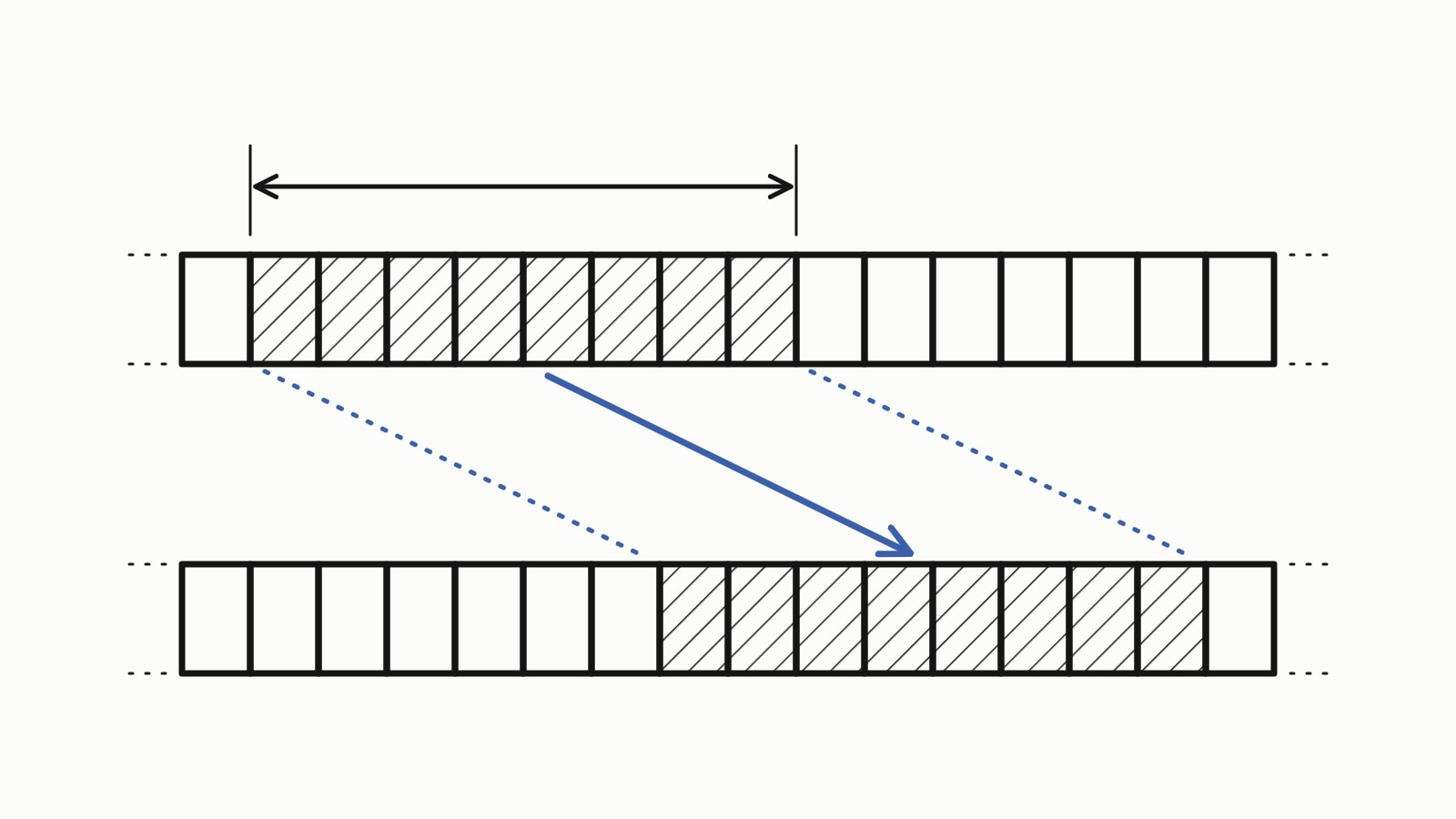
memcpy in C++ is std:: from <cstring>: it copies count bytes from the object at src to the object at dest and returns dest. The two regions must not overlap, and the type must be trivially copyable (plain numbers, arrays and structs of them); for other types, use assignment or std::copy.
Copying a whole C++ array takes one call:
#include <cstring>
#include <iostream>

int main() {
    int src[4] = {10, 20, 30, 40};
    int dst[4];

    std::memcpy(dst, src, sizeof(src));  // 16 bytes: the whole array

    for (int x : dst) {
        std::cout << x << ' ';
    }
    std::cout << '\n';
}
— end example]
All four builds printed 10 20 30 40. The samples are C++17, built with MSVC 19.44, Clang 19.1 (MSVC STL), GCC 16.2 and Clang 23.1 (libc++), and every sample printed the same on all four. Since When lists, for each standard, the first compiler releases that support it.
How do you use std::memcpy?
Pass three arguments: a pointer to the destination, a pointer to the source, and the number of bytes to copy. The count is in bytes, not elements, so multiply the number of elements by the sizeof of one:
std::memcpy(dst, src, sizeof(src));        // whole array: 16 bytes
std::memcpy(first, src, 2 * sizeof(int));  // two elements: 8 bytes
— end example]
sizeof(src) printed 16 on all four, four int of 4 bytes each, and first, an int[2], received 10 20. std::memcpy returns its first argument, the destination pointer; the samples compared the two and all four printed true. The header is <cstring>, which declares it in namespace std; C’s <string.h> gives the same function as ::memcpy.
Which types can you copy with memcpy?
Only trivially copyable types, the standard’s term for types whose objects may be copied byte by byte. They are the built-in types such as int and float, pointers, arrays of them, and structs or classes whose members are all trivially copyable and that have no user-written copy or move operations, destructor, virtual functions or virtual bases. The running example is such a struct, and a static_assert stops the build if it ever stops being one:
struct Reading {
    int id;
    float value;
};

static_assert(std::is_trivially_copyable_v<Reading>,
              "Reading must be safe to copy byte by byte");
// ...
Reading a{7, 21.5f};
Reading b{};
std::memcpy(&b, &a, sizeof(a));
std::cout << b.id << ' ' << b.value << '\n';  // 7 21.5

Reading day[3] = {{1, 18.5f}, {2, 19.0f}, {3, 20.25f}};
Reading backup[3];
std::memcpy(backup, day, 3 * sizeof(Reading));

for (const Reading& r : backup) {
    std::cout << r.id << ' ' << r.value << '\n';
}
std::cout << "sizeof(Reading): " << sizeof(Reading) << '\n';
— end example]
All four printed:
7 21.5
1 18.5
2 19
3 20.25
sizeof(Reading): 8
— end example]
The trait std::, from <type_traits>, answers the question for any type. It gave the same answers on all four:
| Type | Trivially copyable |
|---|---|
int |
true |
Reading |
true |
A struct with a std::string member |
false |
std::string |
false |
std::vector<int> |
false |
| A class with a virtual function | false |
| A struct with its own empty destructor | false |
A struct whose copy constructor is = default |
true |
The last two rows show what “user-written” means: an empty destructor of your own disqualifies a struct, and a copy constructor declared = default does not. A std::string or a std::vector owns memory elsewhere, so a byte copy leaves two objects pointing at one buffer, and a class with a virtual function holds a hidden pointer (Clang’s warning calls it the vtable pointer) that the copy overwrites. The standard defines the result of a byte copy only for trivially copyable types; for the others the behavior is undefined. Copy the others with =.
Compilers catch the mistake only some of the time. GCC warns with -Wall that the type has “no trivial copy-assignment; use copy-assignment or copy-initialization instead”, recent Clang warns by default, and MSVC said nothing at /W4, so the static_assert is the guard to rely on.
memcpy vs memmove: what if the regions overlap?
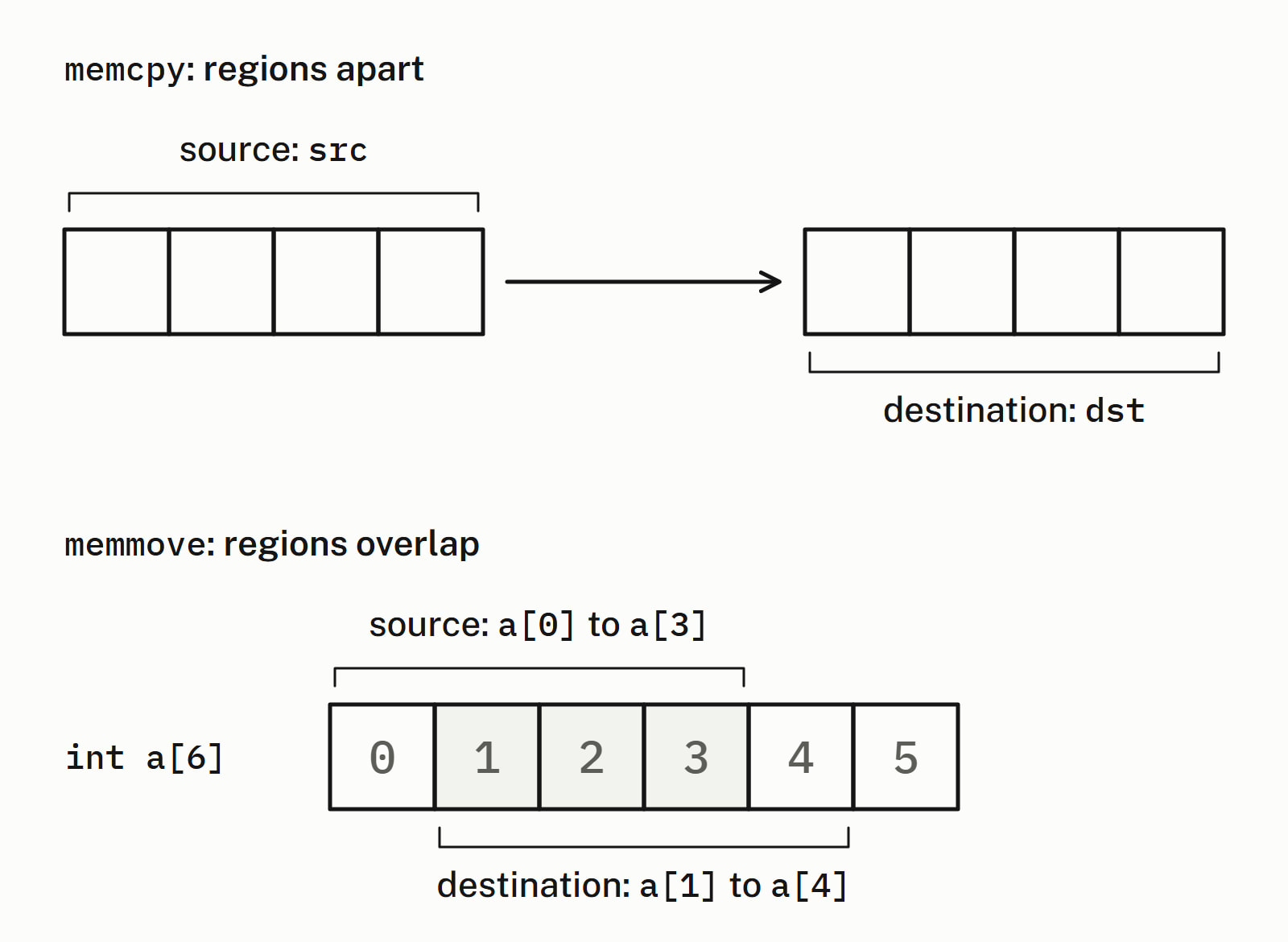
Then memcpy has undefined behavior: call std::memmove instead. It takes the same arguments, returns the same pointer, and copies as if through a temporary buffer, so overlap is fine. The usual case is shifting elements inside one array:
int a[6] = {1, 2, 3, 4, 5, 6};

// a[0..3] moves to a[1..4]: the two regions share three ints
std::memmove(a + 1, a, 4 * sizeof(int));
— end example]
All four printed 1 1 2 3 4 6: the first four values moved one place right, and a[0] kept its 1.
memcpy or std::copy?
Prefer std::copy from <algorithm>, or plain assignment for one object or a std::array. They work for every copyable type, count in elements, and let the compiler check the types:
int src[4] = {10, 20, 30, 40};
int dst[4];
std::copy(std::begin(src), std::end(src), dst);  // counts elements
// ...
std::array<int, 4> a = {10, 20, 30, 40};
std::array<int, 4> b{};
b = a;  // one assignment copies all four
— end example]
Both printed 10 20 30 40 on all four, and std::copy also copied an array of two std::string (north south), which memcpy must not touch. For trivially copyable elements in contiguous memory, such as this int array, the standard libraries hand std::copy to memmove, a block copy (optimized builds with all three showed the call), so choose between the two on type safety.
| Rule | std::memcpy |
std::copy |
|---|---|---|
| Header | <cstring> |
<algorithm> |
| Counts in | bytes | elements |
| Works for | trivially copyable types | any copyable type |
| Overlap | undefined: use std::memmove |
undefined if the destination starts inside the source |
| Returns | dest |
the end of the destination range |
Keep memcpy for raw bytes, such as a buffer read from a file or a socket, and for the job in the next section.
How do you read a float’s bits with memcpy?
Copy its bytes into an integer of the same size. Reading a float through a pointer to an integer type is ruled out in most cases by the type aliasing rule, which forbids examining the same memory as values of two different types. A copy is allowed, and cppreference’s std::memcpy page says it “may be used to convert the values”:
float f = 1.0f;
std::uint32_t bits;
static_assert(sizeof(bits) == sizeof(f));
std::memcpy(&bits, &f, sizeof(bits));

std::cout << std::hex << bits << '\n';  // 3f800000
— end example]
All four printed 3f800000, the bits of 1.0f, with and without optimization. Since C++20, std::bit_cast from <bit> does the same in one expression, for two trivially copyable types of the same size:
auto bits = std::bit_cast<std::uint32_t>(f); // C++20: <bit>— end example]
It printed 3f800000 too, and it also works at compile time, inside a static_assert. Under -std=c++17 it does not exist: GCC says 'bit_cast' is not a member of 'std'.
What are the common memcpy mistakes?
- Counting elements instead of bytes:
std::copies 4 bytes, onememcpy(dst, src, 4) intin these builds. Writesizeof(src)or4 * sizeof(int). - Taking
sizeofof a pointer: an array parameter is a pointer, sosizeofgives a pointer’s size (example below). - Leaving out a C string’s terminating null: copy
std::strlen(s) + 1bytes, notstd::strlen(s). - Writing past a smaller destination:
std::puts 16 bytes into the 8 ofmemcpy(first, src, sizeof(src)) int first[2], which is undefined behavior. The count must fit the destination:sizeof(first).
The sizeof mistake, in a function that takes the readings as an array parameter:
void save(int dst[4], const int readings[4]) {
    // readings is really const int*: sizeof gives a pointer's size
    std::cout << "sizeof(readings): " << sizeof(readings) << '\n';
    std::memcpy(dst, readings, sizeof(readings));
}
— end example]
Called with the four readings, it printed sizeof(readings): 8 and then 10 20 0 0 on all four: 8 bytes, two readings out of four, and no error. GCC and Clang warn about it by default (-Wsizeof-array-argument); MSVC does not. Take sizeof in the caller, where the array is still an array, and pass the count in.
Performance has more answers on what copies cost and how to avoid them.
Questions
Which header is memcpy in?
In C++, #include <cstring> and call std::memcpy. C's header <string.h> declares the same function as ::memcpy, without the std:: prefix. <cstring> also declares std::memmove.
What does memcpy return?
Its first argument: the destination pointer, as a void*. Most code ignores the return value. Comparing it with the destination printed true on MSVC, GCC and both Clangs.
Can memcpy take a null pointer if the count is 0?
No. Both pointers must be valid even when the count is 0: a null pointer is undefined behavior. An empty std::vector’s data() may return a null pointer, so test for an empty source first, or use std::copy, which copies nothing from an empty range.
Is memcpy faster than std::copy?
They usually end in the same kind of call: for trivially copyable elements in contiguous memory, the standard libraries hand std::copy to memmove, and optimized builds of an int array showed that call with all three. So choose on type safety: std::copy counts elements and works for every copyable type, and memcpy counts bytes and is safe only for trivially copyable ones.
Can I memcpy a std::string or a std::vector?
No. Neither is trivially copyable, so a byte copy of the object is undefined behavior: the copy ends up pointing at the memory the original owns. Copy them with =. The characters a string holds, at s.data(), are plain bytes and can be copied with memcpy.
What is the difference between memcpy and strcpy?
memcpy copies exactly the number of bytes you give it, whatever they contain. strcpy copies a C string up to and including its terminating null, so it takes no count and works only on null-terminated text. To copy a C string with memcpy, copy std::strlen(s) + 1 bytes.
Sources
- std::memcpycppreference.com
- std::memmovecppreference.com
- std::is_trivially_copyablecppreference.com
- std::copy, std::copy_ifcppreference.com
- std::bit_castcppreference.com
- [cstring.syn] Header cstring synopsisC++ standard working draft
- [basic.types.trivial] Trivially copyable typesC++ standard working draft