Concurrency[conc]
Non-Uniform Memory Access Explained, With Tuning Tips

- Section
- Concurrency [conc]
- Published
- Length
- 5 min read
In this answer4 clauses
- 1What Non Uniform Memory Access Really Means
- 1.1What is UMA and NUMA?
- 1.2How memory location changes access speed
- 2Tuning NUMA Settings by Hand
- 2.1Advanced override options for admins
- 2.2Trading bandwidth against latency when splitting VMs
- 2.3How hyper-threading interacts with NUMA
- 3NUMA in Virtualized Environments on VMware
- 3.1Letting automatic scheduling manage NUMA placement
- 3.2Sizing VMs to fit inside NUMA nodes
- 3.3How virtual NUMA helps wide VMs
- 4References
Abstract
Non-uniform memory access (NUMA) is a memory architecture where processors access nearby, local memory faster than memory attached to another processor. Performance improves when threads and the data they use stay on the same NUMA node, using first-touch placement, thread pinning, and suitable allocators; remote access can increase latency. In virtualized systems, default scheduling often manages placement well, so measure before changing settings and keep VMs within one node when practical.
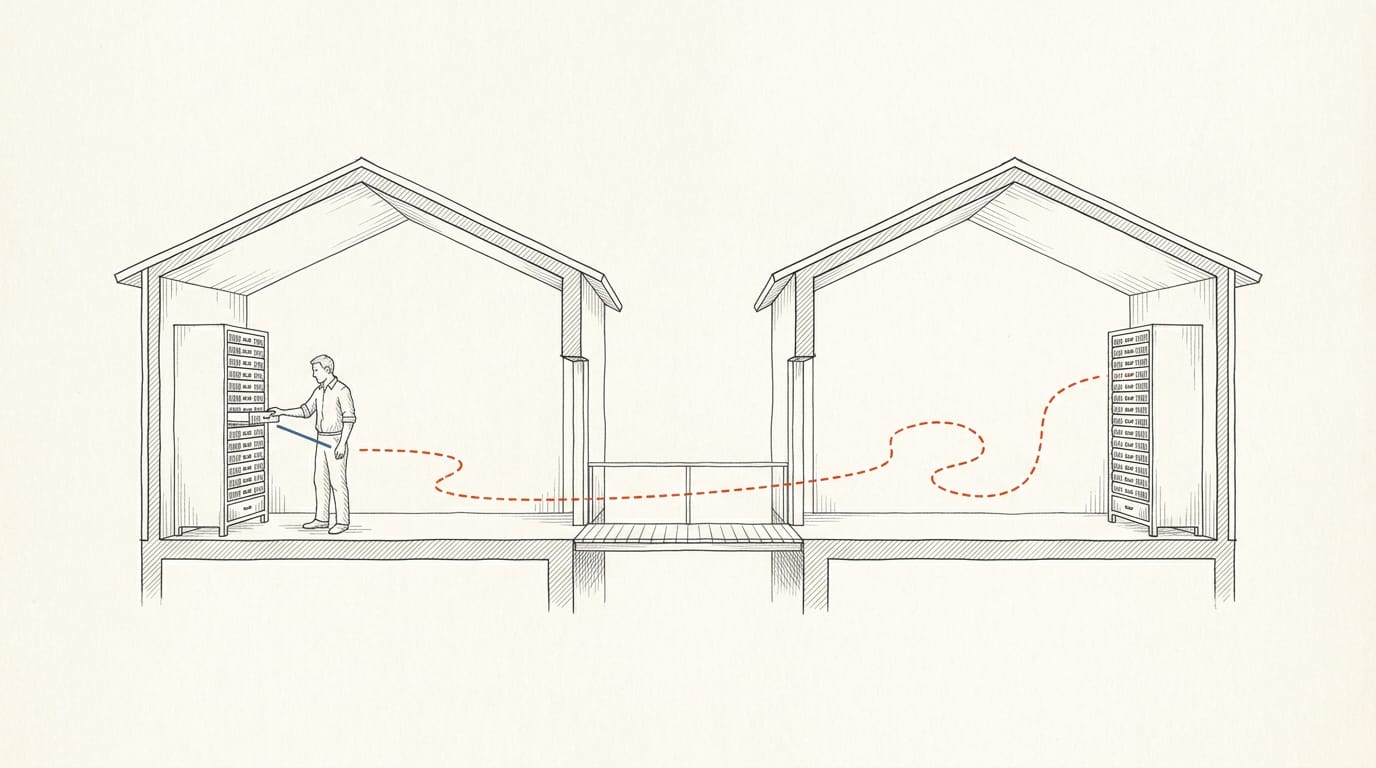
Picture an office spread across several buildings, where files down the hall are quick to grab but files across campus cost you a longer walk.
In Non-Uniform Memory Access (NUMA), each group of processors has memory attached, so local access is fast and remote access is slower.
Uniform Memory Access (UMA) is the opposite, where every processor reaches all memory at the same cost.
We’ll cover NUMA’s topology and tuning, then show C++ developers how first-touch placement (memory lands near the thread that first writes to it), thread pinning and allocators keep threads and their memory together.
What Non Uniform Memory Access Really Means
You’ll need the terms first, so we’ll cover Non-Uniform Memory Access (NUMA) and why where data sits matters.
What is UMA and NUMA?
Uniform Memory Access (UMA) is a memory architecture for multiprocessors where every processor reaches memory at the same cost. NUMA stands for Non-Uniform Memory Access: access time depends on location.
In NUMA, it’s less about how fast memory is than how far it sits from your core. Local memory is faster. Remote memory belongs to another processor and is reachable, but slower.
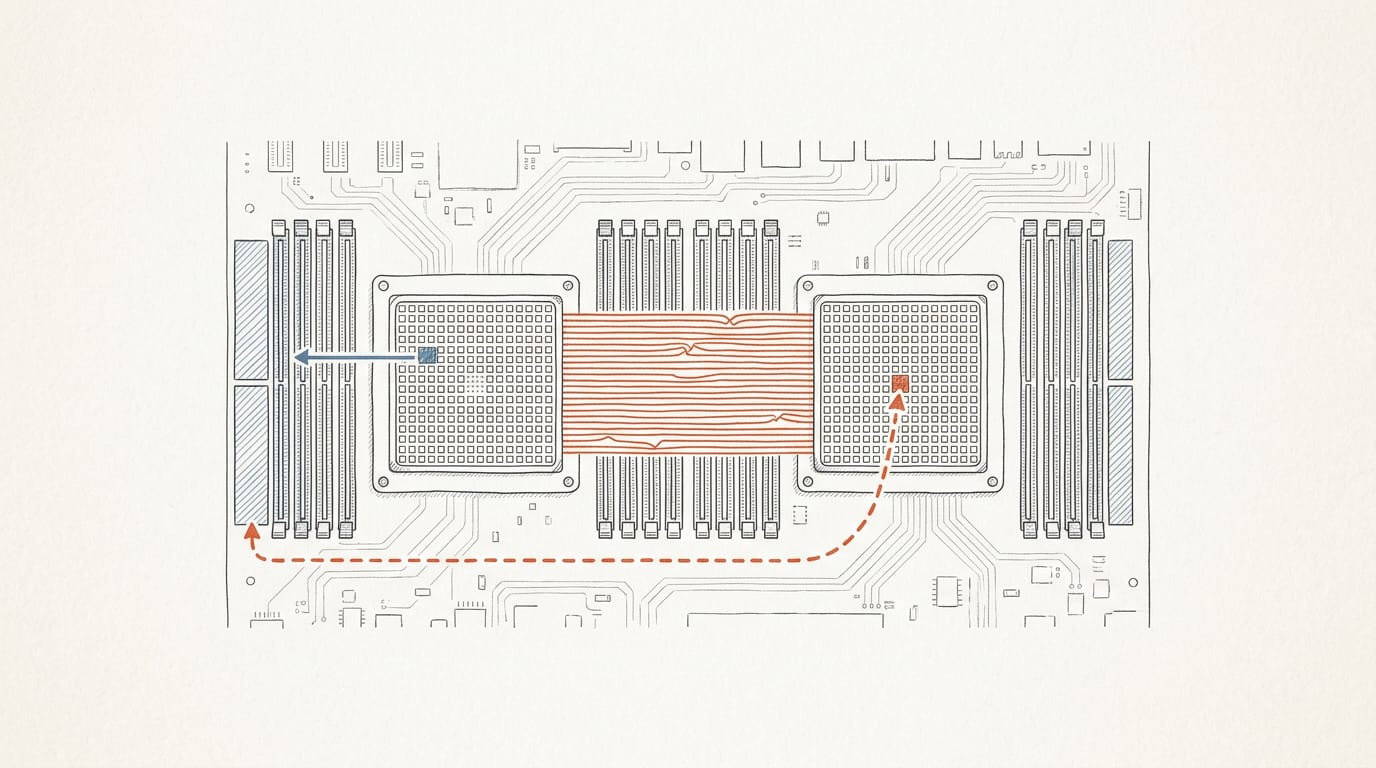
On bare metal, a node is a group of cores with local memory. Sockets hold one or more nodes, and an interconnect links them, so crossing it costs time.
Does AMD use NUMA? Yes, and so does Intel. Both support it on multi-socket servers, so the question for your code is which node each thread and buffer lands on.
How memory location changes access speed
Local access gives the lowest latency. Every remote read crosses the interconnect, so the more reads go remote, the higher your average latency climbs. Locality drives performance.
Think of a game engine programmer who fills one world buffer in a loading thread, then starts workers on both sockets. Every page lands on the loader’s node, so workers on the other socket pay the remote trip, and you’ll see it in frame time.
The culprit is first-touch placement, the common Linux default. A page goes to the node of the thread that writes it first, and a std::vector value-initialized by the loader commits all its pages there.
Cross-node sharing costs more too. Threads on different nodes writing different variables on one cache line trigger false sharing, and the line bounces across the interconnect. A shared atomic counter pays that trip on every update.
Tuning NUMA Settings by Hand
Sometimes the scheduler’s placement isn’t what your workload needs, so you can override it. Each override below trades one benefit for another, so start by inspecting the host with numactl and lscpu.
Advanced override options for admins
Three settings give advanced administrators direct control:
numa.nodeAffinitypins a VM to chosen nodes for manual placement.maxPerMachineNodelimits how many virtual CPUs (vCPUs) a VM can place on one node.numa.vcpu.preferHTsteers vCPUs toward hyper-threads, which we cover below.
Picture a C++ team whose order-matching engine runs in a VM. Their admin pins it with numa.nodeAffinity, so its threads stop reaching across nodes for their memory.
Inside your own process, libnuma gives you that control: you pin threads and allocate memory locally.
Trading bandwidth against latency when splitting VMs
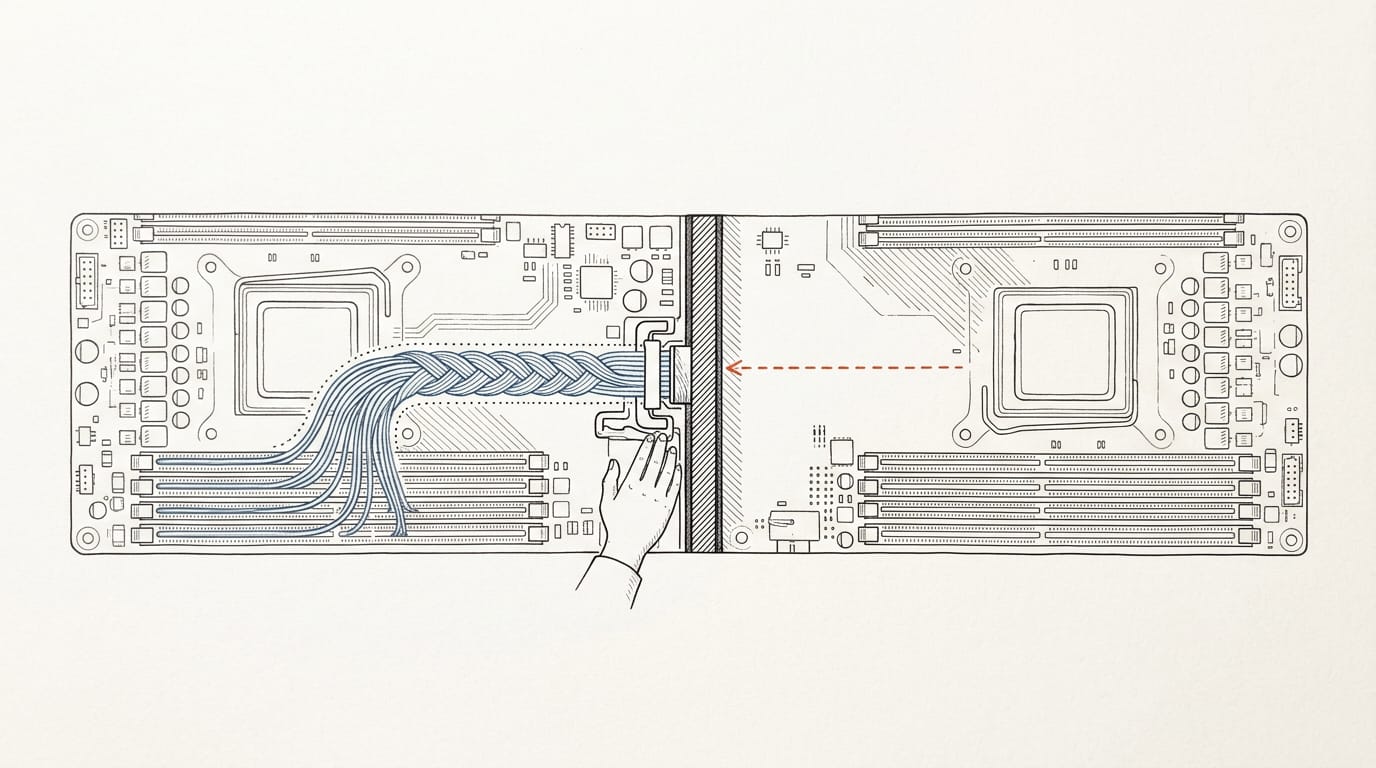
Splitting a VM across nodes gives it higher aggregate memory bandwidth, which helps bandwidth-bottlenecked workloads such as a C++ analytics job streaming large arrays. You gain bandwidth and pay in latency, since some accesses now cross nodes.
Consider the impact on vNUMA (virtual NUMA), the topology your guest operating system sees, because that view changes too. Measure before you split.
How hyper-threading interacts with NUMA
Hyper-threading presents one physical core as two logical processors. The choice is between logical processors with local memory and full cores with remote memory.
This applies to hyper-threaded hosts only, so confirm yours has hyper-threading before you tune for it.
NUMA in Virtualized Environments on VMware
Virtualization adds a hypervisor (the software running your virtual machines, or VMs), which blurs the NUMA (non-uniform memory access) picture. Here’s what the platform handles and where you still have a say.
Letting automatic scheduling manage NUMA placement
Good news first: you usually don’t have to place threads or memory by hand. Adaptive scheduling and memory placement keep work near its memory as load shifts, and the management is transparent to the VM.
No manual balancing is needed by default, so leave the defaults alone and measure first.
Sizing VMs to fit inside NUMA nodes
This is where your input matters most. The question is less about how big a VM is and more about where it sits. Here’s how the two sizes differ:
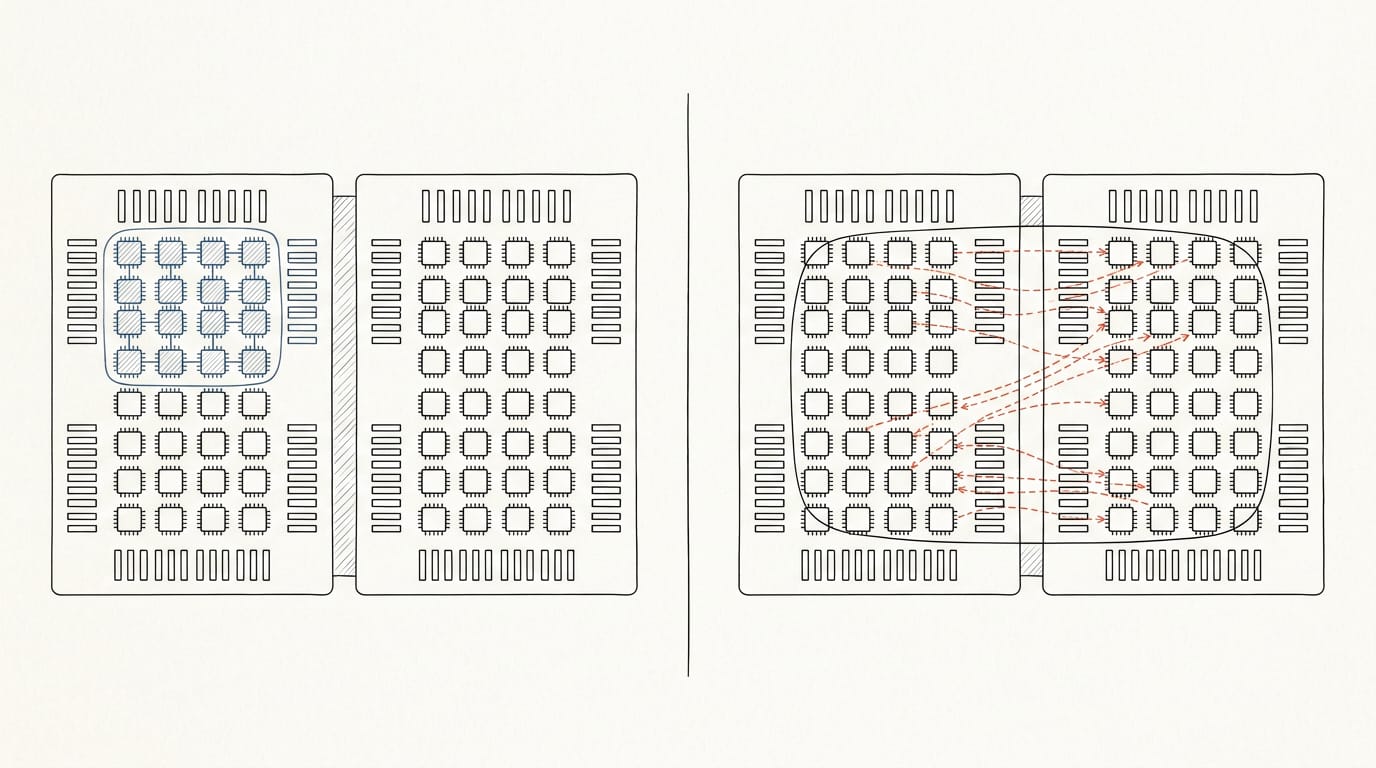
- VMs fitting within one node keep their CPUs and memory together.
- Wide VMs spanning two nodes draw memory from both sides.
- Wide VMs see higher latency on reads that reach the other node.
According to Barhum.ai’s vSphere 9.1 performance guide, a node-sized VM has a slight performance advantage over a wide one: “For NUMA-aware workloads, size VMs to fit within a single NUMA node when possible.”
Picture a game team running its C++ server on a two-socket host. Sized to one node, its hot data stays local. Sized wider, the same code pays for remote reads on its hot paths.
How virtual NUMA helps wide VMs
Sometimes a wide VM can’t be avoided. Virtual NUMA exposes the physical topology to the guest operating system, so the guest can see which CPUs sit near which memory.
That mitigates wide VM latency, and the guest shares locality management with the hypervisor. Your first-touch and thread-pinning habits still pay off inside the VM. Visibility makes that work.
NUMA comes down to one simple idea: memory has a home, and the closer your thread sits to it, the less time it spends waiting. Keeping each thread and its data on the same node is how you turn that idea into speed, and that’s a habit worth building.
We covered the tools above. Start with first-touch placement, pin threads where their data lives, and use allocators that put memory where you intend. Put the data near the thread that uses it, and the hardware works for you instead of against you.
References
Questions
What is UMA and NUMA?
UMA (Uniform Memory Access) is a multiprocessor memory architecture where every processor accesses memory at the same cost. NUMA (Non-Uniform Memory Access) has memory associated with processor groups, so access is faster to local memory than to memory attached to another group.
What does NUMA stand for?
NUMA stands for Non-Uniform Memory Access. It describes systems where memory access time varies depending on where the memory is located relative to the processor.
Does AMD use NUMA?
Yes. AMD supports NUMA, including on multi-socket servers; Intel does too.