Language[lang]
C++ operators: the full list with examples

- Section
- Language [lang]
- Standard
- C++17
- Compilers
- MSVC 19.44, Clang 19.1 (MSVC STL), GCC 16.2, Clang 23.1 (libc++)
- Published
- Length
- 9 min read
In this answer10 clauses
- 1What are the operators in C++?
- 2Arithmetic operators and integer division
- 3Assignment, compound assignment and
=vs== - 4Increment and decrement: prefix or postfix?
- 5Comparison operators
- 6Logical operators and short-circuit evaluation
- 7Bitwise operators and XOR (
^) - 8The conditional operator, member access and sizeof
- 9Which operator runs first?
- 10Common mistakes with C++ operators
Abstract
C++ operators are the symbols that act on values: arithmetic, assignment, increment and decrement, comparison, logical, bitwise, the conditional ?:, member access and sizeof. With two integers, / drops the fraction (7 / 2 is 3) and % takes the sign of the left operand; ^ is exclusive or, not a power; = assigns and == compares; && and || skip their right side when the left side decides the result.
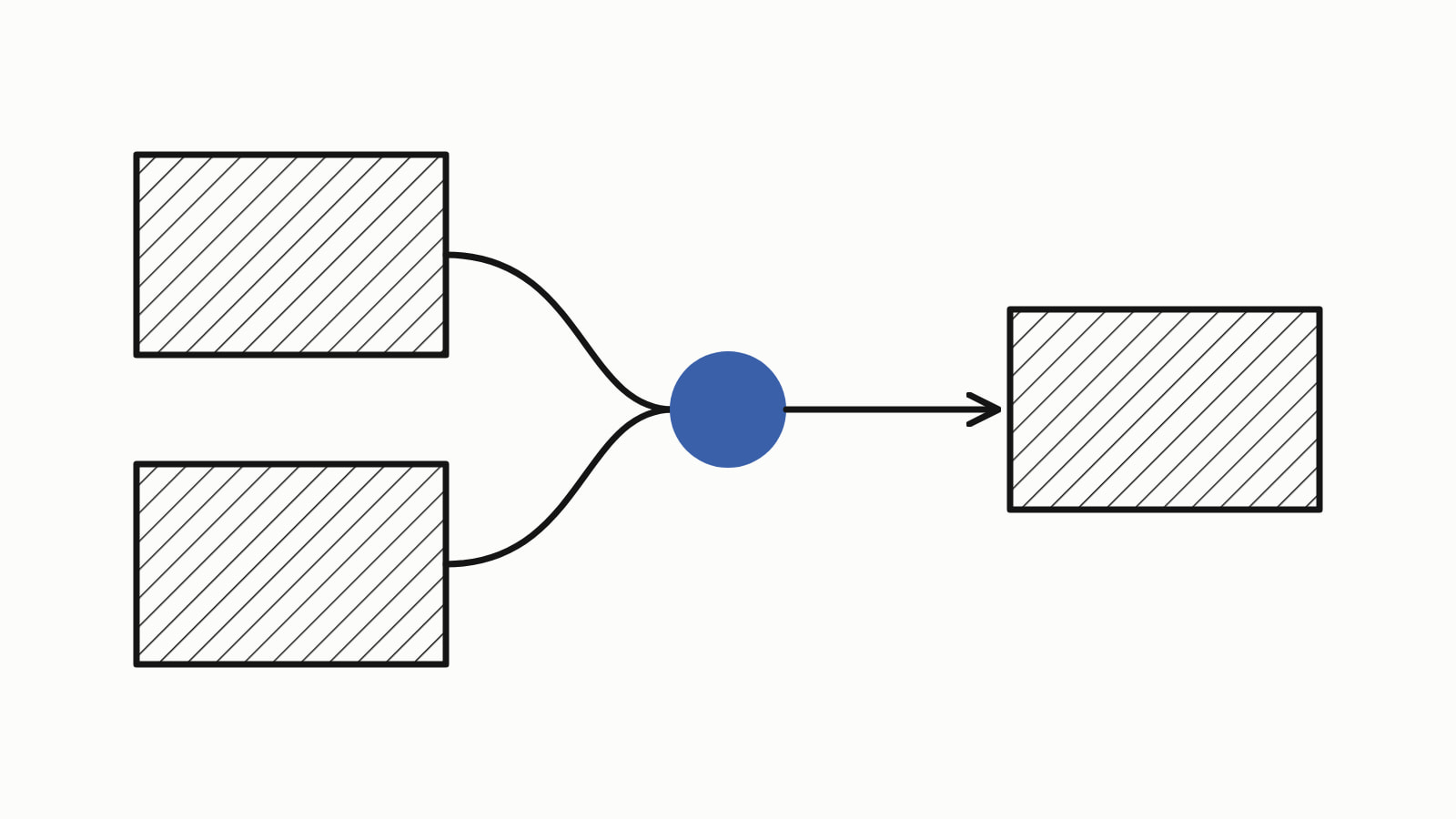
C++ operators are the symbols that act on values, called operands, to give a result: 7 / 2 gives 3, and 7 > 2 gives true. They come in groups: arithmetic (+ - * / %), assignment (=, +=), increment and decrement (++, --), comparison (==, <), logical (&&, ||, !), bitwise (&, |, ^, ~, <<, >>), the conditional ?:, member access (., ->, []) and sizeof.
A whole program that works out a shopping total in cents uses seven of them, named in its comments:
#include <iostream>

int main() {
    int price = 350;      // one notebook: $3.50, in cents
    int count = 7;
    int shipping = 499;   // $4.99

    int subtotal = price * count;                           // *
    bool free_shipping = subtotal >= 2000 && count >= 2;    // >= &&
    int total = subtotal + (free_shipping ? 0 : shipping);  // + ?:

    std::cout << "subtotal: " << subtotal << " cents\n";
    std::cout << "free shipping: " << std::boolalpha
              << free_shipping << '\n';
    std::cout << "total: $" << total / 100 << '.'
              << total % 100 / 10 << total % 10 << '\n';    // / %
}
— end example]
It printed subtotal: 2450 cents, free shipping: true and total: $24.50. total / 100 gave 24 because dividing two integers drops the fraction, and total % 100 gave the 50 cents left over, printed a digit at a time so that 5 cents shows as 05.
The samples are C++17, built with MSVC 19.44, Clang 19.1 (MSVC STL), GCC 16.2 and Clang 23.1 (libc++), and each program printed the same on every compiler that built it. Since When lists which standard added each feature.
What are the operators in C++?
One row per group, each with an example from the samples and its result:
| Group | Operators | What they do | Example |
|---|---|---|---|
| Arithmetic | + - * / % |
add, subtract, multiply, divide, remainder | 7 % 3 is 1 |
| Assignment | = += -= *= /= %= |
store a value | x += 5 turns 7 into 12 |
| Increment and decrement | ++ -- |
add or subtract 1 | ++i turns 6 into 7 |
| Comparison | == != < > <= >= |
compare, give a bool |
7 > 2 is true |
| Logical | && || ! |
combine conditions | true && false is false |
| Bitwise | & | ^ ~ << >> |
work bit by bit | 0b1100 ^ 0b1010 is 0b0110 |
| Conditional | ?: |
pick one of two values | count > 5 ? "many" : "few" is “many” for 7 |
| Member access | . -> [] |
reach a member or an element | v[1] is 2 for {7, 2, 9} |
| Size | sizeof |
size in bytes | sizeof(char) is 1 |
Rarer operators include the comma, the function call (), casts, new, delete and typeid.
Arithmetic operators and integer division
With two integers, / keeps only the whole part of the quotient and % gives the remainder. Make one operand a double, as in 7.0 / 2, to keep the fraction:
std::cout << 7 / 2 << '\n';    // 3: the fraction is dropped
std::cout << 7.0 / 2 << '\n';  // 3.5: one double is enough
std::cout << -7 / 2 << '\n';   // -3: toward zero, not -4

std::cout << 7 % 3 << '\n';    // 1
std::cout << -7 % 3 << '\n';   // -1: the sign of the left side
std::cout << 7 % -3 << '\n';   // 1
— end example]
All four printed what the comments say: integer division cuts the fraction toward zero. The remainder follows from the rule that (a / b) * b + a % b equals a ([expr.mul]), so it takes the sign of the left operand, as the last two lines show. Dividing an integer by zero, with / or %, is undefined behavior: the standard places no requirement on what the program does.
Assignment, compound assignment and = vs ==
= stores the value on its right in the variable on its left, and a compound assignment operator (also called augmented assignment) such as x += 5 means x = x + 5. -=, *=, /=, %= and the bitwise &=, |=, ^=, <<= and >>= work the same way. Assignment groups from the right, so a = b = 5 is a = (b = 5), and it printed 5 5.
= is not ==. if (x = 0) stores 0 in x, then tests that 0, which counts as false:
int x = 7;
if (x = 0) {               // stores 0 in x, then tests 0: false
    std::cout << "if branch\n";
} else {
    std::cout << "else branch\n";
}
std::cout << "x is now " << x << '\n';
— end example]
It printed else branch and x is now 0. All four compilers warned at the samples’ settings (/W4 for MSVC, -Wall -Wextra for the others), and Clang’s note names the fix: use '==' to turn this assignment into an equality comparison.
Increment and decrement: prefix or postfix?
++ adds 1 to a variable and -- subtracts 1. The prefix form, ++i, gives the new value; the postfix form, i++, gives the old one:
int i = 5;
int a = i++;   // a gets the old value, 5; then i is 6
int b = ++i;   // i becomes 7; b gets the new value, 7
std::cout << a << ' ' << b << ' ' << i << '\n';
— end example]
It printed 5 7 7, and the same lines with j-- and --j printed 5 3 3. Prefix gives back the variable itself, already changed; postfix gives a copy of its old value (increment and decrement on cppreference). When the value is not used, as in ++i; on a line of its own, the two do the same.
Comparison operators
==, !=, <, >, <= and >= compare two values and give a bool: for 7 and 2 they gave false, true, false, true, false and true. They do not chain as in math. 1 < x < 10 compares 1 < x, a bool, with 10:
bool in_range = 1 < x < 10;      // (1 < x) < 10, true < 10
bool really = 1 < x && x < 10;   // what was meant
— end example]
With x at 50, MSVC, GCC and Clang 19 compiled the first line with a warning (GCC: comparisons like 'X<=Y<=Z' do not have their mathematical meaning) and printed true false: the chain said 50 is between 1 and 10. Clang 23, at the same flags, refused to compile it. Join the two tests with &&, as the second line does.
C++20 adds the three-way comparison a <=> b, where (a <=> b) < 0 means a is less, == 0 equal and > 0 greater (Since When lists the compilers that have it).
Logical operators and short-circuit evaluation
&& (and) is true when both sides are true, || (or) when at least one is, and ! (not) turns true into false and back. && and || evaluate the left side first and skip the right side when the left side already decides the result, which is called short-circuit evaluation (logical operators on cppreference):
bool check() {
    std::cout << "check() called\n";
    return true;
}
// ...
void report(const int* p) {
    if (p != nullptr && *p > 0) {   // *p is read only if p is set
        std::cout << "in stock: " << *p << '\n';
    } else {
        std::cout << "nothing to report\n";
    }
}
// ...
bool r1 = false && check();   // check() is skipped
bool r2 = true || check();    // check() is skipped
bool r3 = true && check();    // check() runs
std::cout << std::boolalpha << r1 << ' ' << r2 << ' ' << r3 << '\n';
// ...
int stock = 7;
report(&stock);
report(nullptr);
— end example]
check() called printed once, then false true true, in stock: 7 and nothing to report.
Bitwise operators and XOR (^)
Bitwise operators work on the bits of any integer type, not only int or char:
&(and): 1 where both bits are 1.|(or): 1 where at least one bit is 1.^(XOR, exclusive or): 1 where exactly one bit is 1.~(not): every bit flipped.<<and>>: the bits shifted left or right.
unsigned char a = 0b1100;
unsigned char b = 0b1010;
std::cout << std::bitset<8>(a & b) << '\n';    // and
std::cout << std::bitset<8>(a | b) << '\n';    // or
std::cout << std::bitset<8>(a ^ b) << '\n';    // xor
std::cout << std::bitset<8>(~a) << '\n';       // not
std::cout << std::bitset<8>(a << 1) << '\n';   // shift left
std::cout << std::bitset<8>(a >> 1) << '\n';   // shift right

std::cout << (2 ^ 3) << '\n';   // xor of 10 and 11, not 2 cubed

unsigned char flags = 0;
const unsigned char dark_mode = 0b0100;
flags ^= dark_mode;             // the bit goes on
std::cout << std::bitset<8>(flags) << '\n';
flags ^= dark_mode;             // and off again
std::cout << std::bitset<8>(flags) << '\n';
— end example]
It printed:
00001000
00001110
00000110
11110011
00011000
00000110
1
00000100
00000000
— end example]
The first six lines are the six operators in eight bits, printed through std::bitset; the figure of the three results draws only the last four bits.
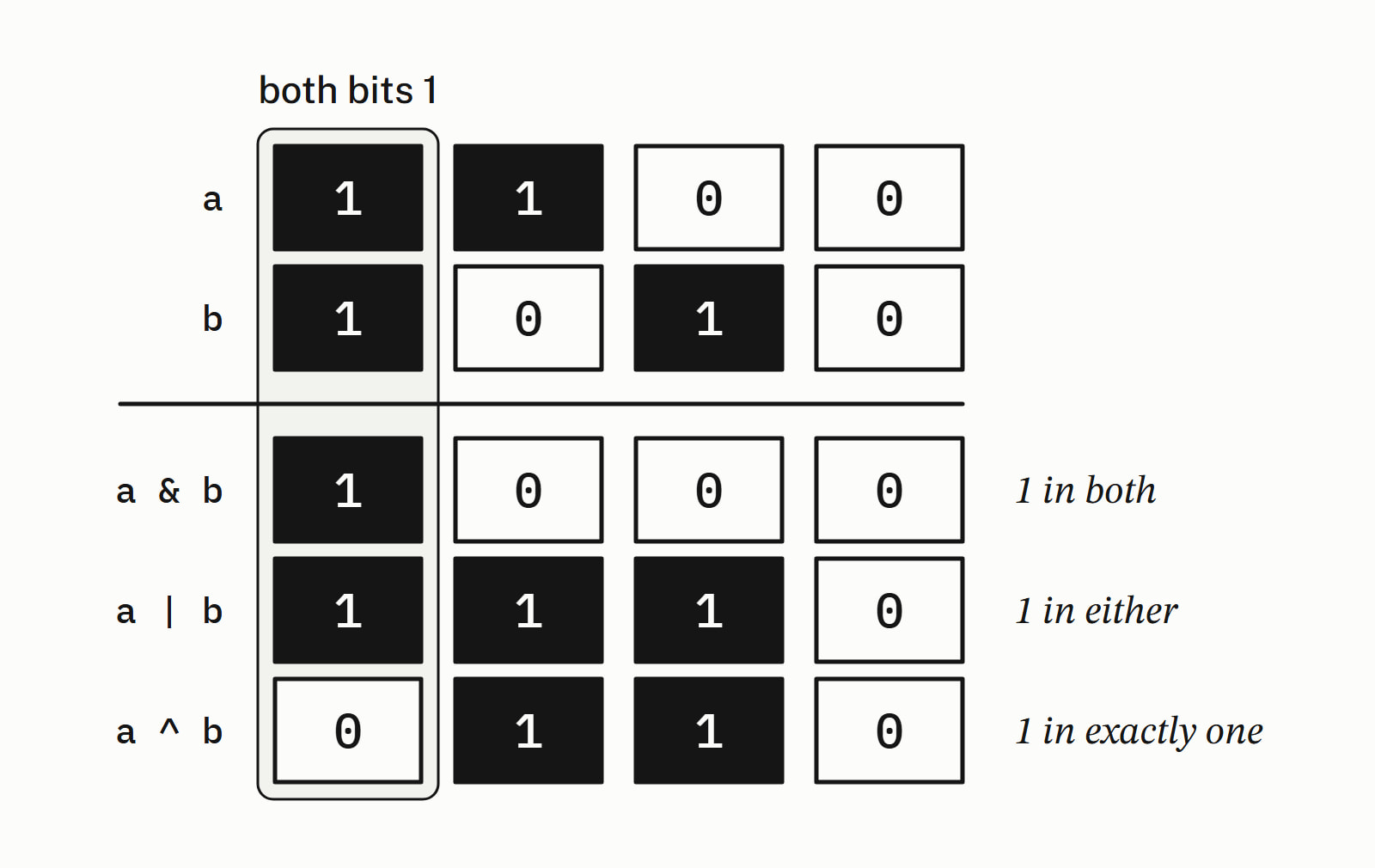
^ is not a power: 2 ^ 3 printed 1, the XOR of binary 10 and 11. GCC and both Clangs warned did you mean '1 << 3' (8)? and MSVC at /W4 said nothing; for a power, call std::pow from <cmath>. XOR toggles a flag: flags ^= dark_mode turned the bit on, and the same line again turned it off.
Shifting by a negative count, or by at least the bit width of the promoted left operand (an unsigned char becomes an int), is undefined behavior ([expr.shift]).
The conditional operator, member access and sizeof
cond ? a : b gives a when the condition is true and b otherwise (the ternary operator has its own page). . reaches a member of an object, -> a member through a pointer, [] an element, *p the object a pointer points to, &x the address of x, :: a name inside a namespace or class (std::cout), and sizeof gives a size in bytes:
struct Item {
    std::string name;
    int price;
};
// ...
int count = 7;
std::cout << (count > 5 ? "many" : "few") << '\n';   // ?:

Item pen{"pen", 2};
Item* p = &pen;
std::cout << pen.name << ' ' << p->price << '\n';    // . and ->

std::vector<int> v{7, 2, 9};
std::cout << v[1] << '\n';                           // []

std::cout << sizeof(char) << '\n';                   // sizeof
— end example]
It printed many, pen 2, 2 and 1. The sizes of the integer types are in C++ data types.
Which operator runs first?
Precedence decides how an expression is grouped: *, / and % before + and -, arithmetic before comparison, comparison before the bitwise &, ^ and |, then &&, then ||, and assignment after all of these (operator precedence on cppreference). So flags & dark_mode != 0 means flags & (dark_mode != 0): write (flags & dark_mode) != 0. The first program’s subtotal >= 2000 && count >= 2 needs no parentheses, while subtotal + (free_shipping ? 0 : shipping) does, because ?: comes after +. When two kinds of operator meet and you are not sure, add parentheses; the C++ operator precedence table has every level.
Common mistakes with C++ operators
| You wrote | What happened | Write instead |
|---|---|---|
7 / 2, expecting 3.5 |
3: the fraction is dropped | 7.0 / 2 |
if (x = 0) |
stores 0, runs the else branch | if (x == 0) |
1 < x < 10 |
true for every x, or a compile error on newer Clang | 1 < x && x < 10 |
2 ^ 3, expecting 8 |
1: ^ is XOR |
std::pow(2, 3) |
i++ where the new value was wanted |
the old value | ++i |
Classes can give these operators a meaning of their own: operator overloading in C++ shows how. The Language section has the rest of the core language.
Questions
What does ^ mean in C++?
It is bitwise exclusive or (XOR): each bit of the result is 1 where exactly one of the two operands has a 1. It is not a power: 2 ^ 3 printed 1, and GCC and Clang warned that 1 << 3 might have been meant. For a power, call std::pow.
What is the difference between = and == in C++?
= is assignment: it stores the value on its right in the variable on its left. == is comparison: it gives true when the two sides are equal. Written by mistake in a condition, if (x = 0) stores 0 in x and runs the else branch; MSVC at /W4 and GCC and Clang at -Wall -Wextra warned about it.
What is the difference between ++i and i++?
Both add 1 to i. ++i gives the new value and i++ the old one, so with i at 5, int a = i++; sets a to 5 and leaves i at 6. When the value is not used, as in the ++i of a for loop, the two do the same.
What does % do in C++?
It gives the remainder of dividing two integers: 7 % 3 is 1. The result takes the sign of the left operand, so -7 % 3 is -1 and 7 % -3 is 1, because / drops the fraction toward zero and (a / b) * b + a % b equals a. % by zero is undefined behavior.
What is the difference between & and && in C++?
& is bitwise and: it combines two integers bit by bit and evaluates both sides. && is logical and: it gives a bool and skips its right side when the left side is false, which is what makes p != nullptr && *p > 0 safe to write.
Can you write and, or and not instead of &&, || and ! in C++?
Yes. and, or, not and xor are alternative spellings of &&, ||, ! and ^. They are keywords, so no header is needed. They built and ran on all four compilers. On MSVC they need /permissive- or /Za; new Visual Studio projects and /std:c++20 already set /permissive-.
Sources
- Arithmetic operatorscppreference.com
- Increment/decrement operatorscppreference.com
- Comparison operatorscppreference.com
- Logical operatorscppreference.com
- C++ operator precedencecppreference.com
- [expr.mul] Multiplicative operatorsC++ standard working draft
- [expr.shift] Shift operatorsC++ standard working draft
- C++ built-in operators, precedence, and associativityMicrosoft Learn